> ## Documentation Index
> Fetch the complete documentation index at: https://learn.nextedy.com/llms.txt
> Use this file to discover all available pages before exploring further.
# Sheet Configuration Assignment
> Sheet Configuration Assignment — common questions about Nextedy POWERSHEET.
export const LastReviewed = ({date, state}) => {
if (!date) return null;
const formatted = new Date(`${date}T00:00:00Z`).toLocaleDateString("en-US", {
year: "numeric",
month: "long",
day: "numeric",
timeZone: "UTC"
});
const label = state === "reviewed" ? `Last reviewed and confirmed up to date on ${formatted}` : `Last updated on ${formatted}`;
return
{label}
;
};
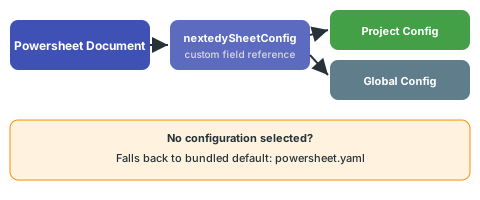
Each Powersheet document has a custom field (`nextedySheetConfig`) that references a sheet configuration YAML file. Powersheet scans both the global and project-specific configuration directories for available YAML files and populates a picklist from which you select the desired configuration. If no configuration is selected, the document uses a bundled default configuration (`powersheet.yaml`).
 Yes. Sheet configurations are stored as standalone YAML files in the repository, independent of any specific document. Multiple Powersheet documents can reference the same configuration file through their `nextedySheetConfig` custom field. This is the recommended approach for maintaining consistency across related documents in a project.
You can change a document's sheet configuration by updating the `nextedySheetConfig` custom field on the document, either through the Polarion work item editor or programmatically. You can also edit the configuration YAML directly through **Administration > Nextedy POWERSHEET > Sheet Configurations**, which will affect all documents referencing that configuration.
See [Creating Your First Sheet Configuration](/powersheet/getting-started/first-sheet-configuration) for a guided walkthrough.
Yes. Sheet configurations are stored as standalone YAML files in the repository, independent of any specific document. Multiple Powersheet documents can reference the same configuration file through their `nextedySheetConfig` custom field. This is the recommended approach for maintaining consistency across related documents in a project.
You can change a document's sheet configuration by updating the `nextedySheetConfig` custom field on the document, either through the Polarion work item editor or programmatically. You can also edit the configuration YAML directly through **Administration > Nextedy POWERSHEET > Sheet Configurations**, which will affect all documents referencing that configuration.
See [Creating Your First Sheet Configuration](/powersheet/getting-started/first-sheet-configuration) for a guided walkthrough.