> ## Documentation Index
> Fetch the complete documentation index at: https://learn.nextedy.com/llms.txt
> Use this file to discover all available pages before exploring further.
# Swimlanes (Rows) Parameters
> The swimlanes (rows) parameters control how Nextedy PLANNINGBOARD groups work items into horizontal rows.
Swimlane parameters are configured in the **Widget Parameters** panel under the **Swimlanes (Rows)** section.
***
## Assignment Type
The **Assignment Type** is the primary swimlane parameter. It determines how work items are mapped to swimlane rows.
| Parameter | Type | Default | Description |
| ---------------- | ------ | ---------- | -------------------------------------------------------------------------------------------------------------------------------- |
| `assignmentMode` | string | `ASSIGNEE` | Determines how work items are grouped into swimlane rows. See [Assignment Mode Values](#assignment-mode-values) for all options. |
### Assignment Mode Values
| Value | UI Label | Description |
| ----------------- | -------------------------------- | ------------------------------------------------------------------------------------------------------ |
| `ASSIGNEE` | Users (Assignee) | Each swimlane represents a project user, grouped by their assigned role. |
| `PARENT` | Parent Item | Each swimlane represents a parent work item (e.g., a Feature). Items appear under their linked parent. |
| `ENUM` | Enumeration Field | Each swimlane represents a value from a custom enumeration field on the work item. |
| `PROJECT` | Project | Each swimlane represents a Polarion project. Used for cross-project planning. |
| `SAFE_TEAM` | Program / Solution Teams (SAFe) | Swimlanes correspond to SAFe teams. Requires SAFe configuration. |
| `SAFE_TRAIN_TEAM` | Agile Release Train Teams (SAFe) | Swimlanes correspond to Agile Release Train teams. Requires SAFe configuration. |
| `SAFE_PROGRAMS` | Programs (SAFe) | Swimlanes correspond to SAFe Programs. Requires SAFe configuration. |
| `none` | No Swimlanes | Swimlane grouping is disabled. All items appear in a single unified view. |
 ***
## Users (Assignee) Parameters
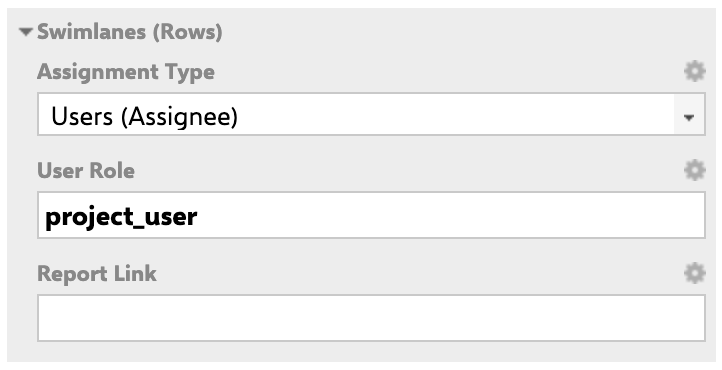
Applies when `assignmentMode` is set to **Users (Assignee)** (`ASSIGNEE`).
***
## Users (Assignee) Parameters
Applies when `assignmentMode` is set to **Users (Assignee)** (`ASSIGNEE`).
 | Parameter | Type | Default | Description |
| ---------------------- | ------- | --------------- | --------------------------------------------------------------------------------------------------------------------------------------------------------------------------- |
| `userRole` | string | See application | Defines which Polarion project role is used to determine which users appear as swimlanes. For example, `project_user` displays all users who hold that role in the project. |
| `reportLink` | string | (empty) | Optional URL template for a link that opens when a user clicks the swimlane label. Supports the `${r.objectId.itemId}` variable for the resource (user) identifier. |
| `showEmptySwimlanes` | boolean | `false` | When `true`, swimlanes for users with no assigned work items are shown. When `false`, only swimlanes containing at least one card are displayed. |
| `swimlaneSort` | string | `alphabetical` | Sort order for swimlanes. See [Swimlane Sort Options](#swimlane-sort-options). |
| `collapsibleSwimlanes` | boolean | `true` | Enables individual swimlane collapse/expand by the user. |
### Report Link Example (Assignee Mode)
```
/polarion/#/project/PlanningBoard/wiki/SOME_REPORT?user=${r.objectId.itemId}
```
The `${r.objectId.itemId}` placeholder is substituted with the user ID of the swimlane's assignee.
### Example: Assignee Mode Configuration
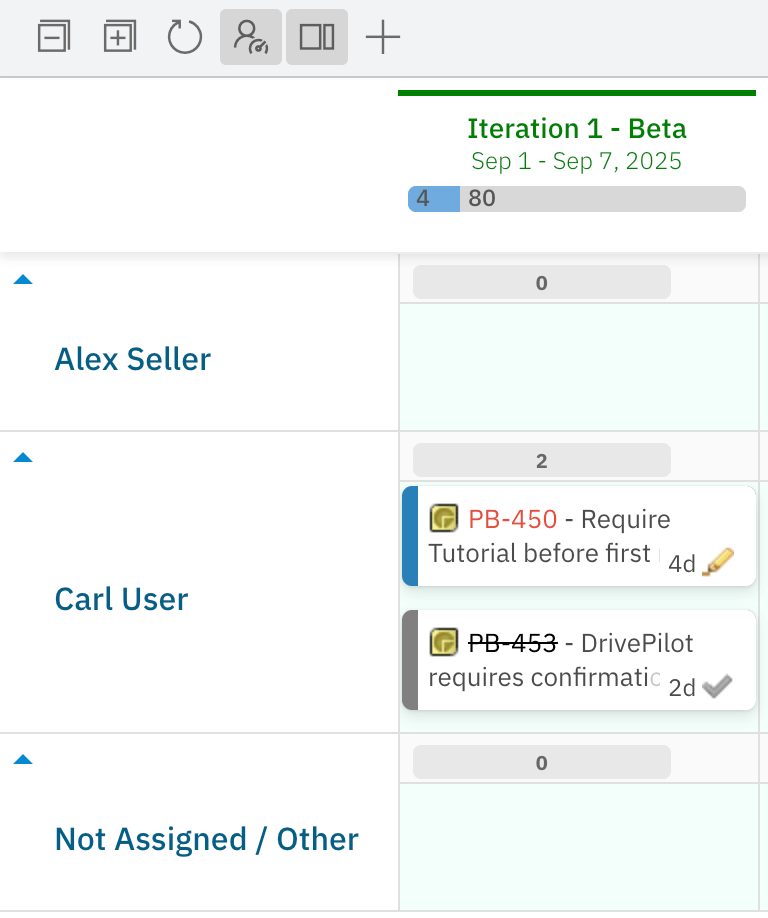
The `project_user` role is configured in **Administration > User Management > Roles**. Users who hold this role in the project (e.g., Alex Seller, Carl User) each receive their own swimlane.
| Parameter | Type | Default | Description |
| ---------------------- | ------- | --------------- | --------------------------------------------------------------------------------------------------------------------------------------------------------------------------- |
| `userRole` | string | See application | Defines which Polarion project role is used to determine which users appear as swimlanes. For example, `project_user` displays all users who hold that role in the project. |
| `reportLink` | string | (empty) | Optional URL template for a link that opens when a user clicks the swimlane label. Supports the `${r.objectId.itemId}` variable for the resource (user) identifier. |
| `showEmptySwimlanes` | boolean | `false` | When `true`, swimlanes for users with no assigned work items are shown. When `false`, only swimlanes containing at least one card are displayed. |
| `swimlaneSort` | string | `alphabetical` | Sort order for swimlanes. See [Swimlane Sort Options](#swimlane-sort-options). |
| `collapsibleSwimlanes` | boolean | `true` | Enables individual swimlane collapse/expand by the user. |
### Report Link Example (Assignee Mode)
```
/polarion/#/project/PlanningBoard/wiki/SOME_REPORT?user=${r.objectId.itemId}
```
The `${r.objectId.itemId}` placeholder is substituted with the user ID of the swimlane's assignee.
### Example: Assignee Mode Configuration
The `project_user` role is configured in **Administration > User Management > Roles**. Users who hold this role in the project (e.g., Alex Seller, Carl User) each receive their own swimlane.
 ***
## Parent Item Parameters
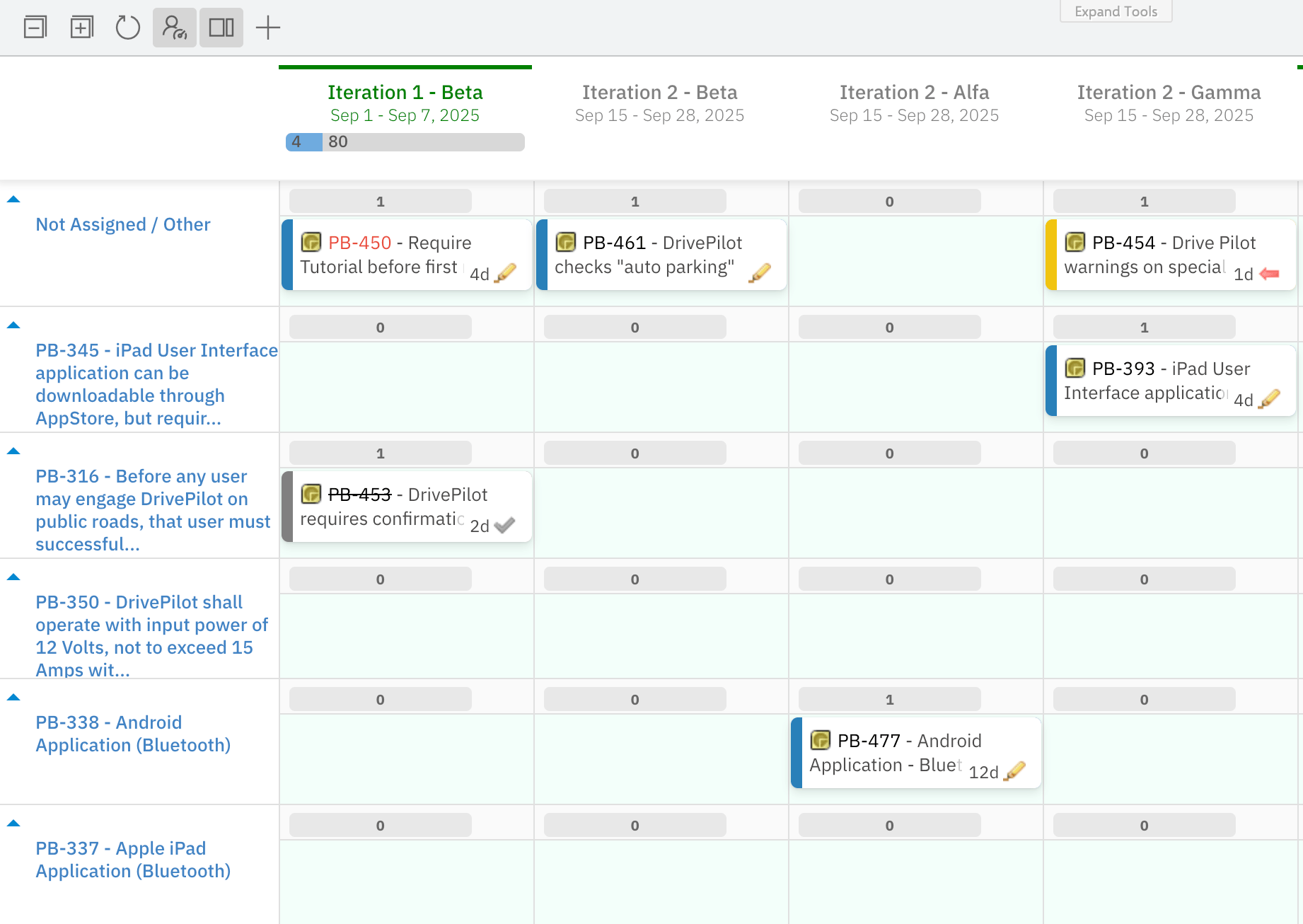
Applies when `assignmentMode` is set to **Parent Item** (`PARENT`).
| Parameter | Type | Default | Description |
| ---------------------- | ------- | --------------- | ------------------------------------------------------------------------------------------------------------------------------------------------------------------------------------------------ |
| `parentWorkItemType` | string | `None` | Specifies which work item type to use as the parent. Filters the set of possible parent swimlanes to items of this type only. |
| `parentRole` | string | See application | The link role that defines the parent–child relationship (e.g., `implements`). Used to determine which parent item a work item belongs to. |
| `parentQuery` | string | (empty) | Optional Lucene query to filter which parent items appear as swimlanes. Leave empty to show all parents of the configured type. |
| `filterParents` | string | `No` | Whether to limit visible parent swimlanes. Set to `Yes` to restrict swimlanes to parents matched by `parentQuery`. |
| `swimlaneSort` | string | `alphabetical` | Sort order of parent item swimlanes. See [Swimlane Sort Options](#swimlane-sort-options). As of Planningboard 25.9.0, parent swimlanes can be sorted by any custom property, including priority. |
| `reportLink` | string | (empty) | Optional URL template for a link that opens when a user clicks the swimlane label. |
| `showEmptySwimlanes` | boolean | `false` | When `true`, parent swimlanes with no child items are shown. |
| `collapsibleSwimlanes` | boolean | `true` | Enables individual swimlane collapse/expand. |
When using Parent Item mode, work items can only be placed under their **actual linked parent**. You cannot freely choose a different row. If a card is dragged to an incorrect swimlane, Planningboard automatically moves it to its correct parent row once dropped. This preserves data integrity of parent–child links.
***
## Parent Item Parameters
Applies when `assignmentMode` is set to **Parent Item** (`PARENT`).
| Parameter | Type | Default | Description |
| ---------------------- | ------- | --------------- | ------------------------------------------------------------------------------------------------------------------------------------------------------------------------------------------------ |
| `parentWorkItemType` | string | `None` | Specifies which work item type to use as the parent. Filters the set of possible parent swimlanes to items of this type only. |
| `parentRole` | string | See application | The link role that defines the parent–child relationship (e.g., `implements`). Used to determine which parent item a work item belongs to. |
| `parentQuery` | string | (empty) | Optional Lucene query to filter which parent items appear as swimlanes. Leave empty to show all parents of the configured type. |
| `filterParents` | string | `No` | Whether to limit visible parent swimlanes. Set to `Yes` to restrict swimlanes to parents matched by `parentQuery`. |
| `swimlaneSort` | string | `alphabetical` | Sort order of parent item swimlanes. See [Swimlane Sort Options](#swimlane-sort-options). As of Planningboard 25.9.0, parent swimlanes can be sorted by any custom property, including priority. |
| `reportLink` | string | (empty) | Optional URL template for a link that opens when a user clicks the swimlane label. |
| `showEmptySwimlanes` | boolean | `false` | When `true`, parent swimlanes with no child items are shown. |
| `collapsibleSwimlanes` | boolean | `true` | Enables individual swimlane collapse/expand. |
When using Parent Item mode, work items can only be placed under their **actual linked parent**. You cannot freely choose a different row. If a card is dragged to an incorrect swimlane, Planningboard automatically moves it to its correct parent row once dropped. This preserves data integrity of parent–child links.
 ***
## Enumeration Field Parameters
Applies when `assignmentMode` is set to **Enumeration Field** (`ENUM`).
| Parameter | Type | Default | Description |
| ---------------------- | -------------------- | ------------------ | ----------------------------------------------------------------------------------------------------------------------------------------------------------------------- |
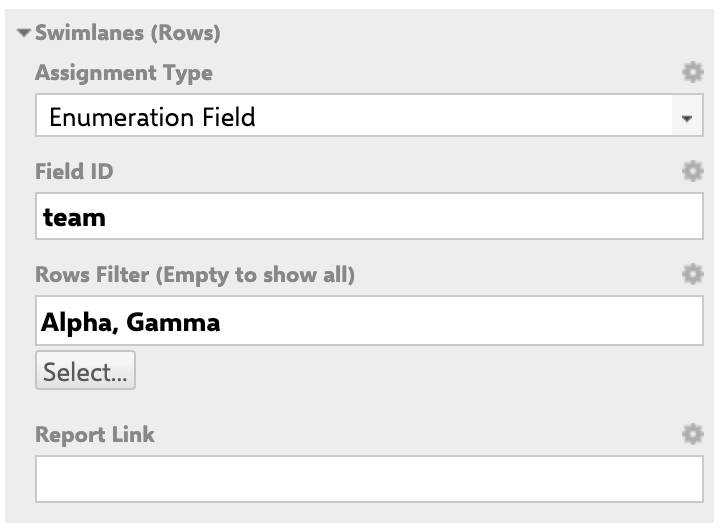
| `enumFieldId` | string | `None` | The Polarion field ID of the enumeration custom field to use for swimlane grouping (e.g., `team`, `severity`). Must be a valid field ID on the selected work item type. |
| `rowsFilter` | string (multi-value) | (empty — show all) | Limits which enumeration values appear as swimlane rows. When empty, all values defined for that field are shown. Select specific values to display only those rows. |
| `reportLink` | string | (empty) | Optional URL template for a report link on the swimlane label. |
| `showEmptySwimlanes` | boolean | `false` | When `true`, rows for enum values with no matching work items are shown. |
| `collapsibleSwimlanes` | boolean | `true` | Enables individual swimlane collapse/expand. |
### Rows Filter Behavior
* **Empty filter (default):** All enumeration values defined for the field and work item type are displayed as rows.
* **Selected values:** Only the chosen enum values appear as swimlane rows. Work items whose field value is not in the selected set do not appear on any row.
* **Multi-enum fields:** A work item with multiple enum values assigned to the field can appear in multiple swimlane rows simultaneously.
* **Type-dependent values:** Available enum values in the filter depend on the selected work item type. Different types may have different enumeration configurations for the same field ID.
***
## Enumeration Field Parameters
Applies when `assignmentMode` is set to **Enumeration Field** (`ENUM`).
| Parameter | Type | Default | Description |
| ---------------------- | -------------------- | ------------------ | ----------------------------------------------------------------------------------------------------------------------------------------------------------------------- |
| `enumFieldId` | string | `None` | The Polarion field ID of the enumeration custom field to use for swimlane grouping (e.g., `team`, `severity`). Must be a valid field ID on the selected work item type. |
| `rowsFilter` | string (multi-value) | (empty — show all) | Limits which enumeration values appear as swimlane rows. When empty, all values defined for that field are shown. Select specific values to display only those rows. |
| `reportLink` | string | (empty) | Optional URL template for a report link on the swimlane label. |
| `showEmptySwimlanes` | boolean | `false` | When `true`, rows for enum values with no matching work items are shown. |
| `collapsibleSwimlanes` | boolean | `true` | Enables individual swimlane collapse/expand. |
### Rows Filter Behavior
* **Empty filter (default):** All enumeration values defined for the field and work item type are displayed as rows.
* **Selected values:** Only the chosen enum values appear as swimlane rows. Work items whose field value is not in the selected set do not appear on any row.
* **Multi-enum fields:** A work item with multiple enum values assigned to the field can appear in multiple swimlane rows simultaneously.
* **Type-dependent values:** Available enum values in the filter depend on the selected work item type. Different types may have different enumeration configurations for the same field ID.
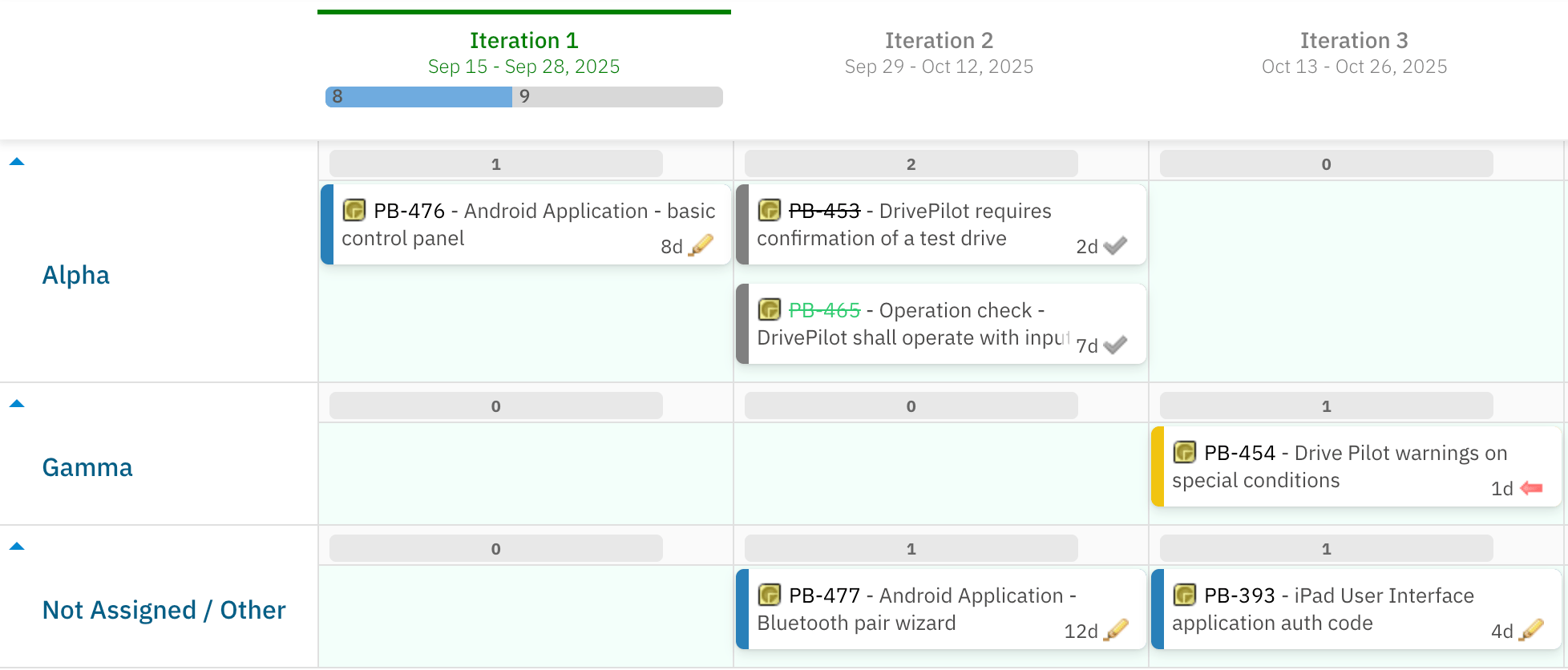
 ### Example: Enumeration Field Mode
Field ID `team` is configured as an enumeration custom field in the Polarion project. Setting `enumFieldId` to `team` creates one swimlane per team value.
### Example: Enumeration Field Mode
Field ID `team` is configured as an enumeration custom field in the Polarion project. Setting `enumFieldId` to `team` creates one swimlane per team value.
 ***
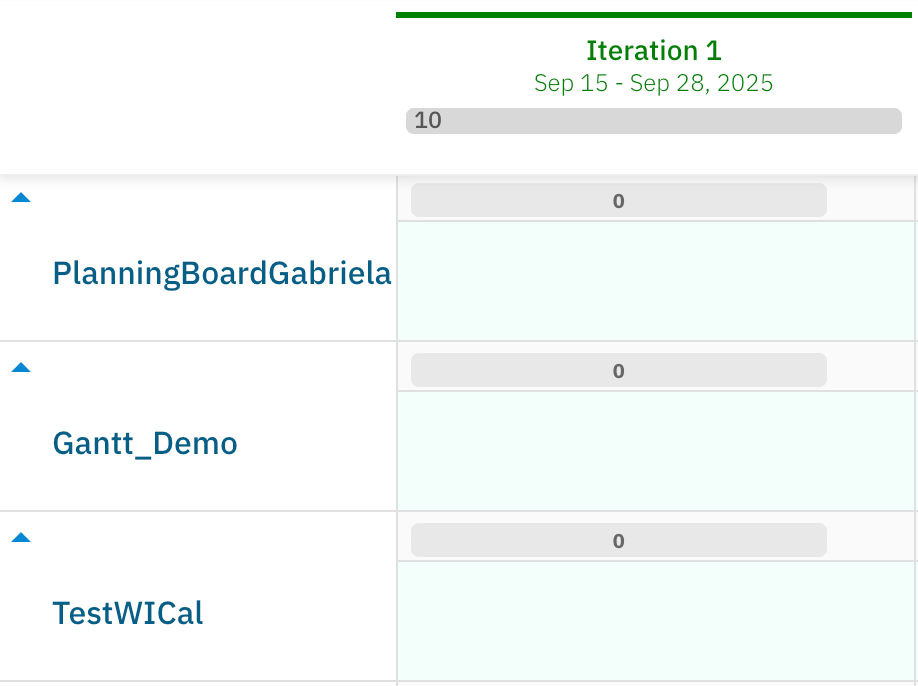
## Project Parameters
Applies when `assignmentMode` is set to **Project** (`PROJECT`).
| Parameter | Type | Default | Description |
| ---------------------- | ------- | ------- | ------------------------------------------------------------------------------- |
| `reportLink` | string | (empty) | Optional URL template for a project-specific report link on the swimlane label. |
| `showEmptySwimlanes` | boolean | `false` | When `true`, swimlanes for projects with no work items are shown. |
| `collapsibleSwimlanes` | boolean | `true` | Enables individual swimlane collapse/expand. |
Use Project mode for cross-project planning boards where the board must display items from multiple Polarion projects simultaneously.
***
## Project Parameters
Applies when `assignmentMode` is set to **Project** (`PROJECT`).
| Parameter | Type | Default | Description |
| ---------------------- | ------- | ------- | ------------------------------------------------------------------------------- |
| `reportLink` | string | (empty) | Optional URL template for a project-specific report link on the swimlane label. |
| `showEmptySwimlanes` | boolean | `false` | When `true`, swimlanes for projects with no work items are shown. |
| `collapsibleSwimlanes` | boolean | `true` | Enables individual swimlane collapse/expand. |
Use Project mode for cross-project planning boards where the board must display items from multiple Polarion projects simultaneously.
 ***
## SAFe Assignment Type Parameters
Applies when `assignmentMode` is set to **Program / Solution Teams (SAFe)** (`SAFE_TEAM`), **Agile Release Train Teams (SAFe)** (`SAFE_TRAIN_TEAM`), or **Programs (SAFe)** (`SAFE_PROGRAMS`).
SAFe swimlane types require dedicated SAFe configuration in your Polarion environment. Contact Nextedy support for setup guidance before configuring these modes.
| Parameter | Type | Default | Description |
| ---------------------- | ------- | ------------- | ----------------------------------------------------------------------------------------------------------------------------------------------------------------------------------------------------------------------- |
| `safeTeamField` | string | `safeTeam` | Custom field ID that stores the SAFe Team assignment on work items. Used when `assignmentMode` is set to **Program / Solution Teams (SAFe)** (`SAFE_TEAM`) or **Agile Release Train Teams (SAFe)** (`SAFE_TRAIN_TEAM`). |
| `safeProgramField` | string | `safeProgram` | Custom field ID that stores the SAFe Program assignment on work items. Used when `assignmentMode` is set to **Programs (SAFe)** (`SAFE_PROGRAMS`). |
| `showEmptySwimlanes` | boolean | `false` | When `true`, SAFe team or program swimlanes with no work items are shown. |
| `collapsibleSwimlanes` | boolean | `true` | Enables individual swimlane collapse/expand. |
For more detail on SAFe assignment modes, see the [SAFe Team Mode](/planningboard/reference/assignment-modes/safe-team-mode), [SAFe Train Team Mode](/planningboard/reference/assignment-modes/safe-train-team-mode), and [SAFe Programs Mode](/planningboard/reference/assignment-modes/safe-programs-mode) reference pages.
***
## No Swimlanes Parameters
Applies when `assignmentMode` is set to **No Swimlanes** (`none`).
When No Swimlanes is selected, all swimlane grouping is disabled. All work items appear in a single unified planning area. There are no per-row parameters to configure in this mode.
Use this mode when you want to focus on column-level (Plan) organization without horizontal grouping — for example, for high-level release overviews or quick board views.
***
## Swimlane Sort Options
The `swimlaneSort` parameter applies to Assignee, Parent Item, and Enumeration Field assignment modes and controls the vertical ordering of swimlane rows.
| Value | Description |
| ---------------------------------- | --------------------------------------------------------------------------------------------------------------------------------------------------------------------- |
| `alphabetical` | Rows are sorted alphabetically by their label. This is the default. |
| Custom property (e.g., `priority`) | As of Planningboard 25.9.0, Parent Item swimlanes can be sorted by any custom property on the parent work item type, such as `priority`. Enter the field ID directly. |
Swimlane sort order is coupled to the work item sort order within each lane. Reordering swimlanes may affect how cards are arranged within those lanes. This is a known characteristic of the current sort implementation.
***
## Common Parameters (All Assignment Types)
The following parameters apply regardless of the selected assignment type.
| Parameter | Type | Default | Description |
| ---------------------- | ------- | -------------- | ----------------------------------------------------------------------------------------------------------------------------- |
| `showEmptySwimlanes` | boolean | `false` | Controls whether swimlanes containing no work items are displayed. When `true`, all possible lanes are visible even if empty. |
| `swimlaneSort` | string | `alphabetical` | Vertical ordering of swimlane rows. |
| `collapsibleSwimlanes` | boolean | `true` | Enables users to collapse/expand individual swimlanes to reduce visual complexity on large boards. |
***
## Report Link Parameter
The `reportLink` parameter is available on all assignment types that have a named resource (Assignee, Parent Item, Enumeration Field, Project). It adds a clickable link to each swimlane label that opens an external report or page.
The link URL is a template string that can reference the swimlane's associated resource:
| Variable | Applies to | Description |
| ------------------------- | --------------- | ----------------------------------------------------- |
| `${r.objectId.itemId}` | Assignee (user) | The user ID of the swimlane's assignee. |
| `${r.objectId.projectId}` | All | The project ID associated with the swimlane resource. |
### Report Link Example
```
/polarion/#/project/PlanningBoard/wiki/SOME_REPORT?user=${r.objectId.itemId}
```
This opens a Wiki page at `SOME_REPORT`, passing the current swimlane's user as a page parameter.
***
## Page Parameters for Dynamic Swimlane Filtering
Planningboard supports Polarion page parameters (`$pageParameters.xxx`) for dynamic swimlane filtering.
Page parameters in swimlane configuration are accepted as **string type** only, requiring manual text entry. An enum picker dropdown for page parameters is not currently available and is under investigation. Plan your configuration accordingly.
### Requirement: Team Work Item Type ID
When using swimlane filtering with Nextedy Team work items, the Team work item type ID **must** be exactly `team`. Custom Team work item type IDs are not supported in Planningboard (unlike Nextedy Gantt, which supports custom Team work item type IDs from version 25.5.0 onwards).
### Multi-Team Deployment Options
| Approach | Description | Limitation |
| -------------------------------------- | ------------------------------------------------------------------------------------------------ | ------------------------------------------------------- |
| Separate board page per team | Configure one Planningboard page per team with hardcoded swimlane settings. | Requires maintaining multiple pages. |
| Dynamic page parameter filtering | Pass a team filter via `$pageParameters.xxx` as a string value. | Manual string entry only; no dropdown picker. |
| Nextedy Gantt with custom Team WI type | Use Gantt (25.5.0+) as the primary planning tool for teams using custom Team work item type IDs. | Planningboard does not support custom Team WI type IDs. |
***
## Configuration Example
The following widget parameter configuration sets up a Planningboard with Parent Item swimlanes, sorted by `priority`, showing only parents matched by a query, with a report link.
```properties theme={null}
# Swimlanes (Rows)
assignmentMode=PARENT
parentWorkItemType=feature
parentRole=implements
parentQuery=status:open
filterParents=Yes
swimlaneSort=priority
showEmptySwimlanes=false
collapsibleSwimlanes=true
reportLink=/polarion/#/project/${r.objectId.projectId}/wiki/FEATURE_REPORT?feature=${r.objectId.itemId}
```
This configuration:
1. Groups work items into swimlanes by their linked parent Feature.
2. Restricts visible swimlanes to open Features only (`status:open`).
3. Sorts parent swimlanes by the `priority` custom field (available from Planningboard 25.9.0).
4. Hides empty parent swimlanes.
5. Adds a report link on each swimlane label pointing to a Feature-specific report page.
***
## Swimlane Board Layout Diagram
***
## SAFe Assignment Type Parameters
Applies when `assignmentMode` is set to **Program / Solution Teams (SAFe)** (`SAFE_TEAM`), **Agile Release Train Teams (SAFe)** (`SAFE_TRAIN_TEAM`), or **Programs (SAFe)** (`SAFE_PROGRAMS`).
SAFe swimlane types require dedicated SAFe configuration in your Polarion environment. Contact Nextedy support for setup guidance before configuring these modes.
| Parameter | Type | Default | Description |
| ---------------------- | ------- | ------------- | ----------------------------------------------------------------------------------------------------------------------------------------------------------------------------------------------------------------------- |
| `safeTeamField` | string | `safeTeam` | Custom field ID that stores the SAFe Team assignment on work items. Used when `assignmentMode` is set to **Program / Solution Teams (SAFe)** (`SAFE_TEAM`) or **Agile Release Train Teams (SAFe)** (`SAFE_TRAIN_TEAM`). |
| `safeProgramField` | string | `safeProgram` | Custom field ID that stores the SAFe Program assignment on work items. Used when `assignmentMode` is set to **Programs (SAFe)** (`SAFE_PROGRAMS`). |
| `showEmptySwimlanes` | boolean | `false` | When `true`, SAFe team or program swimlanes with no work items are shown. |
| `collapsibleSwimlanes` | boolean | `true` | Enables individual swimlane collapse/expand. |
For more detail on SAFe assignment modes, see the [SAFe Team Mode](/planningboard/reference/assignment-modes/safe-team-mode), [SAFe Train Team Mode](/planningboard/reference/assignment-modes/safe-train-team-mode), and [SAFe Programs Mode](/planningboard/reference/assignment-modes/safe-programs-mode) reference pages.
***
## No Swimlanes Parameters
Applies when `assignmentMode` is set to **No Swimlanes** (`none`).
When No Swimlanes is selected, all swimlane grouping is disabled. All work items appear in a single unified planning area. There are no per-row parameters to configure in this mode.
Use this mode when you want to focus on column-level (Plan) organization without horizontal grouping — for example, for high-level release overviews or quick board views.
***
## Swimlane Sort Options
The `swimlaneSort` parameter applies to Assignee, Parent Item, and Enumeration Field assignment modes and controls the vertical ordering of swimlane rows.
| Value | Description |
| ---------------------------------- | --------------------------------------------------------------------------------------------------------------------------------------------------------------------- |
| `alphabetical` | Rows are sorted alphabetically by their label. This is the default. |
| Custom property (e.g., `priority`) | As of Planningboard 25.9.0, Parent Item swimlanes can be sorted by any custom property on the parent work item type, such as `priority`. Enter the field ID directly. |
Swimlane sort order is coupled to the work item sort order within each lane. Reordering swimlanes may affect how cards are arranged within those lanes. This is a known characteristic of the current sort implementation.
***
## Common Parameters (All Assignment Types)
The following parameters apply regardless of the selected assignment type.
| Parameter | Type | Default | Description |
| ---------------------- | ------- | -------------- | ----------------------------------------------------------------------------------------------------------------------------- |
| `showEmptySwimlanes` | boolean | `false` | Controls whether swimlanes containing no work items are displayed. When `true`, all possible lanes are visible even if empty. |
| `swimlaneSort` | string | `alphabetical` | Vertical ordering of swimlane rows. |
| `collapsibleSwimlanes` | boolean | `true` | Enables users to collapse/expand individual swimlanes to reduce visual complexity on large boards. |
***
## Report Link Parameter
The `reportLink` parameter is available on all assignment types that have a named resource (Assignee, Parent Item, Enumeration Field, Project). It adds a clickable link to each swimlane label that opens an external report or page.
The link URL is a template string that can reference the swimlane's associated resource:
| Variable | Applies to | Description |
| ------------------------- | --------------- | ----------------------------------------------------- |
| `${r.objectId.itemId}` | Assignee (user) | The user ID of the swimlane's assignee. |
| `${r.objectId.projectId}` | All | The project ID associated with the swimlane resource. |
### Report Link Example
```
/polarion/#/project/PlanningBoard/wiki/SOME_REPORT?user=${r.objectId.itemId}
```
This opens a Wiki page at `SOME_REPORT`, passing the current swimlane's user as a page parameter.
***
## Page Parameters for Dynamic Swimlane Filtering
Planningboard supports Polarion page parameters (`$pageParameters.xxx`) for dynamic swimlane filtering.
Page parameters in swimlane configuration are accepted as **string type** only, requiring manual text entry. An enum picker dropdown for page parameters is not currently available and is under investigation. Plan your configuration accordingly.
### Requirement: Team Work Item Type ID
When using swimlane filtering with Nextedy Team work items, the Team work item type ID **must** be exactly `team`. Custom Team work item type IDs are not supported in Planningboard (unlike Nextedy Gantt, which supports custom Team work item type IDs from version 25.5.0 onwards).
### Multi-Team Deployment Options
| Approach | Description | Limitation |
| -------------------------------------- | ------------------------------------------------------------------------------------------------ | ------------------------------------------------------- |
| Separate board page per team | Configure one Planningboard page per team with hardcoded swimlane settings. | Requires maintaining multiple pages. |
| Dynamic page parameter filtering | Pass a team filter via `$pageParameters.xxx` as a string value. | Manual string entry only; no dropdown picker. |
| Nextedy Gantt with custom Team WI type | Use Gantt (25.5.0+) as the primary planning tool for teams using custom Team work item type IDs. | Planningboard does not support custom Team WI type IDs. |
***
## Configuration Example
The following widget parameter configuration sets up a Planningboard with Parent Item swimlanes, sorted by `priority`, showing only parents matched by a query, with a report link.
```properties theme={null}
# Swimlanes (Rows)
assignmentMode=PARENT
parentWorkItemType=feature
parentRole=implements
parentQuery=status:open
filterParents=Yes
swimlaneSort=priority
showEmptySwimlanes=false
collapsibleSwimlanes=true
reportLink=/polarion/#/project/${r.objectId.projectId}/wiki/FEATURE_REPORT?feature=${r.objectId.itemId}
```
This configuration:
1. Groups work items into swimlanes by their linked parent Feature.
2. Restricts visible swimlanes to open Features only (`status:open`).
3. Sorts parent swimlanes by the `priority` custom field (available from Planningboard 25.9.0).
4. Hides empty parent swimlanes.
5. Adds a report link on each swimlane label pointing to a Feature-specific report page.
***
## Swimlane Board Layout Diagram
 ***
## Limitations
* **Custom Team work item type IDs** are not supported in swimlane configuration. The Team work item type must use the exact ID `team`. Gantt (25.5.0+) supports custom Team work item type IDs as an alternative.
* **Page parameters for swimlane filtering** accept string type only. An enum picker dropdown is not currently available (under investigation).
* **Parent Item swimlane sorting** by custom property is available from Planningboard 25.9.0. Earlier versions support only alphabetical sorting.
* **Swimlane sort order is coupled to item sort order** within each lane. Changing the swimlane sort may affect card ordering within those swimlanes.
* **No multi-assignee swimlane support.** Work items with multiple assignees are assigned to a single swimlane based on the primary assignee. This is a known gap versus Nextedy Gantt's capacity model.
***
## Related Reference
* [Assignment Modes](/planningboard/reference/assignment-modes/index) — detailed reference for each assignment mode
* [Assignee Mode](/planningboard/reference/assignment-modes/assignee-mode)
* [Parent Item Mode](/planningboard/reference/assignment-modes/parent-mode)
* [Enumeration Field Mode](/planningboard/reference/assignment-modes/enum-mode)
* [Project Mode](/planningboard/reference/assignment-modes/project-mode)
* [No Swimlanes Mode](/planningboard/reference/assignment-modes/no-swimlanes-mode)
* [Capacity Parameters](/planningboard/reference/widget-parameters/capacity-parameters) — configure capacity bars on swimlanes
* [Plans (Columns) Parameters](/planningboard/reference/widget-parameters/plans-parameters) — configure the columns of the board
* [Swimlane Controls](/planningboard/reference/ui-elements/swimlane-controls) — collapse/expand and toolbar interactions
* [Widget Parameters](/planningboard/reference/widget-parameters/index) — overview of all widget parameter groups
**KB Articles**
* Planningboard Widget Parameters
* Swimlane Assignment Types
* Planningboard interface & basic interactions
**Support Tickets**
* [#6681](https://support.nextedy.com/helpdesk/tickets/6681)
* [#6546](https://support.nextedy.com/helpdesk/tickets/6546)
* [#6309](https://support.nextedy.com/helpdesk/tickets/6309)
**Source Code**
* `PlanningBoardWidget.java`
* `licenseReadonly.cy.ts`
* `enum-rows-filter.cy.ts`
* `AssignmentMode.java`
* `widget.vm`
***
## Limitations
* **Custom Team work item type IDs** are not supported in swimlane configuration. The Team work item type must use the exact ID `team`. Gantt (25.5.0+) supports custom Team work item type IDs as an alternative.
* **Page parameters for swimlane filtering** accept string type only. An enum picker dropdown is not currently available (under investigation).
* **Parent Item swimlane sorting** by custom property is available from Planningboard 25.9.0. Earlier versions support only alphabetical sorting.
* **Swimlane sort order is coupled to item sort order** within each lane. Changing the swimlane sort may affect card ordering within those swimlanes.
* **No multi-assignee swimlane support.** Work items with multiple assignees are assigned to a single swimlane based on the primary assignee. This is a known gap versus Nextedy Gantt's capacity model.
***
## Related Reference
* [Assignment Modes](/planningboard/reference/assignment-modes/index) — detailed reference for each assignment mode
* [Assignee Mode](/planningboard/reference/assignment-modes/assignee-mode)
* [Parent Item Mode](/planningboard/reference/assignment-modes/parent-mode)
* [Enumeration Field Mode](/planningboard/reference/assignment-modes/enum-mode)
* [Project Mode](/planningboard/reference/assignment-modes/project-mode)
* [No Swimlanes Mode](/planningboard/reference/assignment-modes/no-swimlanes-mode)
* [Capacity Parameters](/planningboard/reference/widget-parameters/capacity-parameters) — configure capacity bars on swimlanes
* [Plans (Columns) Parameters](/planningboard/reference/widget-parameters/plans-parameters) — configure the columns of the board
* [Swimlane Controls](/planningboard/reference/ui-elements/swimlane-controls) — collapse/expand and toolbar interactions
* [Widget Parameters](/planningboard/reference/widget-parameters/index) — overview of all widget parameter groups
**KB Articles**
* Planningboard Widget Parameters
* Swimlane Assignment Types
* Planningboard interface & basic interactions
**Support Tickets**
* [#6681](https://support.nextedy.com/helpdesk/tickets/6681)
* [#6546](https://support.nextedy.com/helpdesk/tickets/6546)
* [#6309](https://support.nextedy.com/helpdesk/tickets/6309)
**Source Code**
* `PlanningBoardWidget.java`
* `licenseReadonly.cy.ts`
* `enum-rows-filter.cy.ts`
* `AssignmentMode.java`
* `widget.vm`