> ## Documentation Index
> Fetch the complete documentation index at: https://learn.nextedy.com/llms.txt
> Use this file to discover all available pages before exploring further.
# Troubleshooting
> This section collects solutions to the most common problems encountered when running Nextedy PLANNINGBOARD in Siemens Polarion ALM.
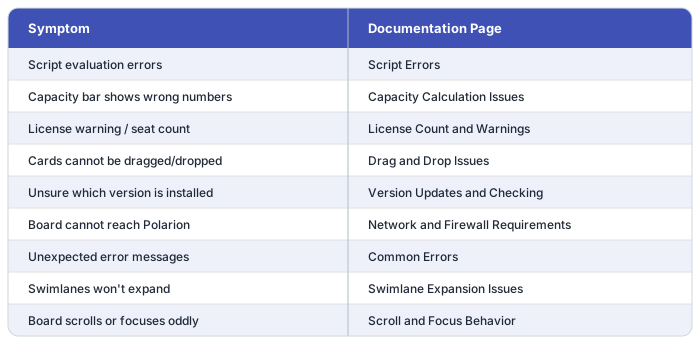
Use the pages below when the board is not behaving as expected, a widget parameter is producing unexpected output, or an error message appears during planning work.
 ## Errors and Configuration
**[Script Errors](/planningboard/guides/troubleshooting/script-errors)** — Diagnose and fix runtime errors from item scripts, config scripts, and data scripts embedded in widget parameters.
**[Common Errors](/planningboard/guides/troubleshooting/common-errors)** — Reference for error messages that appear in the board or browser console, with causes and resolution steps.
## Capacity
**[Capacity Calculation Issues](/planningboard/guides/troubleshooting/capacity-issues)** — Resolve discrepancies in capacity bar totals, incorrect effort aggregation, and capacity normalization problems. See also the known limitations around multi-assignee and sub-item effort distribution.
## Planning Interactions
**[Drag and Drop Issues](/planningboard/guides/troubleshooting/drag-and-drop-issues)** — Fix problems where cards cannot be moved between swimlanes or Plans, including permission and configuration causes.
**[Swimlane Expansion Issues](/planningboard/guides/troubleshooting/swimlane-expansion)** — Address swimlanes that fail to expand, collapse unexpectedly, or do not display expected work items.
**[Scroll and Focus Behavior](/planningboard/guides/troubleshooting/scroll-behavior)** — Resolve unexpected scroll jumps, lost focus, or board viewport issues after interacting with cards.
## Installation and Licensing
**[License Count and Warnings](/planningboard/guides/troubleshooting/license-issues)** — Understand license seat consumption, resolve over-limit warnings, and verify license configuration.
**[Version Updates and Checking](/planningboard/guides/troubleshooting/version-updates)** — Determine the installed Planningboard version and apply updates correctly.
**[Network and Firewall Requirements](/planningboard/guides/troubleshooting/network-requirements)** — Ensure the Polarion server and browser client can reach required endpoints; resolve connectivity-related failures.
Check the browser developer console for JavaScript errors and the Polarion server log for plugin exceptions. Include the Planningboard version (see [Version Updates and Checking](/planningboard/guides/troubleshooting/version-updates)) and the relevant widget parameter values when reporting an issue.
**KB Articles**
* Troubleshooting Script Errors in Planningboard
**Support Tickets**
* [#6659](https://support.nextedy.com/helpdesk/tickets/6659)
* [#6688](https://support.nextedy.com/helpdesk/tickets/6688)
**Source Code**
* `PlanningBoardWidgetDependenciesProcessor.java`
* `PlanningBoardWidgetRenderer.java`
* `PlanningBoardDataService.java`
* `licenseReadonly.cy.ts`
* `PlanningBoardWidget.java`
## Errors and Configuration
**[Script Errors](/planningboard/guides/troubleshooting/script-errors)** — Diagnose and fix runtime errors from item scripts, config scripts, and data scripts embedded in widget parameters.
**[Common Errors](/planningboard/guides/troubleshooting/common-errors)** — Reference for error messages that appear in the board or browser console, with causes and resolution steps.
## Capacity
**[Capacity Calculation Issues](/planningboard/guides/troubleshooting/capacity-issues)** — Resolve discrepancies in capacity bar totals, incorrect effort aggregation, and capacity normalization problems. See also the known limitations around multi-assignee and sub-item effort distribution.
## Planning Interactions
**[Drag and Drop Issues](/planningboard/guides/troubleshooting/drag-and-drop-issues)** — Fix problems where cards cannot be moved between swimlanes or Plans, including permission and configuration causes.
**[Swimlane Expansion Issues](/planningboard/guides/troubleshooting/swimlane-expansion)** — Address swimlanes that fail to expand, collapse unexpectedly, or do not display expected work items.
**[Scroll and Focus Behavior](/planningboard/guides/troubleshooting/scroll-behavior)** — Resolve unexpected scroll jumps, lost focus, or board viewport issues after interacting with cards.
## Installation and Licensing
**[License Count and Warnings](/planningboard/guides/troubleshooting/license-issues)** — Understand license seat consumption, resolve over-limit warnings, and verify license configuration.
**[Version Updates and Checking](/planningboard/guides/troubleshooting/version-updates)** — Determine the installed Planningboard version and apply updates correctly.
**[Network and Firewall Requirements](/planningboard/guides/troubleshooting/network-requirements)** — Ensure the Polarion server and browser client can reach required endpoints; resolve connectivity-related failures.
Check the browser developer console for JavaScript errors and the Polarion server log for plugin exceptions. Include the Planningboard version (see [Version Updates and Checking](/planningboard/guides/troubleshooting/version-updates)) and the relevant widget parameter values when reporting an issue.
**KB Articles**
* Troubleshooting Script Errors in Planningboard
**Support Tickets**
* [#6659](https://support.nextedy.com/helpdesk/tickets/6659)
* [#6688](https://support.nextedy.com/helpdesk/tickets/6688)
**Source Code**
* `PlanningBoardWidgetDependenciesProcessor.java`
* `PlanningBoardWidgetRenderer.java`
* `PlanningBoardDataService.java`
* `licenseReadonly.cy.ts`
* `PlanningBoardWidget.java`