> ## Documentation Index
> Fetch the complete documentation index at: https://learn.nextedy.com/llms.txt
> Use this file to discover all available pages before exploring further.
# Parent Item Swimlanes
> Configure Planningboard to group work items into swimlanes by their parent work item, giving you a visual breakdown of how child tasks are distributed across features, epics, or any other parent type.
## Before you begin
* You have a Nextedy PLANNINGBOARD widget already embedded in a Polarion Wiki page or LiveDoc.
* The work items you want to display have parent–child link relationships configured in Polarion (for example, tasks that *implement* a feature).
* You know the **link role** that connects child items to their parents (for example, `implements`, `is parent of`, or a custom role).
***
1. Open the page containing your Planningboard widget.
2. Expand the tools panel and click the **edit** (pencil) button to enter widget configuration mode.
3. In the configuration panel, navigate to **Swimlanes (Rows)**.
***
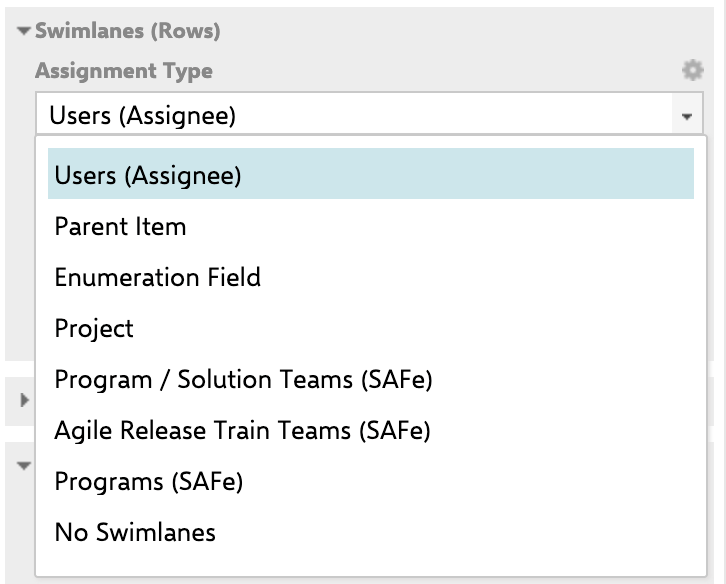
In the **Assignment Type** dropdown, select **Parent Item**.
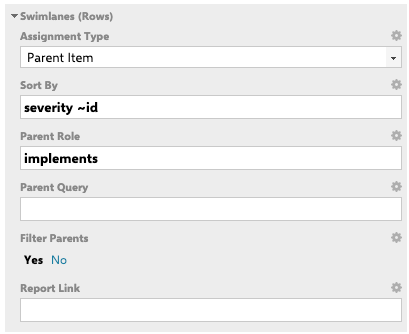
The **Swimlanes (Rows)** section expands to show the fields specific to this mode:
| Field | Required | Description |
| ------------------ | -------- | -------------------------------------------------------------------------------------------- |
| **Parent Role** | Yes | The link role connecting child items to their parent (e.g. `implements`). |
| **Sort By** | No | Field(s) used to order parent swimlanes. See [Step 4](#step-4--sort-parent-swimlanes) below. |
| **Parent Query** | No | A Lucene query to restrict which parent items appear as swimlanes. |
| **Filter Parents** | No | `Yes` / `No` — whether to limit visible parents to those matching the Parent Query. |
| **Report Link** | No | A URL to a related report, attached to each parent swimlane for quick navigation. |
 ***
For parent swimlanes to display correctly, Planningboard must load the parent work items alongside the child items.
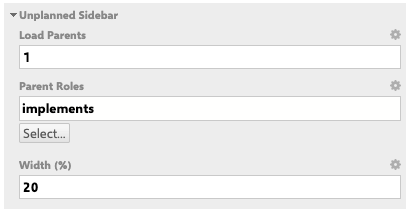
1. In the widget configuration panel, navigate to **Unplanned Sidebar**.
2. Set **Load Parents** to at least `1`.
3. Set **Parent Roles** to the same link role you chose in Step 2 (for example, `implements`).
***
For parent swimlanes to display correctly, Planningboard must load the parent work items alongside the child items.
1. In the widget configuration panel, navigate to **Unplanned Sidebar**.
2. Set **Load Parents** to at least `1`.
3. Set **Parent Roles** to the same link role you chose in Step 2 (for example, `implements`).
 ***
The **Sort By** field controls the vertical order in which parent swimlanes appear. It is available since version **25.9.0**.
Enter one or more Polarion work item field IDs, separated by spaces:
```text theme={null}
priority
```
```text theme={null}
title
```
```text theme={null}
severity id
```
Use the **tilde operator (`~`)** to sort in descending order:
```text theme={null}
~title
```
```text theme={null}
priority ~id
```
Sorting examples:
| Sort By value | Result |
| -------------- | --------------------------------------------------- |
| `priority` | Swimlanes ordered by priority (ascending) |
| `~priority` | Swimlanes ordered by priority (descending) |
| `title` | Alphabetical order by title |
| `~title` | Reverse alphabetical |
| `priority ~id` | By priority ascending; ties broken by ID descending |
| *(empty)* | Default order returned by Polarion |
***
The **Sort By** field controls the vertical order in which parent swimlanes appear. It is available since version **25.9.0**.
Enter one or more Polarion work item field IDs, separated by spaces:
```text theme={null}
priority
```
```text theme={null}
title
```
```text theme={null}
severity id
```
Use the **tilde operator (`~`)** to sort in descending order:
```text theme={null}
~title
```
```text theme={null}
priority ~id
```
Sorting examples:
| Sort By value | Result |
| -------------- | --------------------------------------------------- |
| `priority` | Swimlanes ordered by priority (ascending) |
| `~priority` | Swimlanes ordered by priority (descending) |
| `title` | Alphabetical order by title |
| `~title` | Reverse alphabetical |
| `priority ~id` | By priority ascending; ties broken by ID descending |
| *(empty)* | Default order returned by Polarion |
 ***
If you want only a subset of parent items to appear as swimlanes:
1. Enter a Lucene query in **Parent Query** — for example, `type:feature AND status:open`.
2. Set **Filter Parents** to **Yes**.
Leave both fields empty to show all parent items that have at least one matching child on the board.
***
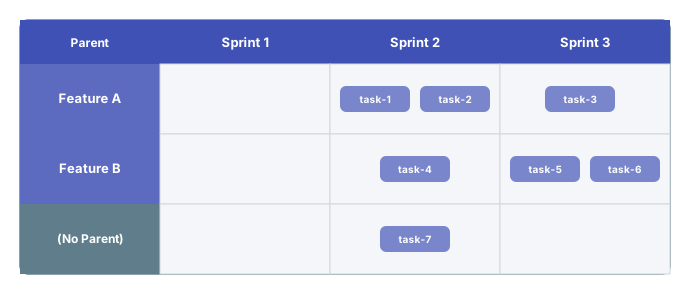
Click **Save** in the widget configuration panel. The board reloads and displays one swimlane per parent work item.
***
If you want only a subset of parent items to appear as swimlanes:
1. Enter a Lucene query in **Parent Query** — for example, `type:feature AND status:open`.
2. Set **Filter Parents** to **Yes**.
Leave both fields empty to show all parent items that have at least one matching child on the board.
***
Click **Save** in the widget configuration panel. The board reloads and displays one swimlane per parent work item.
 ***
## How drag and drop works in this mode
When Parent Item is the swimlane assignment type, you **cannot freely move a card to any swimlane**. Planningboard enforces the parent–child link: if you drag a task to a swimlane that does not match its parent, the card automatically jumps back to the correct parent's row once dropped.
To move an item to a different parent swimlane, first update the parent link relationship on the work item in Polarion.
Cards can still be dragged **between columns** (Plans) within the same parent swimlane to change their planned sprint or release.
***
## Configuration example
The following widget parameter values configure a board grouped by parent features, sorted by priority descending, and filtered to open features only:
```properties theme={null}
# Swimlanes (Rows)
assignmentMode = PARENT
parentRole = implements
sortBy = ~priority
parentQuery = type:feature AND status:open
filterParents = Yes
```
***
## Limitations
The swimlane sort order (parent row order) is currently coupled to the item sort order on the board. **Independent sorting of swimlanes versus items within them is not yet supported.** If you need different sort criteria for swimlane rows versus the cards inside them, this is a known gap — refer to the [sorting guide](/planningboard/guides/swimlanes/sorting-swimlanes) for any available workarounds.
The Parent Item assignment mode does not support plan normalization (`planCellsMode`). If your board uses stemming or plan cells mode, switch to a different assignment type.
***
## Troubleshooting
If parent swimlanes are missing after saving, check that **Load Parents** in the Unplanned Sidebar is set to at least `1` and that **Parent Roles** matches the link role configured in the Swimlanes section. Without this, Planningboard does not load parent data.
Work items without a link matching the configured Parent Role are grouped in a catch-all swimlane. Verify that the correct link role is set in both the **Parent Role** field and the Polarion work item's links tab.
The Sort By parameter for parent swimlanes requires version **25.9.0** or later. If your board shows parents in an unexpected order after entering a sort field, verify your installed version via **Administration > Nextedy PLANNINGBOARD > Version**.
***
## You should now see
A board with one horizontal swimlane per parent work item, ordered according to your Sort By field, with child work item cards distributed across the Plan columns (sprints or releases) within each parent's row.
***
## See also
* [Configure Swimlanes (Rows)](/planningboard/guides/configuration/swimlanes-configuration) — full overview of swimlane widget parameters
* [Sort Swimlanes](/planningboard/guides/swimlanes/sorting-swimlanes) — detailed sorting options across all swimlane types
* [User and Assignee Swimlanes](/planningboard/guides/swimlanes/user-swimlanes) — grouping rows by assignee instead of parent
* [Enumeration Field Swimlanes](/planningboard/guides/swimlanes/enum-swimlanes) — grouping rows by a custom enumeration field
* [Filter Swimlanes by Plan Range](/planningboard/guides/swimlanes/filtering-by-plan-range) — limit visible swimlanes to the active plan window
* [Widget Parameters Overview](/planningboard/guides/configuration/widget-parameters) — full parameter reference
**KB Articles**
* Swimlane Assignment Types
* Sorting of Swimlanes (Parent Item Assignment Type)
* Filter user swimlanes by Plan range
**Support Tickets**
* [#6000](https://support.nextedy.com/helpdesk/tickets/6000)
* [#6681](https://support.nextedy.com/helpdesk/tickets/6681)
* [#5922](https://support.nextedy.com/helpdesk/tickets/5922)
**Source Code**
* `AssignmentMode.java`
* `PlanningBoardDataService.java`
* `licenseReadonly.cy.ts`
* `filterMultiSwimlaneRows.cy.ts`
* `Config.java`
***
## How drag and drop works in this mode
When Parent Item is the swimlane assignment type, you **cannot freely move a card to any swimlane**. Planningboard enforces the parent–child link: if you drag a task to a swimlane that does not match its parent, the card automatically jumps back to the correct parent's row once dropped.
To move an item to a different parent swimlane, first update the parent link relationship on the work item in Polarion.
Cards can still be dragged **between columns** (Plans) within the same parent swimlane to change their planned sprint or release.
***
## Configuration example
The following widget parameter values configure a board grouped by parent features, sorted by priority descending, and filtered to open features only:
```properties theme={null}
# Swimlanes (Rows)
assignmentMode = PARENT
parentRole = implements
sortBy = ~priority
parentQuery = type:feature AND status:open
filterParents = Yes
```
***
## Limitations
The swimlane sort order (parent row order) is currently coupled to the item sort order on the board. **Independent sorting of swimlanes versus items within them is not yet supported.** If you need different sort criteria for swimlane rows versus the cards inside them, this is a known gap — refer to the [sorting guide](/planningboard/guides/swimlanes/sorting-swimlanes) for any available workarounds.
The Parent Item assignment mode does not support plan normalization (`planCellsMode`). If your board uses stemming or plan cells mode, switch to a different assignment type.
***
## Troubleshooting
If parent swimlanes are missing after saving, check that **Load Parents** in the Unplanned Sidebar is set to at least `1` and that **Parent Roles** matches the link role configured in the Swimlanes section. Without this, Planningboard does not load parent data.
Work items without a link matching the configured Parent Role are grouped in a catch-all swimlane. Verify that the correct link role is set in both the **Parent Role** field and the Polarion work item's links tab.
The Sort By parameter for parent swimlanes requires version **25.9.0** or later. If your board shows parents in an unexpected order after entering a sort field, verify your installed version via **Administration > Nextedy PLANNINGBOARD > Version**.
***
## You should now see
A board with one horizontal swimlane per parent work item, ordered according to your Sort By field, with child work item cards distributed across the Plan columns (sprints or releases) within each parent's row.
***
## See also
* [Configure Swimlanes (Rows)](/planningboard/guides/configuration/swimlanes-configuration) — full overview of swimlane widget parameters
* [Sort Swimlanes](/planningboard/guides/swimlanes/sorting-swimlanes) — detailed sorting options across all swimlane types
* [User and Assignee Swimlanes](/planningboard/guides/swimlanes/user-swimlanes) — grouping rows by assignee instead of parent
* [Enumeration Field Swimlanes](/planningboard/guides/swimlanes/enum-swimlanes) — grouping rows by a custom enumeration field
* [Filter Swimlanes by Plan Range](/planningboard/guides/swimlanes/filtering-by-plan-range) — limit visible swimlanes to the active plan window
* [Widget Parameters Overview](/planningboard/guides/configuration/widget-parameters) — full parameter reference
**KB Articles**
* Swimlane Assignment Types
* Sorting of Swimlanes (Parent Item Assignment Type)
* Filter user swimlanes by Plan range
**Support Tickets**
* [#6000](https://support.nextedy.com/helpdesk/tickets/6000)
* [#6681](https://support.nextedy.com/helpdesk/tickets/6681)
* [#5922](https://support.nextedy.com/helpdesk/tickets/5922)
**Source Code**
* `AssignmentMode.java`
* `PlanningBoardDataService.java`
* `licenseReadonly.cy.ts`
* `filterMultiSwimlaneRows.cy.ts`
* `Config.java`