Last reviewed on {formatted}
; }; A work item form can show both Polarion's built-in **Attachments** section and the Mediakit gallery. They are two views of one set of files, not two separate stores. ## Same Files, Two Views | | Attachments section | Mediakit gallery | | -------- | ------------------------------------------------- | ------------------------------------------------- | | Shows | A table of file names, with size, author and date | Thumbnails for images, type icons for other files | | Good for | Scanning names, sizes and dates | Recognising images without opening them | | Acts on | Work item attachments | The same work item attachments | Add a file in either place and it is the same attachment. Delete it in either place and it is gone from both.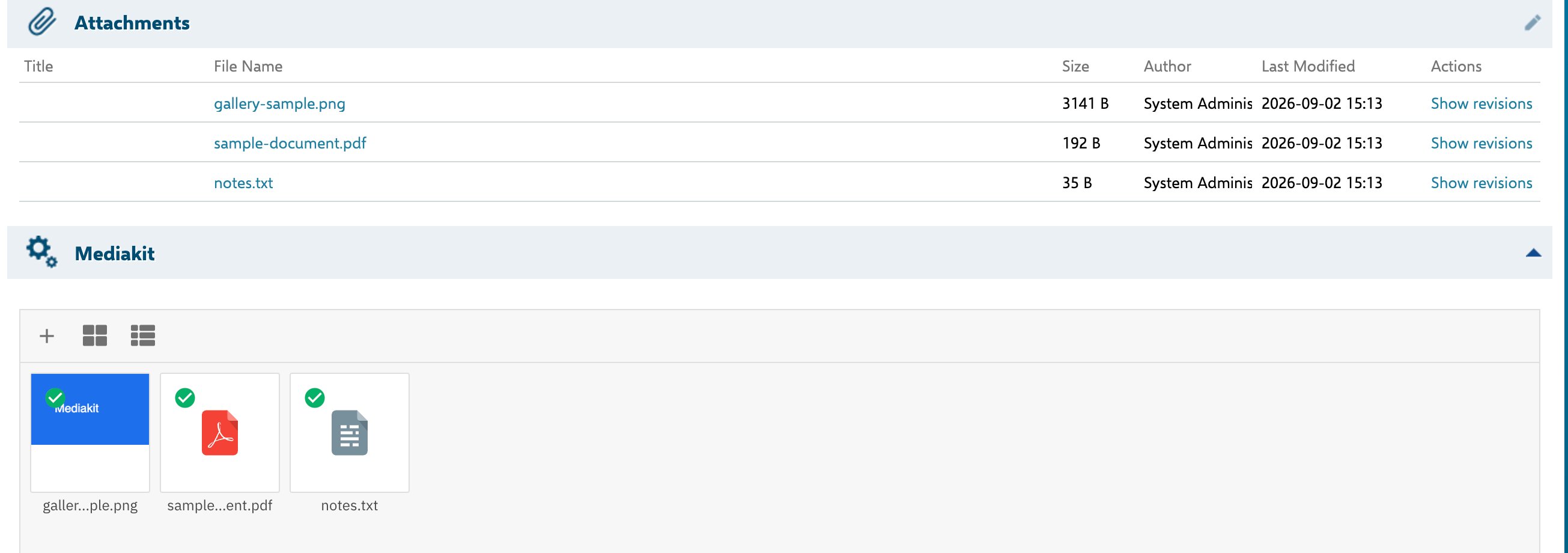 ## Whether to Show Both
That is a project decision, and both arrangements are reasonable.
Keeping both gives readers the gallery for recognising images and the table for the precise metadata — file size, author and modification date in a scannable column layout. Showing only the gallery makes for a shorter form, at the cost of that table; the same metadata is still available in the gallery's list view.
You control this per work item type when you [add the gallery](/mediakit/getting-started/adding-the-gallery) — the gallery and the `attachments` field are separate entries in the form layout, and either can be left out.
## One Behaviour to Know About
## Whether to Show Both
That is a project decision, and both arrangements are reasonable.
Keeping both gives readers the gallery for recognising images and the table for the precise metadata — file size, author and modification date in a scannable column layout. Showing only the gallery makes for a shorter form, at the cost of that table; the same metadata is still available in the gallery's list view.
You control this per work item type when you [add the gallery](/mediakit/getting-started/adding-the-gallery) — the gallery and the `attachments` field are separate entries in the form layout, and either can be left out.
## One Behaviour to Know About