> ## Documentation Index
> Fetch the complete documentation index at: https://learn.nextedy.com/llms.txt
> Use this file to discover all available pages before exploring further.
# Work Items Gantt Widget Parameters
> Complete reference for all Nextedy GANTT Work Items Gantt widget parameters.
export const LastReviewed = ({date}) => {
if (!date) return null;
const formatted = new Date(`${date}T00:00:00Z`).toLocaleDateString("en-US", {
year: "numeric",
month: "long",
day: "numeric",
timeZone: "UTC"
});
return
Last reviewed on {formatted}
;
};
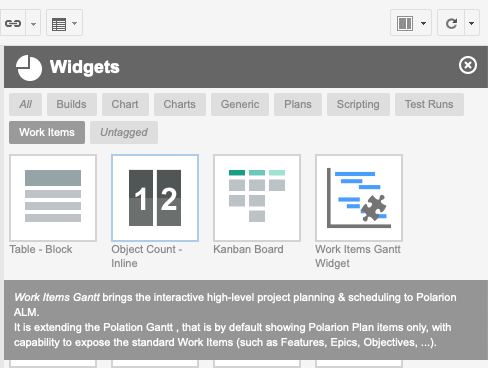
Only one Work Items Gantt widget is supported per Polarion wiki page.
In the Polarion page editor, the Work Items Gantt widget is listed under the **Work Items** tag of the widget picker..
 ## Core Parameters
| Parameter | Default | Description |
| ------------------ | ----------------- | --------------------------------------------------------------------------------------------------------------------------------------------------------------------------------------- |
| `Scope` | `current project` | Scope of displayed work items |
| `Sort by` | `start id` | Sort criteria for top-level work items in the Gantt grid. |
| `Load Children` | `1` | Number of child levels to traverse and add to the list. `0` means no additional items beyond the dataset. |
| `Show Unplanned` | `true` | When `yes`, work items without a Start Field value are shown at today's date in gray. When `no`, they are hidden. |
| `Scale` | `W` | Timeline scale unit. Values: `H` (hour), `DD` (bi-daily), `D` (day), `W` (week), `M` (month), `Q` (quarter), `Y` (year), `YY` (multi-year). |
| `Parent Role` | `implements` | Work item link roles used to detect parent-child relationships. If empty, no hierarchy is shown. |
| `Dependency Roles` | `depends_on` | Work item link roles used to detect dependency relationships. If empty, no dependency arrows are shown. The first selected role is used when creating new dependency links by dragging. |
## Type Configuration
Each work item type listed in the widget can be individually configured beyond just its presentation mode. These per-type settings control creation behavior and hierarchy placement.
| Parameter | Default | Description |
| ---------------------- | ------- | ------------------------------------------------------------------------------------------------------------------------------------------------------------------------------------------------------------------- |
| `Presentation Mode` | `task` | How the type renders on the chart. Values: `task`, `project` (summary bar derived from children), `milestone` (diamond shape). |
| `Allow Create` | `true` | Whether new items of this type can be created directly from the Gantt chart. |
| `Create Field Filter` | Empty | Limits which fields are shown in the inline create form for this type. |
| `Parent Mode` | `root` | Where in the hierarchy items of this type may be placed. Values: `root` (top level only), `child` (nested under a parent), `any`. |
| `Allowed Parent Types` | Empty | When `Parent Mode` is `child`, restricts which types may serve as a parent. |
| `Sync to Plans` | Empty | Polarion plan template(s) to automatically assign work items of this type to, based on matching time range. When set, items are planned into all Polarion plans whose date range overlaps with the item's schedule. |
| `Extra Child Query` | Empty | Additional Lucene query fragment appended when loading children of this type. |
## Data Mapping
These parameters map Polarion work item fields to Gantt scheduling data. See [Data Mapping Parameters](/gantt/reference/widget-parameters/data-mapping) for details.
| Parameter | Default | Description |
| -------------------- | ----------------- | ------------------------------------------------------------------------------------------------------------------------ |
| `Start Field` | `gantt_start` | Work item field storing the task start date. Supports Date, DateTime, or String field types. |
| `End Field` | None | Work item field storing the task end date. Supports Date, DateTime, or String field types. |
| `Duration Field` | `gantt_duration` | Work item field storing the task duration in days. Supports Integer or String field types. |
| `Progress Field` | `gantt_progress` | Work item field storing the task progress as a float (0.0 to 1.0). Supports Float or String field types. |
| `Duration Precision` | `Standard (Days)` | Precision mode. `Standard (Days)` uses day-based durations. `High (Hours)` stores durations in hours and displays times. |
Configure at least two of the three date fields: **Start Field + Duration Field**, **End Field + Duration Field**, or **Start Field + End Field**. For production use, define proper custom fields with the recommended types (Date, Integer, Float) rather than relying on ad-hoc string fields.
## Grid Columns
These parameters control the left-hand grid panel of the Gantt chart.
| Parameter | Default | Description |
| -------------------- | ----------------- | ----------------------------------------------------------------------------------------------------------------------------------------------------------------------------- |
| `Grid Width` | `400` | Width of the grid panel in pixels. |
| `First Column Label` | `Item` | Label for the combined ID + title column. |
| `Show ID` | `true` | Display the work item ID in the first column. |
| `Show Title` | `true` | Display the work item title in the first column. |
| `Show Type Icon` | `true` | Display the type icon in the first column. |
| `Columns` | `duration` column | Additional grid columns. Each column entry has a `Field`, `Label`, `Width` (px), `Alignment` (`left`, `center`, `right`), and `Render` mode (`default` or a custom renderer). |
## Deadlines
| Parameter | Default | Description |
| ---------------- | --------- | -------------------------------------------------------------------------------------------------- |
| `Show Deadlines` | `true` | Displays a deadline marker on the chart for each work item that has a value in the Deadline Field. |
| `Deadline Field` | `dueDate` | Work item field used as the deadline date. Supports Date or DateTime field types. |
| `Deadline Color` | `red` | Color of the deadline marker. Accepts CSS color names or hex values. |
## Baseline
| Parameter | Default | Description |
| --------------- | ------- | ------------------------------------------------------------------------------------------------------------------------------------------------------------ |
| `Show Baseline` | `true` | Overlays a baseline bar behind each task bar to compare the current schedule against a historical snapshot. |
| `Baseline Date` | `-1` | Reference point for the baseline snapshot. A relative value of `-1` means one year ago; `0` means today. Can also be set to a specific Polarion revision ID. |
| `Revision ID` | Empty | Explicit Polarion revision to use as the baseline instead of a relative date. When set, takes precedence over `Baseline Date`. |
## Resource View
| Parameter | Default | Description |
| ----------------------- | ---------- | -------------------------------------------------------------------------------------------------------------- |
| `Show Resource View` | `true` | Displays a resource allocation panel below the Gantt chart. |
| `Resource Field` | `assignee` | Work item field used to identify the resource (person or team) for each task. |
| `Resource Label` | Empty | Display label shown in the resource panel header. |
| `Resource View Height` | `250` | Height of the resource view panel in pixels. |
| `Max Assignments OK` | `1` | Number of simultaneous assignments considered acceptable before flagging overallocation. |
| `Show Unassigned` | `false` | When `true`, includes an "Unassigned" row in the resource panel for tasks with no value in the Resource Field. |
| `Resource Load Display` | `time` | How resource load is shown. `num` displays a count of assigned tasks; `time` displays total estimated time. |
## Working Calendars
These parameters configure which working calendars are applied when calculating task durations and scheduling. Use these instead of the deprecated `Working Time` parameter.
| Parameter | Default | Description |
| -------------------------- | ------- | ----------------------------------------------------------------------------------------------------------------- |
| `Use Global Calendar` | `true` | Apply the project-level global working calendar (excludes weekends and public holidays as defined globally). |
| `Use User Calendars` | `false` | Apply per-user working calendars when calculating resource availability. |
| `Use Assignment Calendars` | `false` | Apply calendars based on work item assignments. |
| `Load Future Years` | `0` | Number of future years of calendar data to pre-load. Increase if the chart spans beyond the current year. |
| `Load Past Years` | `0` | Number of past years of calendar data to pre-load. Increase when using baselines that reference historical dates. |
| `Use Cache` | `false` | Cache resolved working calendar data for faster rendering on large datasets. |
## Advanced Parameters
| Parameter | Default | Description |
| ----------------------- | --------------------------------------------------------------------------------------------- | -------------------------------------------------------------------------------------------------------------------------------------------------------------------------------- |
| `Maximize Gantt View` | `true` | Expands the Gantt widget to fill the full working area of the Polarion page. |
| `Gantt Height` | `600` | Fixed pixel height of the Gantt panel (label: *Gantt Height (0 for auto-height)*); `0` lets it auto-size to content. |
| `Hide Toolbar` | `false` | Hides the Gantt toolbar. Implicitly sets `Always Edit` to `true`. A floating save button appears instead. |
| `Always Edit` | `false` | Opens the Gantt directly in edit mode without the sidebar detail panel. |
| `Drag Children` | `true` | When dragging a parent task, child tasks are rescheduled by the same offset. |
| `Max Items` | `1000` | Maximum number of work items loaded into the Gantt view. |
| `Show Today Marker` | `true` | Displays a vertical line on today's date in the Gantt chart. |
| `Progress Coloring` | `true` | Color-codes task bars based on their progress percentage. |
| `Read Only` | `false` | Prevents all edits. Also automatically set when the user has no license or a Polarion baseline is active. |
| `Override Today's Date` | Empty | Overrides the date treated as "today" on the chart (useful for snapshots/testing). |
| `Working Time` | `true` | **Deprecated** (label: *Working Time (DEPRECATED - Use Working Calendars)*) — legacy working-time mode (weekends as non-working). Use the **Working Calendars** section instead. |
| `Sidebar Fields` | `title`, `status`, `initialEstimate`, `remainingEstimate`, `timeSpent`, `dueDate`, `assignee` | Work item fields displayed in the detail sidebar panel when a task is clicked. |
## Scripting Parameters
| Parameter | Default | Description |
| --------------------- | ------- | ------------------------------------------------------------------------------------------------------------------------------------------------------------------------------------------------ |
| `Gantt Config Script` | Empty | Client-side JavaScript snippet for advanced configuration. Runs once when the chart initializes, before data is rendered. See [Gantt Config Script API](/gantt/reference/api/config-script-api). |
| `Item Script` | Empty | Server-side JavaScript snippet executed per task to customize appearance. See [Item Script API](/gantt/reference/api/item-script-api). |
| `Markers Script` | Empty | Server-side JavaScript snippet for creating timeline markers. See [Marker Factory API](/gantt/reference/api/markers-api). |
## Configuration Example
A typical Work Items Gantt configuration for a project using parent-child hierarchy and finish-to-start dependencies:
* **Work Items**: Query selecting all `release` and `feature` items in the current project (`type:(release feature)`)
* **Sort by**: `start id`
* **Load Children**: `1`
* **Show Unplanned**: `true`
* **Scale**: `W`
* **Parent Role**: `implements`
* **Dependency Role**: `depends_on`
* **Project Types**: `feature`
* **Milestone Types**: `release`
* **Start Field**: `gantt_start`
* **Duration Field**: `gantt_duration`
* **Progress Field**: `gantt_progress`
* **Duration Precision**: `Standard (Days)`
* **Grid Width**: `400`
* **Grid Columns**: `duration` (label: `Durat.`, width: `80px`, aligned center)
* **Show Deadlines**: `true`, field: `dueDate`, color: `red`
* **Show Baseline**: `true`, relative date: `-1` (one year ago)
* **Show Resource View**: `true`, field: `assignee`, height: `250px`, load display: `time`
* **Use Global Calendar**: `true`
* **Maximize Gantt View**: `true`
* **Gantt Height**: `600`
* **Max Items**: `1000`
* **Drag Children**: `true`
* **Progress Coloring**: `true`
* **Show Today Marker**: `true`
* **Sidebar Fields**: `title`, `status`, `initialEstimate`, `remainingEstimate`, `timeSpent`, `dueDate`, `assignee`
## See Also
* [Plans Gantt Widget Parameters](/gantt/reference/widget-parameters/plans-gantt)
* [Data Mapping Parameters](/gantt/reference/widget-parameters/data-mapping)
* [Set Up a Basic Gantt Chart](/gantt/getting-started/setup-basic-gantt)
* [General Administration Properties](/gantt/reference/configuration/general-properties)
## Core Parameters
| Parameter | Default | Description |
| ------------------ | ----------------- | --------------------------------------------------------------------------------------------------------------------------------------------------------------------------------------- |
| `Scope` | `current project` | Scope of displayed work items |
| `Sort by` | `start id` | Sort criteria for top-level work items in the Gantt grid. |
| `Load Children` | `1` | Number of child levels to traverse and add to the list. `0` means no additional items beyond the dataset. |
| `Show Unplanned` | `true` | When `yes`, work items without a Start Field value are shown at today's date in gray. When `no`, they are hidden. |
| `Scale` | `W` | Timeline scale unit. Values: `H` (hour), `DD` (bi-daily), `D` (day), `W` (week), `M` (month), `Q` (quarter), `Y` (year), `YY` (multi-year). |
| `Parent Role` | `implements` | Work item link roles used to detect parent-child relationships. If empty, no hierarchy is shown. |
| `Dependency Roles` | `depends_on` | Work item link roles used to detect dependency relationships. If empty, no dependency arrows are shown. The first selected role is used when creating new dependency links by dragging. |
## Type Configuration
Each work item type listed in the widget can be individually configured beyond just its presentation mode. These per-type settings control creation behavior and hierarchy placement.
| Parameter | Default | Description |
| ---------------------- | ------- | ------------------------------------------------------------------------------------------------------------------------------------------------------------------------------------------------------------------- |
| `Presentation Mode` | `task` | How the type renders on the chart. Values: `task`, `project` (summary bar derived from children), `milestone` (diamond shape). |
| `Allow Create` | `true` | Whether new items of this type can be created directly from the Gantt chart. |
| `Create Field Filter` | Empty | Limits which fields are shown in the inline create form for this type. |
| `Parent Mode` | `root` | Where in the hierarchy items of this type may be placed. Values: `root` (top level only), `child` (nested under a parent), `any`. |
| `Allowed Parent Types` | Empty | When `Parent Mode` is `child`, restricts which types may serve as a parent. |
| `Sync to Plans` | Empty | Polarion plan template(s) to automatically assign work items of this type to, based on matching time range. When set, items are planned into all Polarion plans whose date range overlaps with the item's schedule. |
| `Extra Child Query` | Empty | Additional Lucene query fragment appended when loading children of this type. |
## Data Mapping
These parameters map Polarion work item fields to Gantt scheduling data. See [Data Mapping Parameters](/gantt/reference/widget-parameters/data-mapping) for details.
| Parameter | Default | Description |
| -------------------- | ----------------- | ------------------------------------------------------------------------------------------------------------------------ |
| `Start Field` | `gantt_start` | Work item field storing the task start date. Supports Date, DateTime, or String field types. |
| `End Field` | None | Work item field storing the task end date. Supports Date, DateTime, or String field types. |
| `Duration Field` | `gantt_duration` | Work item field storing the task duration in days. Supports Integer or String field types. |
| `Progress Field` | `gantt_progress` | Work item field storing the task progress as a float (0.0 to 1.0). Supports Float or String field types. |
| `Duration Precision` | `Standard (Days)` | Precision mode. `Standard (Days)` uses day-based durations. `High (Hours)` stores durations in hours and displays times. |
Configure at least two of the three date fields: **Start Field + Duration Field**, **End Field + Duration Field**, or **Start Field + End Field**. For production use, define proper custom fields with the recommended types (Date, Integer, Float) rather than relying on ad-hoc string fields.
## Grid Columns
These parameters control the left-hand grid panel of the Gantt chart.
| Parameter | Default | Description |
| -------------------- | ----------------- | ----------------------------------------------------------------------------------------------------------------------------------------------------------------------------- |
| `Grid Width` | `400` | Width of the grid panel in pixels. |
| `First Column Label` | `Item` | Label for the combined ID + title column. |
| `Show ID` | `true` | Display the work item ID in the first column. |
| `Show Title` | `true` | Display the work item title in the first column. |
| `Show Type Icon` | `true` | Display the type icon in the first column. |
| `Columns` | `duration` column | Additional grid columns. Each column entry has a `Field`, `Label`, `Width` (px), `Alignment` (`left`, `center`, `right`), and `Render` mode (`default` or a custom renderer). |
## Deadlines
| Parameter | Default | Description |
| ---------------- | --------- | -------------------------------------------------------------------------------------------------- |
| `Show Deadlines` | `true` | Displays a deadline marker on the chart for each work item that has a value in the Deadline Field. |
| `Deadline Field` | `dueDate` | Work item field used as the deadline date. Supports Date or DateTime field types. |
| `Deadline Color` | `red` | Color of the deadline marker. Accepts CSS color names or hex values. |
## Baseline
| Parameter | Default | Description |
| --------------- | ------- | ------------------------------------------------------------------------------------------------------------------------------------------------------------ |
| `Show Baseline` | `true` | Overlays a baseline bar behind each task bar to compare the current schedule against a historical snapshot. |
| `Baseline Date` | `-1` | Reference point for the baseline snapshot. A relative value of `-1` means one year ago; `0` means today. Can also be set to a specific Polarion revision ID. |
| `Revision ID` | Empty | Explicit Polarion revision to use as the baseline instead of a relative date. When set, takes precedence over `Baseline Date`. |
## Resource View
| Parameter | Default | Description |
| ----------------------- | ---------- | -------------------------------------------------------------------------------------------------------------- |
| `Show Resource View` | `true` | Displays a resource allocation panel below the Gantt chart. |
| `Resource Field` | `assignee` | Work item field used to identify the resource (person or team) for each task. |
| `Resource Label` | Empty | Display label shown in the resource panel header. |
| `Resource View Height` | `250` | Height of the resource view panel in pixels. |
| `Max Assignments OK` | `1` | Number of simultaneous assignments considered acceptable before flagging overallocation. |
| `Show Unassigned` | `false` | When `true`, includes an "Unassigned" row in the resource panel for tasks with no value in the Resource Field. |
| `Resource Load Display` | `time` | How resource load is shown. `num` displays a count of assigned tasks; `time` displays total estimated time. |
## Working Calendars
These parameters configure which working calendars are applied when calculating task durations and scheduling. Use these instead of the deprecated `Working Time` parameter.
| Parameter | Default | Description |
| -------------------------- | ------- | ----------------------------------------------------------------------------------------------------------------- |
| `Use Global Calendar` | `true` | Apply the project-level global working calendar (excludes weekends and public holidays as defined globally). |
| `Use User Calendars` | `false` | Apply per-user working calendars when calculating resource availability. |
| `Use Assignment Calendars` | `false` | Apply calendars based on work item assignments. |
| `Load Future Years` | `0` | Number of future years of calendar data to pre-load. Increase if the chart spans beyond the current year. |
| `Load Past Years` | `0` | Number of past years of calendar data to pre-load. Increase when using baselines that reference historical dates. |
| `Use Cache` | `false` | Cache resolved working calendar data for faster rendering on large datasets. |
## Advanced Parameters
| Parameter | Default | Description |
| ----------------------- | --------------------------------------------------------------------------------------------- | -------------------------------------------------------------------------------------------------------------------------------------------------------------------------------- |
| `Maximize Gantt View` | `true` | Expands the Gantt widget to fill the full working area of the Polarion page. |
| `Gantt Height` | `600` | Fixed pixel height of the Gantt panel (label: *Gantt Height (0 for auto-height)*); `0` lets it auto-size to content. |
| `Hide Toolbar` | `false` | Hides the Gantt toolbar. Implicitly sets `Always Edit` to `true`. A floating save button appears instead. |
| `Always Edit` | `false` | Opens the Gantt directly in edit mode without the sidebar detail panel. |
| `Drag Children` | `true` | When dragging a parent task, child tasks are rescheduled by the same offset. |
| `Max Items` | `1000` | Maximum number of work items loaded into the Gantt view. |
| `Show Today Marker` | `true` | Displays a vertical line on today's date in the Gantt chart. |
| `Progress Coloring` | `true` | Color-codes task bars based on their progress percentage. |
| `Read Only` | `false` | Prevents all edits. Also automatically set when the user has no license or a Polarion baseline is active. |
| `Override Today's Date` | Empty | Overrides the date treated as "today" on the chart (useful for snapshots/testing). |
| `Working Time` | `true` | **Deprecated** (label: *Working Time (DEPRECATED - Use Working Calendars)*) — legacy working-time mode (weekends as non-working). Use the **Working Calendars** section instead. |
| `Sidebar Fields` | `title`, `status`, `initialEstimate`, `remainingEstimate`, `timeSpent`, `dueDate`, `assignee` | Work item fields displayed in the detail sidebar panel when a task is clicked. |
## Scripting Parameters
| Parameter | Default | Description |
| --------------------- | ------- | ------------------------------------------------------------------------------------------------------------------------------------------------------------------------------------------------ |
| `Gantt Config Script` | Empty | Client-side JavaScript snippet for advanced configuration. Runs once when the chart initializes, before data is rendered. See [Gantt Config Script API](/gantt/reference/api/config-script-api). |
| `Item Script` | Empty | Server-side JavaScript snippet executed per task to customize appearance. See [Item Script API](/gantt/reference/api/item-script-api). |
| `Markers Script` | Empty | Server-side JavaScript snippet for creating timeline markers. See [Marker Factory API](/gantt/reference/api/markers-api). |
## Configuration Example
A typical Work Items Gantt configuration for a project using parent-child hierarchy and finish-to-start dependencies:
* **Work Items**: Query selecting all `release` and `feature` items in the current project (`type:(release feature)`)
* **Sort by**: `start id`
* **Load Children**: `1`
* **Show Unplanned**: `true`
* **Scale**: `W`
* **Parent Role**: `implements`
* **Dependency Role**: `depends_on`
* **Project Types**: `feature`
* **Milestone Types**: `release`
* **Start Field**: `gantt_start`
* **Duration Field**: `gantt_duration`
* **Progress Field**: `gantt_progress`
* **Duration Precision**: `Standard (Days)`
* **Grid Width**: `400`
* **Grid Columns**: `duration` (label: `Durat.`, width: `80px`, aligned center)
* **Show Deadlines**: `true`, field: `dueDate`, color: `red`
* **Show Baseline**: `true`, relative date: `-1` (one year ago)
* **Show Resource View**: `true`, field: `assignee`, height: `250px`, load display: `time`
* **Use Global Calendar**: `true`
* **Maximize Gantt View**: `true`
* **Gantt Height**: `600`
* **Max Items**: `1000`
* **Drag Children**: `true`
* **Progress Coloring**: `true`
* **Show Today Marker**: `true`
* **Sidebar Fields**: `title`, `status`, `initialEstimate`, `remainingEstimate`, `timeSpent`, `dueDate`, `assignee`
## See Also
* [Plans Gantt Widget Parameters](/gantt/reference/widget-parameters/plans-gantt)
* [Data Mapping Parameters](/gantt/reference/widget-parameters/data-mapping)
* [Set Up a Basic Gantt Chart](/gantt/getting-started/setup-basic-gantt)
* [General Administration Properties](/gantt/reference/configuration/general-properties)