> ## Documentation Index
> Fetch the complete documentation index at: https://learn.nextedy.com/llms.txt
> Use this file to discover all available pages before exploring further.
# Item Color Legend
> Nextedy GANTT uses dynamic color-coding to indicate task status at a glance. Each task bar color reflects the relationship between the task's schedule, progress, and resolution state.
export const LastReviewed = ({date}) => {
if (!date) return null;
const formatted = new Date(`${date}T00:00:00Z`).toLocaleDateString("en-US", {
year: "numeric",
month: "long",
day: "numeric",
timeZone: "UTC"
});
return
Last reviewed on {formatted}
;
};
## Default Dynamic Colors
The following colors are applied automatically when progress coloring is enabled (the default):
| Color | Condition | Meaning |
| -------------- | ------------------------------------------------------------------------------------------------- | --------------------------------------------------------------------------- |
| **Red** | Work item is unresolved AND the end date is in the past | Task is **overdue** -- it should have been completed already |
| **Orange** | Work item is unresolved AND the end date is in the future AND current progress is behind schedule | Task is **delayed** -- progress does not match the expected completion rate |
| **Blue** | Work item is unresolved AND schedule and progress are on track | Task is **on track** -- optimistic schedule and progress alignment |
| **Gray** | Work item is resolved (completed in Polarion) | Task is **resolved** -- no further action required |
| **Light Blue** | Work item has no scheduled start date | Task is **unplanned** -- start date defaults to today |
| **Green** | Work item is configured as a `project` type via Item Script | Task is a **project item** -- schedule derived from children |
Each color case is shown below.

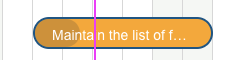
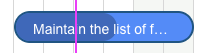


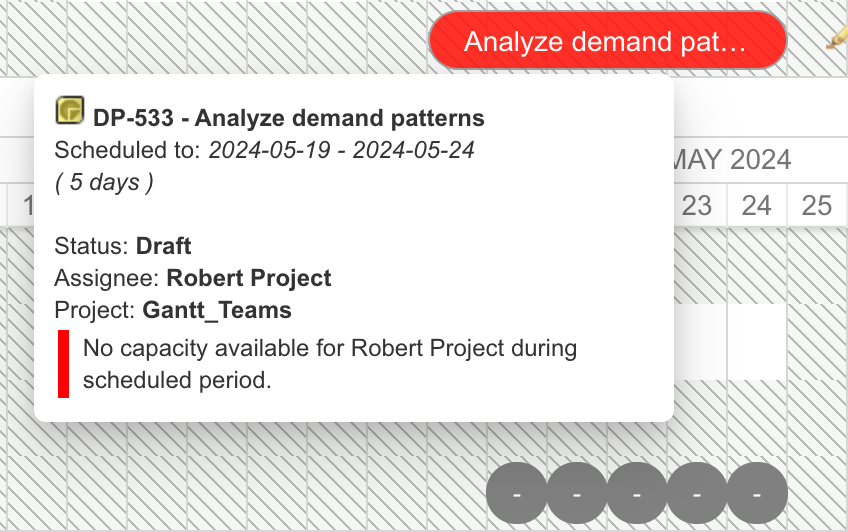
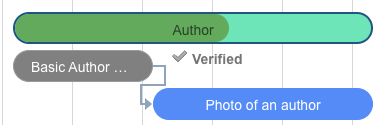 Starting with version **25.10.2**, the Gantt chart visually flags tasks in red when the assigned user has no available working days during the scheduled period. This helps planners immediately identify unrealistic schedules caused by calendar conflicts.
 ## Color Decision Flow
 ## Static vs. Dynamic Coloring
There are two task color properties with different behavior:
| Property | Type | Behavior | Use Case |
| ---------------- | -------- | --------------------------------------------------------------------- | ----------------------------------------------------------------- |
| `task.color` | `String` | **Static** -- overrides ALL colors, including progress-based coloring | Force a specific color regardless of task status |
| `task.taskColor` | `String` | **Dynamic** -- only overrides the default blue color | Change color while preserving red/orange/gray progress indicators |
Use `task.taskColor` when you want to keep progress-based color indicators (red for overdue, orange for delayed, gray for resolved). Use `task.color` only when you want to force a specific color regardless of progress status.
### Disabling Dynamic Colors
To use fully static coloring where only `task.color` values from the Item Script determine task bar colors, add the following to the Gantt Config Script:
```javascript theme={null}
gantt.config.show_progress_colors = false;
```
When `show_progress_colors` is set to `false`, the Gantt chart does not apply the automatic red/orange/blue/gray coloring. Only colors explicitly set via `task.color` in the Item Script are used.
## Script-Based Color Overrides
### Color by Type and Status
Use `task.color` for fully static coloring (requires `gantt.config.show_progress_colors=false` in the Gantt Config Script):
**Item Script:**
```javascript theme={null}
if (wi.getType().getId() === "workpackage" && wi.getStatus().getId() === "draft") {
var today = new Date();
if (task.start_date.getTime() < today.getTime()) {
task.color = "green";
}
}
```
### Color by Assignee
Use `task.taskColor` to change the base color while keeping progress indicators:
**Item Script:**
```javascript theme={null}
var assignee = null;
var aIterator = wi.getAssignees().iterator();
if (aIterator.hasNext()) {
assignee = aIterator.next();
if (assignee && assignee.id === "yourAssigneeId") {
task.taskColor = "#a9d08e";
}
}
```
### Highlight Overdue Unresolved Items (Static Mode)
When dynamic colors are off, manually flag overdue items:
**Gantt Config Script:**
```javascript theme={null}
gantt.config.show_progress_colors = false;
```
**Item Script:**
```javascript theme={null}
var tdate = new Date();
var edate = task.end_date;
var interval = tdate.getTime() - edate.getTime();
if (interval > 0) {
task.color = "red";
}
```
## Resource View Marker Colors
The resource view uses separate color assignments for allocation markers:
| CSS Class | Default Color | Condition |
| ------------- | ----------------- | -------------------------------------------------- |
| `marker_ok` | Green (`#4CAF50`) | Resource utilization is within capacity |
| `marker_over` | Red/Orange | Resource is over-allocated (load exceeds capacity) |
Resource marker colors are configurable through the `resourceMarkersColorConfig` with `colors` and `percentages` arrays that define threshold breakpoints and corresponding color values.
The `percentages` array must contain numeric values in ascending order. The `colors` array must be exactly one element longer than the `percentages` array. Invalid configurations display error messages in both view mode and wiki editor mode.
## Marker CSS Classes
Timeline milestone markers receive CSS classes based on their type:
| CSS Class | Applied To | Description |
| -------------------------- | -------------- | ------------------------------------------------- |
| `gantt_marker` | All markers | Base class for all marker elements |
| `today` | Today marker | Applied to the automatic today-date vertical line |
| `plan` | Plan markers | Applied to markers synced from plan boundaries |
| Named color (e.g., `blue`) | Custom markers | Applied when a color is set via `setColor()` |
## Configuration Example
A complete setup combining static coloring with custom color logic:
**Gantt Config Script:**
```javascript theme={null}
gantt.config.show_progress_colors = false;
```
**Item Script:**
```javascript theme={null}
if (wi != null) {
// Color by type
if (wi.getType().getId() === "workpackage") {
task.color = "#4472C4";
} else if (wi.getType().getId() === "feature") {
task.color = "#70AD47";
}
// Override: flag overdue items
var today = new Date();
if (task.end_date.getTime() < today.getTime() && wi.getResolution() == null) {
task.color = "red";
}
}
```
## Related Pages
* [Item Script API](/gantt/reference/api/item-script-api) -- `task.color` and `task.taskColor` property reference
* [Gantt Config Script API](/gantt/reference/api/config-script-api) -- `gantt.config.show_progress_colors` setting
* [Color and Styling Properties](/gantt/reference/configuration/color-properties) -- global color administration properties
* [Default Configuration Values](/gantt/reference/configuration/default-values) -- default `progress_coloring` value
* [CSS Classes and DOM Structure](/gantt/reference/css-classes) -- marker CSS classes for custom styling
## Static vs. Dynamic Coloring
There are two task color properties with different behavior:
| Property | Type | Behavior | Use Case |
| ---------------- | -------- | --------------------------------------------------------------------- | ----------------------------------------------------------------- |
| `task.color` | `String` | **Static** -- overrides ALL colors, including progress-based coloring | Force a specific color regardless of task status |
| `task.taskColor` | `String` | **Dynamic** -- only overrides the default blue color | Change color while preserving red/orange/gray progress indicators |
Use `task.taskColor` when you want to keep progress-based color indicators (red for overdue, orange for delayed, gray for resolved). Use `task.color` only when you want to force a specific color regardless of progress status.
### Disabling Dynamic Colors
To use fully static coloring where only `task.color` values from the Item Script determine task bar colors, add the following to the Gantt Config Script:
```javascript theme={null}
gantt.config.show_progress_colors = false;
```
When `show_progress_colors` is set to `false`, the Gantt chart does not apply the automatic red/orange/blue/gray coloring. Only colors explicitly set via `task.color` in the Item Script are used.
## Script-Based Color Overrides
### Color by Type and Status
Use `task.color` for fully static coloring (requires `gantt.config.show_progress_colors=false` in the Gantt Config Script):
**Item Script:**
```javascript theme={null}
if (wi.getType().getId() === "workpackage" && wi.getStatus().getId() === "draft") {
var today = new Date();
if (task.start_date.getTime() < today.getTime()) {
task.color = "green";
}
}
```
### Color by Assignee
Use `task.taskColor` to change the base color while keeping progress indicators:
**Item Script:**
```javascript theme={null}
var assignee = null;
var aIterator = wi.getAssignees().iterator();
if (aIterator.hasNext()) {
assignee = aIterator.next();
if (assignee && assignee.id === "yourAssigneeId") {
task.taskColor = "#a9d08e";
}
}
```
### Highlight Overdue Unresolved Items (Static Mode)
When dynamic colors are off, manually flag overdue items:
**Gantt Config Script:**
```javascript theme={null}
gantt.config.show_progress_colors = false;
```
**Item Script:**
```javascript theme={null}
var tdate = new Date();
var edate = task.end_date;
var interval = tdate.getTime() - edate.getTime();
if (interval > 0) {
task.color = "red";
}
```
## Resource View Marker Colors
The resource view uses separate color assignments for allocation markers:
| CSS Class | Default Color | Condition |
| ------------- | ----------------- | -------------------------------------------------- |
| `marker_ok` | Green (`#4CAF50`) | Resource utilization is within capacity |
| `marker_over` | Red/Orange | Resource is over-allocated (load exceeds capacity) |
Resource marker colors are configurable through the `resourceMarkersColorConfig` with `colors` and `percentages` arrays that define threshold breakpoints and corresponding color values.
The `percentages` array must contain numeric values in ascending order. The `colors` array must be exactly one element longer than the `percentages` array. Invalid configurations display error messages in both view mode and wiki editor mode.
## Marker CSS Classes
Timeline milestone markers receive CSS classes based on their type:
| CSS Class | Applied To | Description |
| -------------------------- | -------------- | ------------------------------------------------- |
| `gantt_marker` | All markers | Base class for all marker elements |
| `today` | Today marker | Applied to the automatic today-date vertical line |
| `plan` | Plan markers | Applied to markers synced from plan boundaries |
| Named color (e.g., `blue`) | Custom markers | Applied when a color is set via `setColor()` |
## Configuration Example
A complete setup combining static coloring with custom color logic:
**Gantt Config Script:**
```javascript theme={null}
gantt.config.show_progress_colors = false;
```
**Item Script:**
```javascript theme={null}
if (wi != null) {
// Color by type
if (wi.getType().getId() === "workpackage") {
task.color = "#4472C4";
} else if (wi.getType().getId() === "feature") {
task.color = "#70AD47";
}
// Override: flag overdue items
var today = new Date();
if (task.end_date.getTime() < today.getTime() && wi.getResolution() == null) {
task.color = "red";
}
}
```
## Related Pages
* [Item Script API](/gantt/reference/api/item-script-api) -- `task.color` and `task.taskColor` property reference
* [Gantt Config Script API](/gantt/reference/api/config-script-api) -- `gantt.config.show_progress_colors` setting
* [Color and Styling Properties](/gantt/reference/configuration/color-properties) -- global color administration properties
* [Default Configuration Values](/gantt/reference/configuration/default-values) -- default `progress_coloring` value
* [CSS Classes and DOM Structure](/gantt/reference/css-classes) -- marker CSS classes for custom styling