> ## Documentation Index
> Fetch the complete documentation index at: https://learn.nextedy.com/llms.txt
> Use this file to discover all available pages before exploring further.
# Troubleshooting Script Errors
> This guide helps you identify and resolve errors in Nextedy GANTT item scripts, config scripts, and marker scripts.
export const LastReviewed = ({date}) => {
if (!date) return null;
const formatted = new Date(`${date}T00:00:00Z`).toLocaleDateString("en-US", {
year: "numeric",
month: "long",
day: "numeric",
timeZone: "UTC"
});
return
Last reviewed on {formatted}
;
};
## How Script Errors Are Displayed
Since version 25.4.2, the Gantt provides an improved error alert system that makes it easier to identify and resolve script issues.
### In Edit Mode (Administrator View)
When a script contains an error, a footer indicator appears. Clicking it opens a detailed message that identifies the error location. Errors are also logged in the **browser console** and **server logs**.
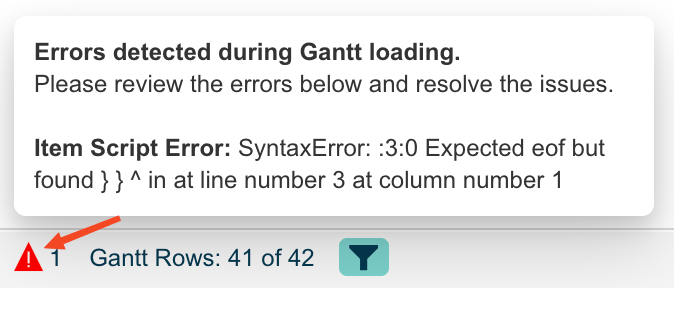 To access the browser console, right-click on the page, select **Inspect**, and go to the **Console** tab.
### In View Mode (User View)
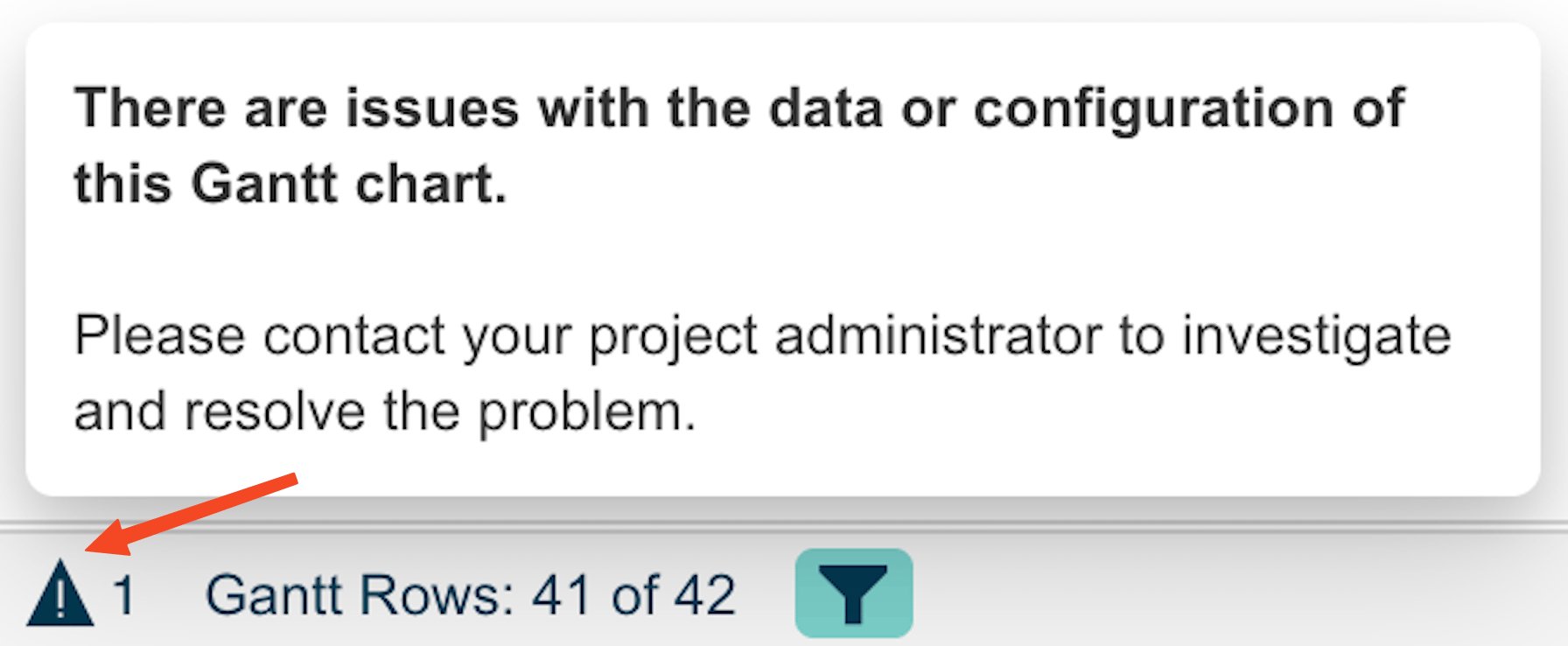
A visual indicator (triangle icon in the Gantt footer) informs end users when configuration or data-related issues occur. The indicator shows a count badge with the number of errors detected.
To access the browser console, right-click on the page, select **Inspect**, and go to the **Console** tab.
### In View Mode (User View)
A visual indicator (triangle icon in the Gantt footer) informs end users when configuration or data-related issues occur. The indicator shows a count badge with the number of errors detected.
 ## Error Types
The Gantt distinguishes between three script error categories:
| Error Type | Prefix in Error Panel | Source |
| -------------------- | ----------------------- | ------------------------------------ |
| Config Script Error | `Config Script Error:` | Gantt Config Script widget parameter |
| Markers Script Error | `Markers Script Error:` | Markers Script widget parameter |
| Item Script Error | `Item Script Error:` | Item Script widget parameter |
1. Open the page in edit mode
2. Look for the error indicator in the Gantt footer
3. Click the indicator to see the detailed error list
4. Note the error type prefix to determine which script is failing
Item scripts run on the server for each work item. If an item script contains an error, the error is logged but the Gantt continues to load. Items with script errors may display without the customizations the script was supposed to apply (e.g., missing colors).
If your scripts stopped working after a Polarion upgrade to version 2304 or later, you need to update the script syntax:
**Before (Polarion 2303 and earlier):**
```javascript theme={null}
if (wi.status != null) {
var statusId = wi.status.id;
}
```
**After (Polarion 2304+):**
```javascript theme={null}
if (typeof wi !== 'undefined') {
var statusId = wi.getStatus().getId();
}
```
Key changes:
* Replace `null` checks with `typeof` checks (e.g., `typeof wi !== 'undefined'`)
* Replace direct property access with getter methods (e.g., `wi.getStatus().getId()` instead of `wi.status.id`)
After upgrading Polarion to 2304+, existing item and plan scripts may fail with `undefined` variable errors. Visual elements like colors may stop loading. Update all scripts to use the new API syntax.
1. **Isolate the error** -- Temporarily clear the script content, save, and confirm the Gantt loads without errors
2. **Re-add incrementally** -- Add the script back line by line to pinpoint the failing statement
3. **Check variable availability** -- Item scripts have access to `task`, `wi` (work item), `plan`, `config`, `util`, and other context variables. Verify you are using the correct variable names.
4. **Check browser console** -- Look for detailed JavaScript error messages including line numbers
If item scripts are not executing at all (causing colors or other visual elements to not load), update to Gantt version 24.5.3 or later, which includes a fix for script execution issues.
After correcting the script:
1. Save the page in the wiki editor
2. Switch to view mode
3. Verify the error indicator has disappeared from the Gantt footer
4. Check that the script's intended behavior (colors, markers, custom logic) is applied correctly
## Verify
You should now see the Gantt chart loading without the error indicator in the footer. If you had script-driven colors, markers, or other customizations, they should now render correctly on all task bars.
## See also
* [Write Item Scripts](/gantt/guides/scripting/item-script-basics)
* [Write Gantt Config Scripts](/gantt/guides/scripting/gantt-config-script)
* [Debug Script Errors](/gantt/guides/scripting/debug-scripts)
* [Migrate Scripts for Polarion 2304+](/gantt/guides/scripting/script-migration-2304)
## Error Types
The Gantt distinguishes between three script error categories:
| Error Type | Prefix in Error Panel | Source |
| -------------------- | ----------------------- | ------------------------------------ |
| Config Script Error | `Config Script Error:` | Gantt Config Script widget parameter |
| Markers Script Error | `Markers Script Error:` | Markers Script widget parameter |
| Item Script Error | `Item Script Error:` | Item Script widget parameter |
1. Open the page in edit mode
2. Look for the error indicator in the Gantt footer
3. Click the indicator to see the detailed error list
4. Note the error type prefix to determine which script is failing
Item scripts run on the server for each work item. If an item script contains an error, the error is logged but the Gantt continues to load. Items with script errors may display without the customizations the script was supposed to apply (e.g., missing colors).
If your scripts stopped working after a Polarion upgrade to version 2304 or later, you need to update the script syntax:
**Before (Polarion 2303 and earlier):**
```javascript theme={null}
if (wi.status != null) {
var statusId = wi.status.id;
}
```
**After (Polarion 2304+):**
```javascript theme={null}
if (typeof wi !== 'undefined') {
var statusId = wi.getStatus().getId();
}
```
Key changes:
* Replace `null` checks with `typeof` checks (e.g., `typeof wi !== 'undefined'`)
* Replace direct property access with getter methods (e.g., `wi.getStatus().getId()` instead of `wi.status.id`)
After upgrading Polarion to 2304+, existing item and plan scripts may fail with `undefined` variable errors. Visual elements like colors may stop loading. Update all scripts to use the new API syntax.
1. **Isolate the error** -- Temporarily clear the script content, save, and confirm the Gantt loads without errors
2. **Re-add incrementally** -- Add the script back line by line to pinpoint the failing statement
3. **Check variable availability** -- Item scripts have access to `task`, `wi` (work item), `plan`, `config`, `util`, and other context variables. Verify you are using the correct variable names.
4. **Check browser console** -- Look for detailed JavaScript error messages including line numbers
If item scripts are not executing at all (causing colors or other visual elements to not load), update to Gantt version 24.5.3 or later, which includes a fix for script execution issues.
After correcting the script:
1. Save the page in the wiki editor
2. Switch to view mode
3. Verify the error indicator has disappeared from the Gantt footer
4. Check that the script's intended behavior (colors, markers, custom logic) is applied correctly
## Verify
You should now see the Gantt chart loading without the error indicator in the footer. If you had script-driven colors, markers, or other customizations, they should now render correctly on all task bars.
## See also
* [Write Item Scripts](/gantt/guides/scripting/item-script-basics)
* [Write Gantt Config Scripts](/gantt/guides/scripting/gantt-config-script)
* [Debug Script Errors](/gantt/guides/scripting/debug-scripts)
* [Migrate Scripts for Polarion 2304+](/gantt/guides/scripting/script-migration-2304)