> ## Documentation Index
> Fetch the complete documentation index at: https://learn.nextedy.com/llms.txt
> Use this file to discover all available pages before exploring further.
# Color Logic Script Examples
> Apply custom color logic to task bars in Nextedy GANTT using Item Scripts and Gantt Config Scripts, from simple date-based highlighting to multi-condition color schemes.
export const LastReviewed = ({date}) => {
if (!date) return null;
const formatted = new Date(`${date}T00:00:00Z`).toLocaleDateString("en-US", {
year: "numeric",
month: "long",
day: "numeric",
timeZone: "UTC"
});
return
Last reviewed on {formatted}
;
};
## Understand Static vs. Dynamic Coloring
Before writing color scripts, choose between two coloring modes:
| Mode | Property | Behavior |
| ----------- | ---------------- | -------------------------------------------------------------------------------------------------------------------------------------------- |
| **Dynamic** | `task.taskColor` | Overrides the default blue color only. Progress-related colors (red for overdue, orange for delayed, gray for resolved) still apply. |
| **Static** | `task.color` | Overrides all coloring. No automatic progress-based colors. Requires `gantt.config.show_progress_colors = false` in the Gantt Config Script. |
 ## Default Color Legend
Out of the box, the Gantt chart uses these dynamic colors:
| Color | Meaning |
| ---------- | ----------------------------------------------------- |
| Red | Overdue -- end date in the past, still unresolved |
| Orange | Delayed -- progress behind schedule, still unresolved |
| Blue | On track -- unresolved, schedule looks optimistic |
| Gray | Resolved -- work item completed |
| Light blue | Unscheduled -- no start date, defaults to today |
| Green | Project item -- schedule derived from children |
## Case 1: Date-Based Dynamic Coloring
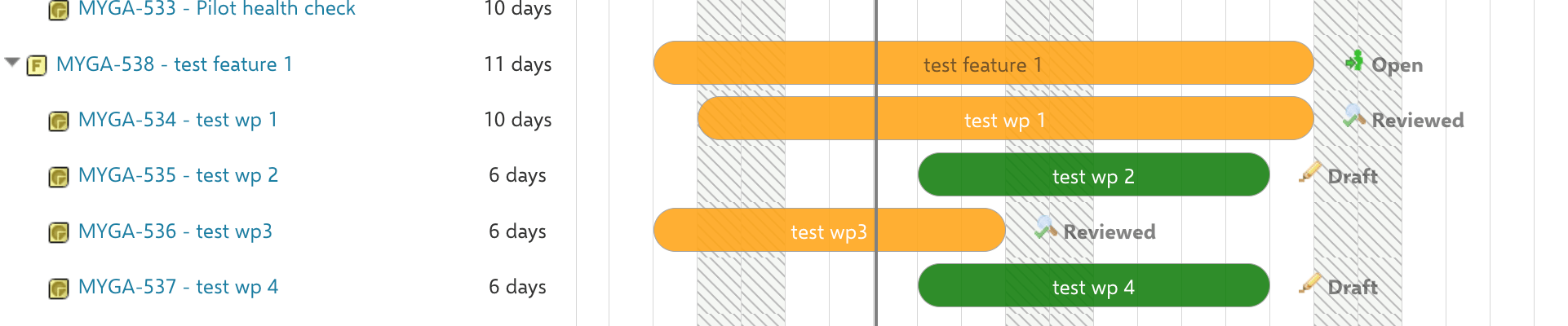
Highlight tasks starting after today in green while keeping progress colors for all other tasks.
## Default Color Legend
Out of the box, the Gantt chart uses these dynamic colors:
| Color | Meaning |
| ---------- | ----------------------------------------------------- |
| Red | Overdue -- end date in the past, still unresolved |
| Orange | Delayed -- progress behind schedule, still unresolved |
| Blue | On track -- unresolved, schedule looks optimistic |
| Gray | Resolved -- work item completed |
| Light blue | Unscheduled -- no start date, defaults to today |
| Green | Project item -- schedule derived from children |
## Case 1: Date-Based Dynamic Coloring
Highlight tasks starting after today in green while keeping progress colors for all other tasks.
 In **Widget Parameters > Advanced > Item Script**:
```javascript theme={null}
var today = new Date();
if(task.start_date.getTime() > today.getTime()){
task.taskColor = "green";
}
```
This uses dynamic coloring (`task.taskColor`), so overdue and delayed tasks retain their red/orange indicators.
In **Widget Parameters > Advanced > Item Script**:
```javascript theme={null}
var today = new Date();
if(task.start_date.getTime() > today.getTime()){
task.taskColor = "green";
}
```
This uses dynamic coloring (`task.taskColor`), so overdue and delayed tasks retain their red/orange indicators.
 ## Case 2: Type and Status Static Coloring
Color tasks based on their work item type and status, overriding all automatic colors.
In **Widget Parameters > Advanced > Gantt Config Script**:
```javascript theme={null}
gantt.config.show_progress_colors = false;
```
In **Widget Parameters > Advanced > Item Script**:
```javascript theme={null}
var today = new Date();
if(wi.getType().getId() === "workpackage" && wi.getStatus().getId() === "draft"){
if(task.start_date.getTime() < today.getTime()){
task.color = "green";
}
}
```
## Case 2: Type and Status Static Coloring
Color tasks based on their work item type and status, overriding all automatic colors.
In **Widget Parameters > Advanced > Gantt Config Script**:
```javascript theme={null}
gantt.config.show_progress_colors = false;
```
In **Widget Parameters > Advanced > Item Script**:
```javascript theme={null}
var today = new Date();
if(wi.getType().getId() === "workpackage" && wi.getStatus().getId() === "draft"){
if(task.start_date.getTime() < today.getTime()){
task.color = "green";
}
}
```
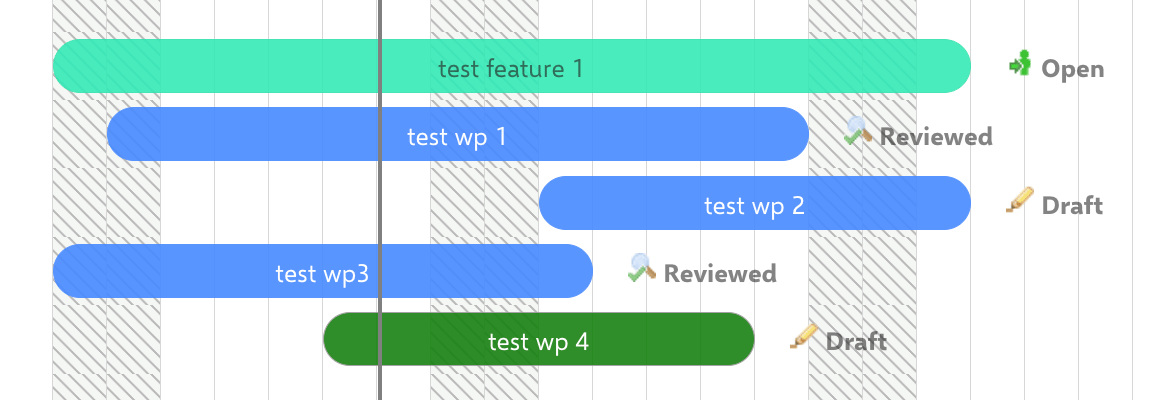 If you set `task.taskColor` for tasks that already changed color due to progress (overdue, delayed), the dynamic color takes precedence. Switch to `task.color` with `show_progress_colors = false` for full control.
## Case 3: Assignee-Based Coloring
Color tasks by their assigned user. This example uses dynamic coloring for a single-assignee scenario:
```javascript theme={null}
var assignee = null;
var aIterator = wi.getAssignees().iterator();
if(aIterator.hasNext()){
assignee = aIterator.next();
if(assignee && assignee.id === "yourAssigneeId"){
task.taskColor = "#a9d08e";
}
}
```
Both `task.color` and `task.taskColor` accept standard color names and HEX values like `"#bfbfbf"`. Use HEX for precise brand or team colors.
## Case 4: Overdue Highlighting Without Progress Colors
Show tasks with end dates in the past as red, with all other progress coloring disabled:
In **Gantt Config Script**:
```javascript theme={null}
gantt.config.show_progress_colors = false;
```
In **Item Script**:
```javascript theme={null}
var tdate = new Date();
var edate = task.end_date;
var interval = tdate.getTime() - edate.getTime();
if(interval > 0){
task.color = "red";
}
```
If your scripts use `wi.type.id` or `wi.status.id`, update them to `wi.getType().getId()` and `wi.getStatus().getId()` after upgrading to Polarion 2304+. See [Migrate Scripts for Polarion 2304+](/gantt/guides/scripting/script-migration-2304).
## Verify Your Changes
Save the page and reload the Gantt chart. You should now see task bars reflecting your custom color logic. Hover over individual tasks to confirm that the correct conditions trigger the expected colors.
## See Also
* [Configure Item Colors](/gantt/guides/visualization/configure-colors) for non-scripting color configuration
* [Customize Progress-Related Coloring](/gantt/guides/visualization/progress-coloring) for the `progress_color_resolved` property
* [Write Item Scripts](/gantt/guides/scripting/item-script-basics) for Item Script fundamentals
* [Write Gantt Config Scripts](/gantt/guides/scripting/gantt-config-script) for Gantt Config Script patterns
* [Migrate Scripts for Polarion 2304+](/gantt/guides/scripting/script-migration-2304) for syntax migration
If you set `task.taskColor` for tasks that already changed color due to progress (overdue, delayed), the dynamic color takes precedence. Switch to `task.color` with `show_progress_colors = false` for full control.
## Case 3: Assignee-Based Coloring
Color tasks by their assigned user. This example uses dynamic coloring for a single-assignee scenario:
```javascript theme={null}
var assignee = null;
var aIterator = wi.getAssignees().iterator();
if(aIterator.hasNext()){
assignee = aIterator.next();
if(assignee && assignee.id === "yourAssigneeId"){
task.taskColor = "#a9d08e";
}
}
```
Both `task.color` and `task.taskColor` accept standard color names and HEX values like `"#bfbfbf"`. Use HEX for precise brand or team colors.
## Case 4: Overdue Highlighting Without Progress Colors
Show tasks with end dates in the past as red, with all other progress coloring disabled:
In **Gantt Config Script**:
```javascript theme={null}
gantt.config.show_progress_colors = false;
```
In **Item Script**:
```javascript theme={null}
var tdate = new Date();
var edate = task.end_date;
var interval = tdate.getTime() - edate.getTime();
if(interval > 0){
task.color = "red";
}
```
If your scripts use `wi.type.id` or `wi.status.id`, update them to `wi.getType().getId()` and `wi.getStatus().getId()` after upgrading to Polarion 2304+. See [Migrate Scripts for Polarion 2304+](/gantt/guides/scripting/script-migration-2304).
## Verify Your Changes
Save the page and reload the Gantt chart. You should now see task bars reflecting your custom color logic. Hover over individual tasks to confirm that the correct conditions trigger the expected colors.
## See Also
* [Configure Item Colors](/gantt/guides/visualization/configure-colors) for non-scripting color configuration
* [Customize Progress-Related Coloring](/gantt/guides/visualization/progress-coloring) for the `progress_color_resolved` property
* [Write Item Scripts](/gantt/guides/scripting/item-script-basics) for Item Script fundamentals
* [Write Gantt Config Scripts](/gantt/guides/scripting/gantt-config-script) for Gantt Config Script patterns
* [Migrate Scripts for Polarion 2304+](/gantt/guides/scripting/script-migration-2304) for syntax migration