> ## Documentation Index
> Fetch the complete documentation index at: https://learn.nextedy.com/llms.txt
> Use this file to discover all available pages before exploring further.
# Map Resources to Polarion Users
> Tell Nextedy GANTT which resource work item stands for which Polarion user, so a person reached as a resource and as an assignee occupies one row and is counted once.
export const LastReviewed = ({date, state}) => {
if (!date) return null;
const formatted = new Date(`${date}T00:00:00Z`).toLocaleDateString("en-US", {
year: "numeric",
month: "long",
day: "numeric",
timeZone: "UTC"
});
const label = state === "reviewed" ? `Last reviewed and confirmed up to date on ${formatted}` : `Last updated on ${formatted}`;
return
{label}
;
};
The same person can reach a plan twice: as the **Assignee** of a task and as the **Resource** of a Team Assignment. Without a declared identity that is two rows in the resource view and an allocation counted twice.
Identity mapping is opt-in and independent of the picker -- a structure can be browsed for a long time before anyone needs the two sides merged. For the model behind it, see [Resource Breakdown Structure](/gantt/concepts/resource-breakdown-structure). Available since version **26.9.0**.
## Prerequisites
Before you begin, ensure that:
* A resource breakdown structure exists as Polarion work items -- see [Set Up a Hierarchical Resource Picker](/gantt/guides/resources/hierarchical-resource-picker)
* You have administrator rights on the project whose Gantt you are configuring
* You can add a custom field to the resource work items -- that is where the mapping is declared (an advanced, user-side alternative for externally-provisioned deployments is covered under Advanced below)
Name the attributes of the resource work item that hold a user. List them in order -- the first that resolves to a real user wins:
```properties theme={null}
nextedy.gantt.resourceIdentity.userIdField=polarionUser,assignee
```
The built-in `assignee` is accepted alongside custom fields, so a structure that already assigns each resource to its person needs nothing new.
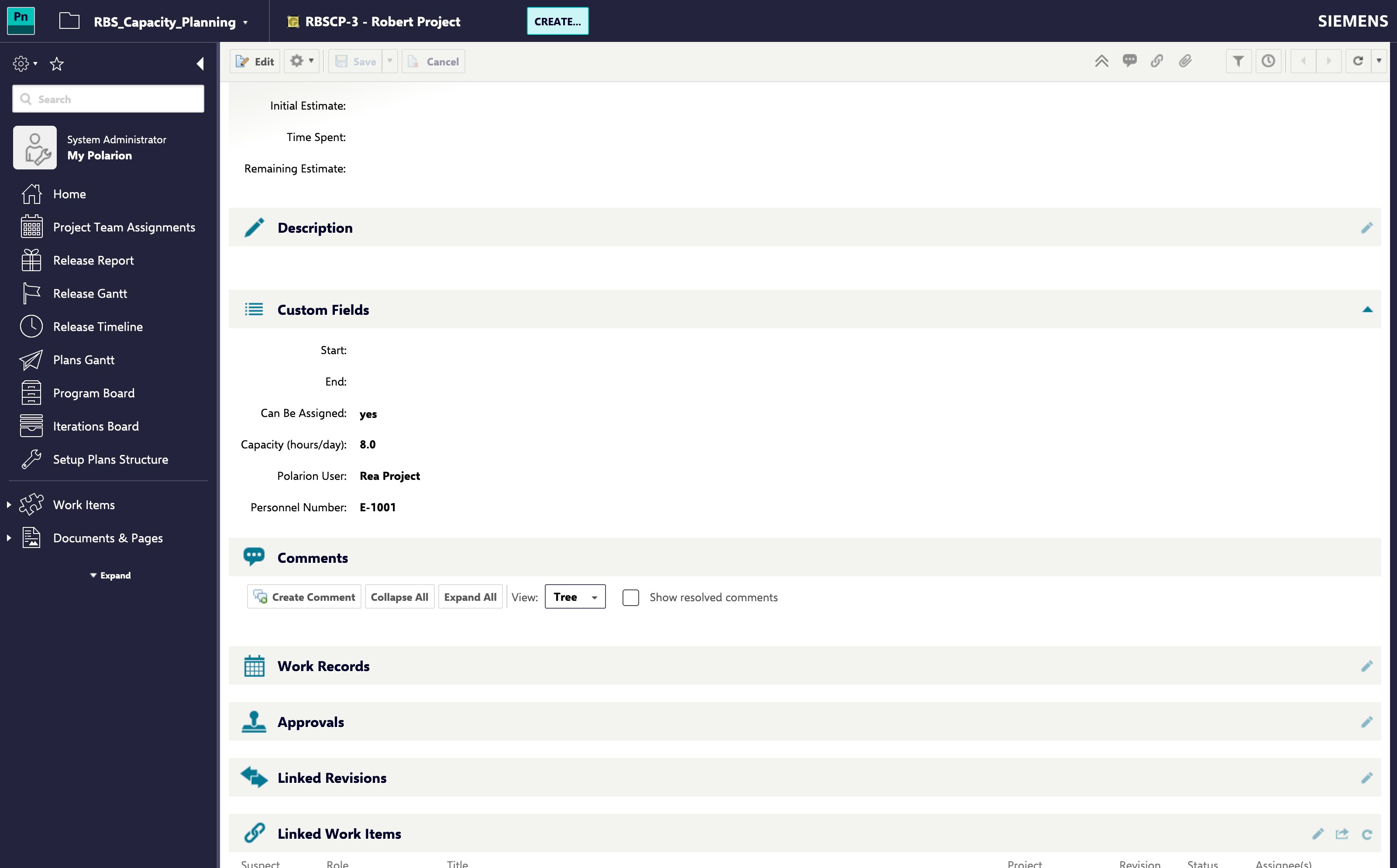 The resource's own title and the user it names need not match -- the mapping is what decides who the resource is, not the title.
Identity lookup reads the resource work items from:
```properties theme={null}
nextedy.gantt.resourceIdentity.projectId=ResourceBreakdown
```
Leave it unset and it falls back to `nextedy.gantt.resourceHierarchy.projectId`, and then to the project you are configuring. Set it only when identity is resolved against a different project from the one the picker browses -- you can name more than one, separated by commas, when resources live in several projects.
Open a Gantt where the same person carries both a Team Assignment resource and assigned tasks. One resource row should now carry both allocations.
Two rows for the same person means the mapping did not resolve. Work through the Troubleshooting table below.
## Advanced: Resolve Identity from the Polarion User Side
Where an upstream system owns the resource structure and you cannot add a field to the resource work items, the mapping can instead be read from the **Polarion user**: a field on the user names its resource node (`nextedy.gantt.resourceIdentity.userResourceField`), matched by default against the resource work item's ID -- or against a field of the node when users are keyed by a personnel number (`nextedy.gantt.resourceIdentity.nodeKeyField`).
Polarion has **no admin UI for adding custom fields to users**. A user-side field only exists when your user provisioning puts it there -- LDAP/SSO attribute mapping, an import, or the API. Use this direction only when such a field is already present on your users; otherwise declare the mapping on the resource work item as above.
When both directions are configured, the resource-work-item side is tried first and the user side is the fallback. See [Resource Hierarchy and Identity Properties](/gantt/reference/configuration/resource-hierarchy-properties) for the full property list.
## What Carries an Identity, and What Does Not
A container is not a person, so it is not expected to name a user. Where `nextedy.gantt.resourceHierarchy.pickableField` is configured, the picker resolves an identity only for the nodes it offers for selection -- the levels above it are navigation, and a lookup per node is not free.
**Nothing Is Merged Until You Configure It**
With neither `nextedy.gantt.resourceIdentity.userIdField` nor `nextedy.gantt.resourceIdentity.userResourceField` set, no merging happens at all. A person reachable both as a resource and as an assignee then occupies two rows and their allocation is counted twice -- which reads as an underloaded plan.
## Troubleshooting
| Symptom | Cause | Fix |
| -------------------------------------------------------- | --------------------------------------------------------------------------------------------------------------------------------------------------------------------- | -------------------------------------------------------------------------------------------------------------------------------------- |
| The same person still has two rows | Neither identity property is set | Set `nextedy.gantt.resourceIdentity.userIdField` or `.userResourceField` |
| One resource merges and another does not | The field named in `userIdField` is empty on that resource, or holds something that is not a Polarion user | Fill the field on that work item, or add a second field to the list |
| The picker still lists a node separately from its person | The node is not selectable, so the picker does not resolve its identity | Set its `pickableField` to `true` -- see [Set Up a Hierarchical Resource Picker](/gantt/guides/resources/hierarchical-resource-picker) |
| The user-side mapping resolves for nobody | The user attribute holds a personnel number rather than the work item ID | Set `nextedy.gantt.resourceIdentity.nodeKeyField` to the resource field holding that number |
| Searching the picker by a person's login finds nothing | No field of that node holds the user. Search always covers the built-in **Assignee** alongside anything named in `userIdField`, so an unset property is not the cause | Fill the node's **Assignee** with the person, or name the field that does hold them in `nextedy.gantt.resourceIdentity.userIdField` |
## Verification
You should now see:
* One resource row per person, carrying both their Team Assignment allocation and their assigned work
* That person's total allocation counted once rather than twice
* The picker's search finding a resource by the login held in any field you named, as it already does for the built-in **Assignee**
## See Also
* [Resource Breakdown Structure](/gantt/concepts/resource-breakdown-structure)
* [Set Up a Hierarchical Resource Picker](/gantt/guides/resources/hierarchical-resource-picker)
* [Declare Resource Capacity in Hours per Day](/gantt/guides/calendars/resource-capacity-field)
* [Resource Hierarchy and Identity Properties](/gantt/reference/configuration/resource-hierarchy-properties)
* [Set Up the Resource View](/gantt/guides/resources/resource-view)
The resource's own title and the user it names need not match -- the mapping is what decides who the resource is, not the title.
Identity lookup reads the resource work items from:
```properties theme={null}
nextedy.gantt.resourceIdentity.projectId=ResourceBreakdown
```
Leave it unset and it falls back to `nextedy.gantt.resourceHierarchy.projectId`, and then to the project you are configuring. Set it only when identity is resolved against a different project from the one the picker browses -- you can name more than one, separated by commas, when resources live in several projects.
Open a Gantt where the same person carries both a Team Assignment resource and assigned tasks. One resource row should now carry both allocations.
Two rows for the same person means the mapping did not resolve. Work through the Troubleshooting table below.
## Advanced: Resolve Identity from the Polarion User Side
Where an upstream system owns the resource structure and you cannot add a field to the resource work items, the mapping can instead be read from the **Polarion user**: a field on the user names its resource node (`nextedy.gantt.resourceIdentity.userResourceField`), matched by default against the resource work item's ID -- or against a field of the node when users are keyed by a personnel number (`nextedy.gantt.resourceIdentity.nodeKeyField`).
Polarion has **no admin UI for adding custom fields to users**. A user-side field only exists when your user provisioning puts it there -- LDAP/SSO attribute mapping, an import, or the API. Use this direction only when such a field is already present on your users; otherwise declare the mapping on the resource work item as above.
When both directions are configured, the resource-work-item side is tried first and the user side is the fallback. See [Resource Hierarchy and Identity Properties](/gantt/reference/configuration/resource-hierarchy-properties) for the full property list.
## What Carries an Identity, and What Does Not
A container is not a person, so it is not expected to name a user. Where `nextedy.gantt.resourceHierarchy.pickableField` is configured, the picker resolves an identity only for the nodes it offers for selection -- the levels above it are navigation, and a lookup per node is not free.
**Nothing Is Merged Until You Configure It**
With neither `nextedy.gantt.resourceIdentity.userIdField` nor `nextedy.gantt.resourceIdentity.userResourceField` set, no merging happens at all. A person reachable both as a resource and as an assignee then occupies two rows and their allocation is counted twice -- which reads as an underloaded plan.
## Troubleshooting
| Symptom | Cause | Fix |
| -------------------------------------------------------- | --------------------------------------------------------------------------------------------------------------------------------------------------------------------- | -------------------------------------------------------------------------------------------------------------------------------------- |
| The same person still has two rows | Neither identity property is set | Set `nextedy.gantt.resourceIdentity.userIdField` or `.userResourceField` |
| One resource merges and another does not | The field named in `userIdField` is empty on that resource, or holds something that is not a Polarion user | Fill the field on that work item, or add a second field to the list |
| The picker still lists a node separately from its person | The node is not selectable, so the picker does not resolve its identity | Set its `pickableField` to `true` -- see [Set Up a Hierarchical Resource Picker](/gantt/guides/resources/hierarchical-resource-picker) |
| The user-side mapping resolves for nobody | The user attribute holds a personnel number rather than the work item ID | Set `nextedy.gantt.resourceIdentity.nodeKeyField` to the resource field holding that number |
| Searching the picker by a person's login finds nothing | No field of that node holds the user. Search always covers the built-in **Assignee** alongside anything named in `userIdField`, so an unset property is not the cause | Fill the node's **Assignee** with the person, or name the field that does hold them in `nextedy.gantt.resourceIdentity.userIdField` |
## Verification
You should now see:
* One resource row per person, carrying both their Team Assignment allocation and their assigned work
* That person's total allocation counted once rather than twice
* The picker's search finding a resource by the login held in any field you named, as it already does for the built-in **Assignee**
## See Also
* [Resource Breakdown Structure](/gantt/concepts/resource-breakdown-structure)
* [Set Up a Hierarchical Resource Picker](/gantt/guides/resources/hierarchical-resource-picker)
* [Declare Resource Capacity in Hours per Day](/gantt/guides/calendars/resource-capacity-field)
* [Resource Hierarchy and Identity Properties](/gantt/reference/configuration/resource-hierarchy-properties)
* [Set Up the Resource View](/gantt/guides/resources/resource-view)