> ## Documentation Index
> Fetch the complete documentation index at: https://learn.nextedy.com/llms.txt
> Use this file to discover all available pages before exploring further.
# Set Up a Hierarchical Resource Picker
> Replace the flat resource dropdown in the Nextedy GANTT lightbox with a drill-down picker over a resource breakdown structure held as Polarion work items.
export const LastReviewed = ({date, state}) => {
if (!date) return null;
const formatted = new Date(`${date}T00:00:00Z`).toLocaleDateString("en-US", {
year: "numeric",
month: "long",
day: "numeric",
timeZone: "UTC"
});
const label = state === "reviewed" ? `Last reviewed and confirmed up to date on ${formatted}` : `Last updated on ${formatted}`;
return
{label}
;
};
A flat dropdown cannot serve hundreds of resources, and it cannot tell two of them apart when the same short name appears under several branches. The hierarchical picker browses the structure one level at a time and always shows the full path of what you picked.
For the model behind it, see [Resource Breakdown Structure](/gantt/concepts/resource-breakdown-structure). The picker is available since version **26.9.0**.
## Prerequisites
Before you begin, ensure that:
* A Polarion project holds your resource work items, each linked to its parent by the project's parent link role. Resources at the top of the structure have no parent
* You have administrator rights on the project whose Gantt you are configuring, so you can set configuration properties
* Team Assignments are configured and a **Resource Field** is in use -- see [Set Up Team Assignments Gantt](/gantt/guides/resources/team-assignments-gantt)
In **Administration > Configuration Properties** of the project holding the Gantt, set:
```properties theme={null}
nextedy.gantt.resourceHierarchy.projectId=ResourceBreakdown
```
This single property turns the picker on. Until it names a project, the resource field keeps its usual control and nothing changes.
**Not the Team Management Project**
The hierarchy project is deliberately separate from the project you are configuring and from the project holding your teams. A deployment can keep its resource breakdown and its teams in different places.
If the project carries more than the resource structure, restrict which work items take part with a Lucene query:
```properties theme={null}
nextedy.gantt.resourceHierarchy.query=type:resource
```
Work items outside the query are neither shown as nodes nor reachable by search.
Most structures mix containers with real resources: you browse *through* a department, you assign *to* a team. Mark the ones that can be assigned to with a boolean custom field on the resource work item and name it:
```properties theme={null}
nextedy.gantt.resourceHierarchy.pickableField=assignable
```
Nodes whose field is `true` can be selected; every other node can only be opened to show the level below.
Leave the property unset and every node can be selected.
The picker replaces exactly one field: the one already resolved as the team assignment resource field. Every other field keeps its usual control.
That field is the **Resource Field** widget parameter where a widget is in play, then the project default `nextedy.gantt.workitems.default.resource_field`, then `nextedy.gantt.teamAssignmentResourceField`. The first of the three naming a custom field wins -- `assignee` and `categories` are not custom fields, so a value of either is passed over and the next candidate is tried.
Open a Team Assignment in the Gantt lightbox and click the resource field. The drop-down opens on the top level of the structure.
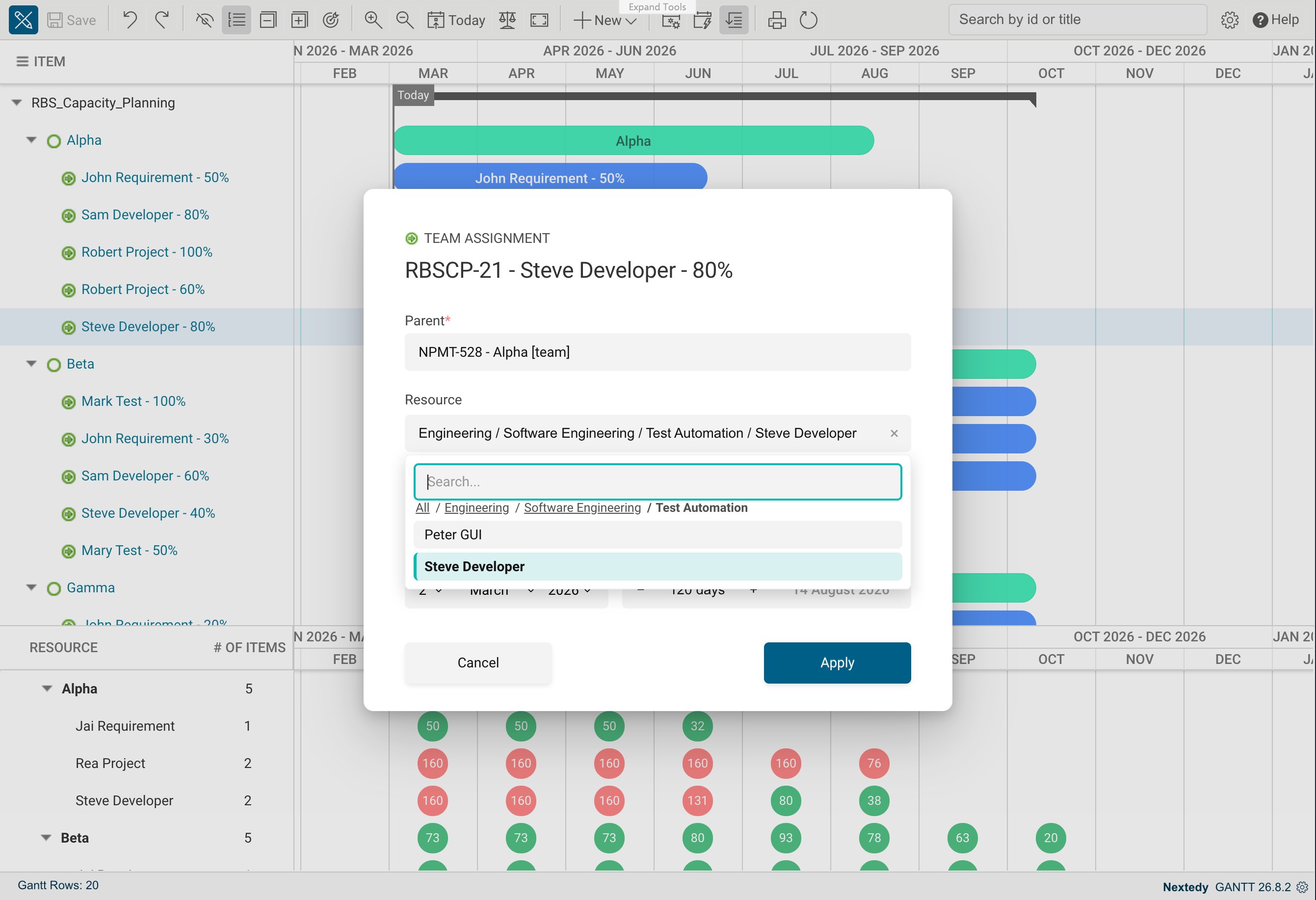 | Control | What it does |
| --------------------------------- | ------------------------------------------------------------------------------------------------------------------------------------------------------- |
| A leaf row's label | Selects that node, when the node is selectable |
| A row that has children | Clicking the row opens it and lists its children -- going deeper is the common intent on a branch |
| **Select** on a branch row | Picks the branch itself, which a whole department legitimately is. Shown only where the branch is selectable, so one click never has to mean two things |
| **Show the level below** | The drill glyph at the end of a branch row |
| The path above the list | Steps back to any level you came through. Its first crumb is **All** |
| **Search the resource hierarchy** | Searches the whole structure instead of browsing it |
| **Clear the selection** | Empties the field |
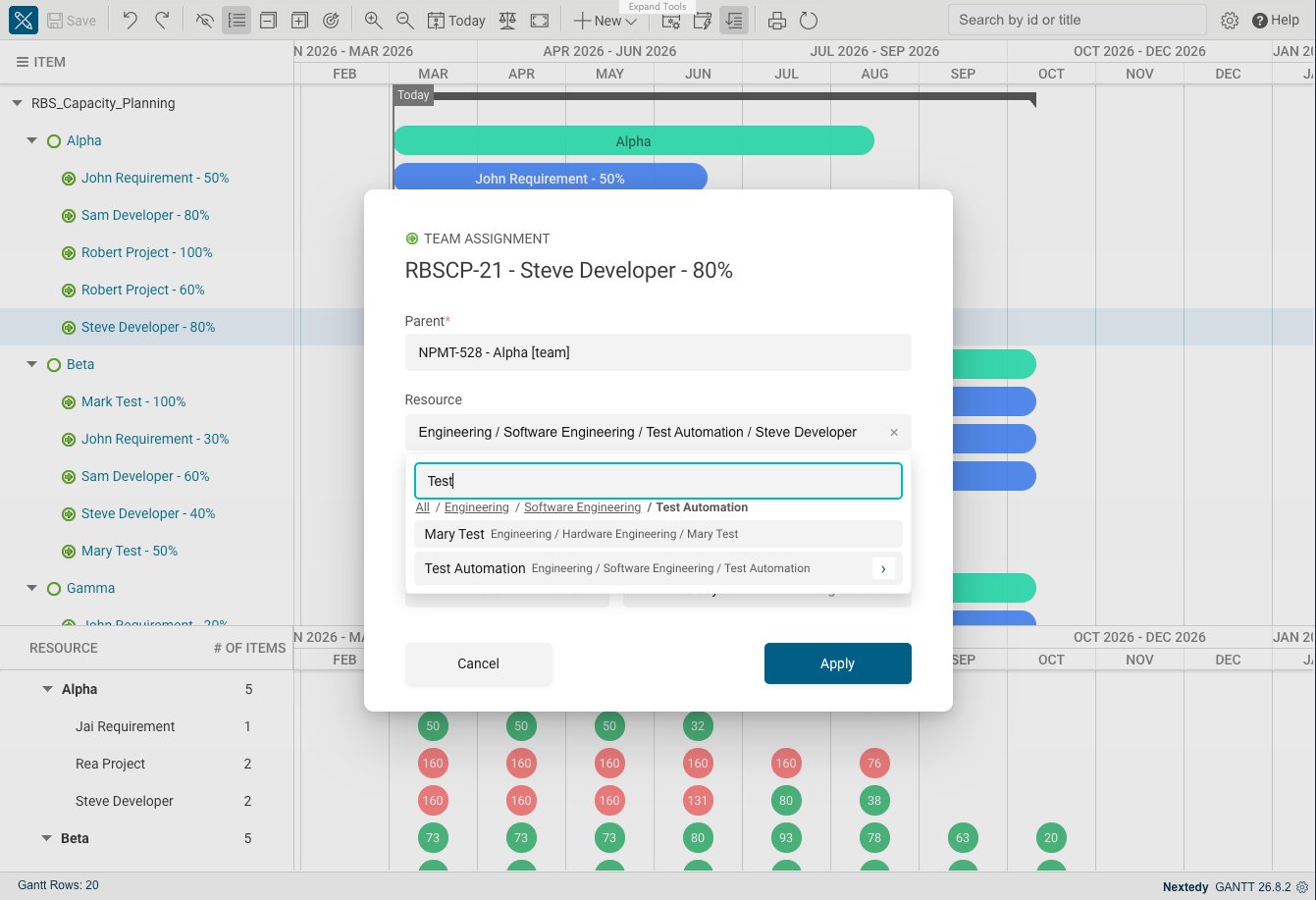
Type at least two characters to search. Search matches a node's title, its work item ID, and the fields holding a user -- the built-in **Assignee** always, plus anything named in `nextedy.gantt.resourceIdentity.userIdField`; several words must all match, and each is matched as a prefix. `nextedy.gantt.resourceHierarchy.searchLimit` caps how many results come back, by default 50 -- narrow the search rather than raise the cap.
Every result and the picked value are shown with their full path, with `/` between the levels.
| Control | What it does |
| --------------------------------- | ------------------------------------------------------------------------------------------------------------------------------------------------------- |
| A leaf row's label | Selects that node, when the node is selectable |
| A row that has children | Clicking the row opens it and lists its children -- going deeper is the common intent on a branch |
| **Select** on a branch row | Picks the branch itself, which a whole department legitimately is. Shown only where the branch is selectable, so one click never has to mean two things |
| **Show the level below** | The drill glyph at the end of a branch row |
| The path above the list | Steps back to any level you came through. Its first crumb is **All** |
| **Search the resource hierarchy** | Searches the whole structure instead of browsing it |
| **Clear the selection** | Empties the field |
Type at least two characters to search. Search matches a node's title, its work item ID, and the fields holding a user -- the built-in **Assignee** always, plus anything named in `nextedy.gantt.resourceIdentity.userIdField`; several words must all match, and each is matched as a prefix. `nextedy.gantt.resourceHierarchy.searchLimit` caps how many results come back, by default 50 -- narrow the search rather than raise the cap.
Every result and the picked value are shown with their full path, with `/` between the levels.
 ## Where the Path Shows Up
Once a resource is picked, the Gantt labels the two places differently, because sibling names repeat across branches:
* The **bar and the resource row** carry the node's own name.
* The **picker itself**, showing the value already chosen, carries the full path -- which is what tells two same-named nodes apart while you are choosing between them.
## Tuning a Large Structure
| Property | Type | Default | What it controls |
| ------------------------------------------------------- | ------- | ------- | ------------------------------------------------------------------------------------------------------------------------------------------------------------------------------------------------------------------------------------------------------------------------- |
| `nextedy.gantt.resourceHierarchy.searchLimit` | Integer | `50` | Maximum search results. Raising it makes every search slower; narrowing the search term is usually the better answer. |
| `nextedy.gantt.resourceHierarchy.maxDepth` | Integer | `20` | How far a path is walked upward when the breadcrumb for a node is built. Raise it only if your structure is genuinely deeper than this; a larger value costs a step per level. |
| `nextedy.gantt.resourceHierarchy.hasChildrenProbeLimit` | Integer | `1000` | The level size above which the Gantt stops checking which rows have children and offers every row as openable. Lowering it -- or setting `0` to switch the check off entirely -- makes a wide level open faster, at the cost of opening a row that turns out to be empty. |
## Troubleshooting
| Symptom | Cause | Fix |
| ------------------------------------------------------------------------------- | ------------------------------------------------------------------------------------------------------------------------------------------- | --------------------------------------------------------------------------------------------------------------------------------------------------------------- |
| The field still shows the old dropdown | `nextedy.gantt.resourceHierarchy.projectId` is unset, or the field is not the effective resource field | Set the property, and check the **Resource Field** parameter names the field you are looking at |
| `Nothing on this level can be selected - open one of the rows below.` | Every node on this level is a container | Open one of the rows to reach selectable resources |
| `Nothing on this level can be selected or opened. Go back with the path above.` | The level is a dead end -- nothing here can be selected and nothing has children | Step back with the path above and try another branch |
| `Nothing here.` | The level has no children, or the query excludes them | Check `nextedy.gantt.resourceHierarchy.query` covers the work items you expect |
| `Nothing here.` on the **top** level, though the structure exists | The link role joining the nodes is not flagged as a parent role, so Polarion indexes no parent back-reference and no node looks like a root | Flag the role as a parent role in the hierarchy project's `workitem-link-role-enum.xml` |
| `Failed to load this level.` or `Search failed.` | The hierarchy project could not be read | Confirm the project ID is correct and that you can read that project in Polarion |
| Search finds nothing by a person's login | No field of that node holds the user. The built-in **Assignee** is always searched, alongside anything named in `userIdField` | Fill the node's **Assignee**, or name the field that holds the user -- see [Map Resources to Polarion Users](/gantt/guides/resources/resource-identity-mapping) |
## Verification
You should now see:
* The resource field in the Team Assignment lightbox opening as a drill-down list rather than a flat dropdown
* A path above the list, starting at **All**, that steps back through the levels you opened
* The picked resource shown with its full path in the picker, and with its own name on the bar and in the resource row
## See Also
* [Resource Breakdown Structure](/gantt/concepts/resource-breakdown-structure)
* [Map Resources to Polarion Users](/gantt/guides/resources/resource-identity-mapping)
* [Declare Resource Capacity in Hours per Day](/gantt/guides/calendars/resource-capacity-field)
* [Resource Hierarchy and Identity Properties](/gantt/reference/configuration/resource-hierarchy-properties)
* [Configure Resource Fields](/gantt/guides/resources/resource-field-configuration)
## Where the Path Shows Up
Once a resource is picked, the Gantt labels the two places differently, because sibling names repeat across branches:
* The **bar and the resource row** carry the node's own name.
* The **picker itself**, showing the value already chosen, carries the full path -- which is what tells two same-named nodes apart while you are choosing between them.
## Tuning a Large Structure
| Property | Type | Default | What it controls |
| ------------------------------------------------------- | ------- | ------- | ------------------------------------------------------------------------------------------------------------------------------------------------------------------------------------------------------------------------------------------------------------------------- |
| `nextedy.gantt.resourceHierarchy.searchLimit` | Integer | `50` | Maximum search results. Raising it makes every search slower; narrowing the search term is usually the better answer. |
| `nextedy.gantt.resourceHierarchy.maxDepth` | Integer | `20` | How far a path is walked upward when the breadcrumb for a node is built. Raise it only if your structure is genuinely deeper than this; a larger value costs a step per level. |
| `nextedy.gantt.resourceHierarchy.hasChildrenProbeLimit` | Integer | `1000` | The level size above which the Gantt stops checking which rows have children and offers every row as openable. Lowering it -- or setting `0` to switch the check off entirely -- makes a wide level open faster, at the cost of opening a row that turns out to be empty. |
## Troubleshooting
| Symptom | Cause | Fix |
| ------------------------------------------------------------------------------- | ------------------------------------------------------------------------------------------------------------------------------------------- | --------------------------------------------------------------------------------------------------------------------------------------------------------------- |
| The field still shows the old dropdown | `nextedy.gantt.resourceHierarchy.projectId` is unset, or the field is not the effective resource field | Set the property, and check the **Resource Field** parameter names the field you are looking at |
| `Nothing on this level can be selected - open one of the rows below.` | Every node on this level is a container | Open one of the rows to reach selectable resources |
| `Nothing on this level can be selected or opened. Go back with the path above.` | The level is a dead end -- nothing here can be selected and nothing has children | Step back with the path above and try another branch |
| `Nothing here.` | The level has no children, or the query excludes them | Check `nextedy.gantt.resourceHierarchy.query` covers the work items you expect |
| `Nothing here.` on the **top** level, though the structure exists | The link role joining the nodes is not flagged as a parent role, so Polarion indexes no parent back-reference and no node looks like a root | Flag the role as a parent role in the hierarchy project's `workitem-link-role-enum.xml` |
| `Failed to load this level.` or `Search failed.` | The hierarchy project could not be read | Confirm the project ID is correct and that you can read that project in Polarion |
| Search finds nothing by a person's login | No field of that node holds the user. The built-in **Assignee** is always searched, alongside anything named in `userIdField` | Fill the node's **Assignee**, or name the field that holds the user -- see [Map Resources to Polarion Users](/gantt/guides/resources/resource-identity-mapping) |
## Verification
You should now see:
* The resource field in the Team Assignment lightbox opening as a drill-down list rather than a flat dropdown
* A path above the list, starting at **All**, that steps back through the levels you opened
* The picked resource shown with its full path in the picker, and with its own name on the bar and in the resource row
## See Also
* [Resource Breakdown Structure](/gantt/concepts/resource-breakdown-structure)
* [Map Resources to Polarion Users](/gantt/guides/resources/resource-identity-mapping)
* [Declare Resource Capacity in Hours per Day](/gantt/guides/calendars/resource-capacity-field)
* [Resource Hierarchy and Identity Properties](/gantt/reference/configuration/resource-hierarchy-properties)
* [Configure Resource Fields](/gantt/guides/resources/resource-field-configuration)