> ## Documentation Index
> Fetch the complete documentation index at: https://learn.nextedy.com/llms.txt
> Use this file to discover all available pages before exploring further.
# Declare Resource Capacity in Hours per Day
> Read a resource's available hours per day from a field on its work item, so a department or a supplier can state its own capacity instead of being described as a percentage of one person's day in Nextedy GANTT.
export const LastReviewed = ({date, state}) => {
if (!date) return null;
const formatted = new Date(`${date}T00:00:00Z`).toLocaleDateString("en-US", {
year: "numeric",
month: "long",
day: "numeric",
timeZone: "UTC"
});
const label = state === "reviewed" ? `Last reviewed and confirmed up to date on ${formatted}` : `Last updated on ${formatted}`;
return
{label}
;
};
A Polarion working calendar expresses availability as a **percentage of a working day**. That is the right shape for a person and the wrong shape for a department: a department able to supply sixty hours a day is stating a fact about itself, not a percentage of anybody.
Where resources are held as work items, each one can declare that figure on itself. See [Resource Breakdown Structure](/gantt/concepts/resource-breakdown-structure) for the model. Available since version **26.9.0**. Available since version **26.9.0**.
## Prerequisites
Before you begin, ensure that:
* Your resources are Polarion work items -- see [Set Up a Hierarchical Resource Picker](/gantt/guides/resources/hierarchical-resource-picker)
* The resource work item type carries a numeric custom field for the capacity figure
* You have administrator rights on the project whose Gantt you are configuring
In **Administration > Configuration Properties**, name the field on the resource work item:
```properties theme={null}
nextedy.gantt.resourceCapacityField=capacityHours
```
The property has no default. Until a field is named, declared capacity stays off and every resource falls back to its working calendar.
The unit decides what the number means:
```properties theme={null}
nextedy.gantt.resourceCapacityFieldUnit=perDay
```
| Value | The field value is read as |
| ------------------- | --------------------------------------------------------------------------------------------------------------------------------------------------------------------------------------------------------------------------------------------------------------------------------------------------------------------------------------------------------------------------------------------------------------------------------------------------------------------------------------------------------------------------------------------- |
| `perDay` (default) | Hours available on each working day. The Gantt multiplies it by the working days of the period. |
| `perPeriodAbsolute` | The capacity of the whole period, used as it stands without being multiplied. **Honoured by the [Resource Capacity API](/gantt/reference/api/capacity-api) only** -- the resource view reads a declared figure only under `perDay`, and a resource set this way falls back to its working calendar on screen. **Honoured by the [Resource Capacity API](/gantt/reference/api/capacity-api) only** -- the resource view reads a declared figure only under `perDay`, and a resource set this way falls back to its working calendar on screen. |
Leave the property unset for `perDay`, which is what most structures want, and which is the only unit both the resource view and the API act on, and which is the only unit both the resource view and the API act on.
Set the figure on the resource work items that supply capacity -- 60 for a department that can field roughly seven and a half people, 8 for an individual.
Fill it on the nodes that have no Polarion user behind them. A resource that leaves the field empty, and a resource that resolves to a user, both keep theFill it on the nodes that have no Polarion user behind them. A resource that leaves the field empty, and a resource that resolves to a user, both keep the working calendar. The two can coexist in one structure, which is what lets a plan carry named people alongside a department that has not yet been broken down.
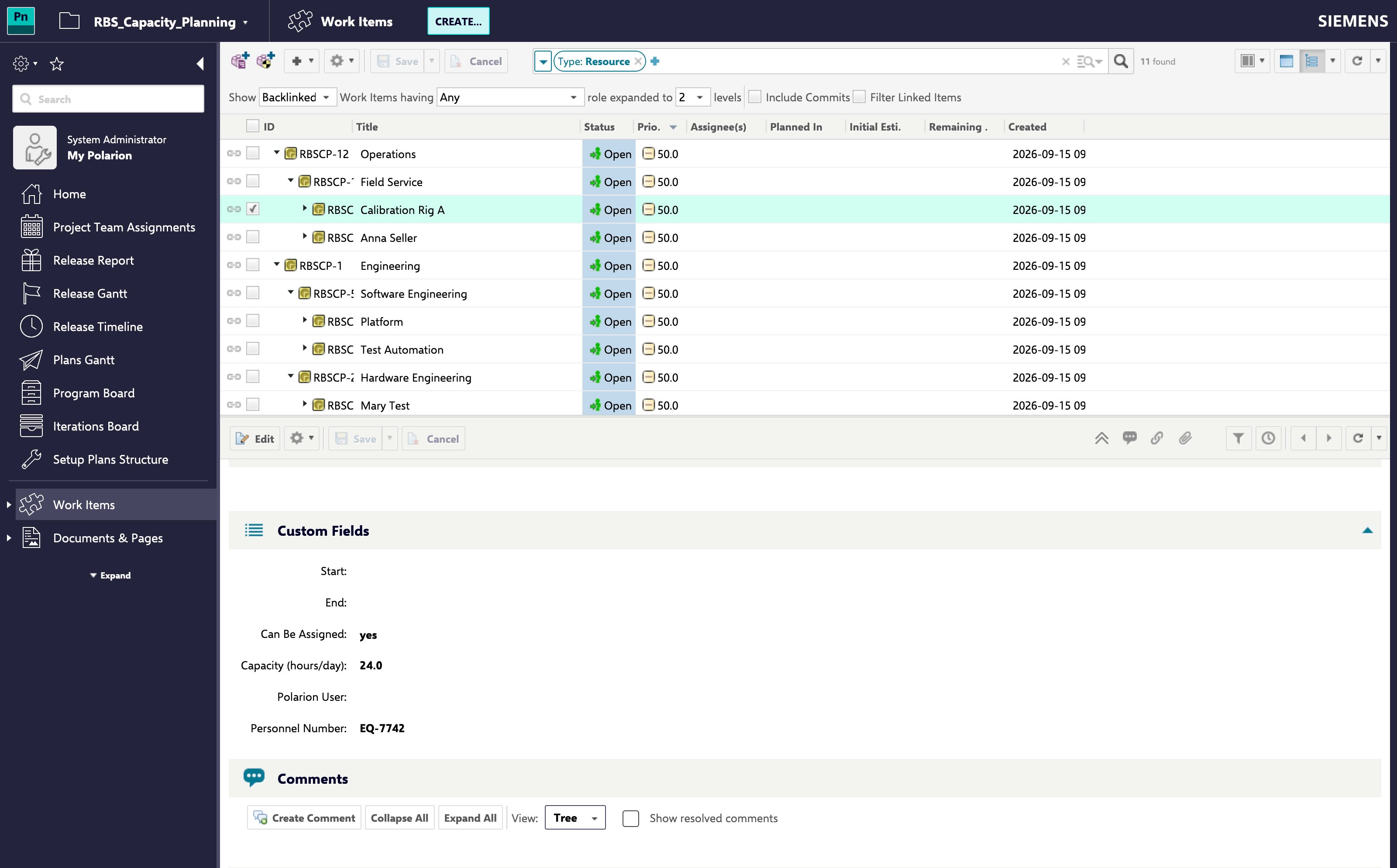 A resource that is not a person -- a rig, a bench, a supplier -- carries no Polarion user at all and is described entirely by this figure.
Open a Gantt whose Team Assignments point at those resources. The declared figure is what the resource row now divides allocation by, so a department carrying 60 hours a day no longer shows as catastrophically overallocated.
## Which Resources the Figure Applies Toich Resources the Figure Applies To
A declared figure does not compete with a working calendar -- it covers the resources that have no calendar to draw onfigure does not compete with a working calendar -- it covers the resources that have no calendar to draw on:
* A resource that **resolves to a Polarion user** takes that user's working calendar, and its declared figure is not read. Filling the field on such a node changes nothingresource that **resolves to a Polarion user** takes that user's working calendar, and its declared figure is not read. Filling the field on such a node changes nothing.
* Every **other** resource -- a department, a rig, a supplier, or a person who carries no identity mapping -- is described byEvery **other** resource -- a department, a rig, a supplier, or a person who carries no identity mapping -- is described by the declared figure.
The rule is the same on screen and in the [Resource Capacity API](/gantt/reference/api/capacity-api), so the two do not disagreeThe rule is the same on screen and in the [Resource Capacity API](/gantt/reference/api/capacity-api), so the two do not disagree.
**Filling the Field on a Mapped Person Has No EffectFilling the Field on a Mapped Person Has No Effect**
Where [identity mapping](/gantt/guides/resources/resource-identity-mapping) resolves a node to a Polarion user, that user's calendar decides their availability. There is no error and no warning -- the figure is simply never read. Change the person's working calendar insteadWhere [identity mapping](/gantt/guides/resources/resource-identity-mapping) resolves a node to a Polarion user, that user's calendar decides their availability. There is no error and no warning -- the figure is simply never read. Change the person's working calendar instead.
## What the Working Calendar Still Decides
For the resources the figure does apply to, the calendar keeps **the shape of the week**:
* A non-working day still carries no capacity, whatever the field says.
* Schedule exceptions, plant holidays and vacations continue to apply on top of the declared figure.
So a department declaring 60 hours a day supplies 60 on each working day and nothing on a weekend or a shutdown.
**Fractions Are Rounded in the Team Calendar**
A declared figure is rounded to whole hours when it is folded into a team's calendar, so 7.5 counts as 8 there. Prefer a whole number where the distinction matters.
## Troubleshooting
| Symptom | Cause | Fix |
| ---------------------------------------------------------- | --------------------------------------------------------------------------------------- | -------------------------------------------------------------------------------------------------------------------------- |
| The resource still uses its working calendar | The resource resolves to a Polarion user, so the user's calendar decides | Expected -- change that user's working calendar, or remove the identity mapping if the node is not meant to be that person |
| The resource still uses its working calendar | `nextedy.gantt.resourceCapacityField` is unset, or the field is empty on that work item | Set the property, and fill the field on the resource |
| The figure is ignored on screen but the API honours it | The unit is `perPeriodAbsolute`, which the resource view does not read | Set the field as a daily figure and leave the unit at `perDay` |
| Capacity looks multiplied when it should not be | The unit is `perDay` but the field holds a whole-period total | Set `nextedy.gantt.resourceCapacityFieldUnit=perPeriodAbsolute` |
| Capacity looks far too small over a month | The unit is `perPeriodAbsolute` but the field holds a daily figure | Remove the unit property, or set it back to `perDay` |
| A resource shows no capacity on days you expect it to work | The working calendar marks those days non-working | Adjust the calendar -- declared capacity does not override a non-working day |
## Verification
| Symptom | Cause | Fix |
| ---------------------------------------------------------- | --------------------------------------------------------------------------------------- | -------------------------------------------------------------------------------------------------------------------------- |
| The resource still uses its working calendar | The resource resolves to a Polarion user, so the user's calendar decides | Expected -- change that user's working calendar, or remove the identity mapping if the node is not meant to be that person |
| The resource still uses its working calendar | `nextedy.gantt.resourceCapacityField` is unset, or the field is empty on that work item | Set the property, and fill the field on the resource |
| The figure is ignored on screen but the API honours it | The unit is `perPeriodAbsolute`, which the resource view does not read | Set the field as a daily figure and leave the unit at `perDay` |
| Capacity looks multiplied when it should not be | The unit is `perDay` but the field holds a whole-period total | Set `nextedy.gantt.resourceCapacityFieldUnit=perPeriodAbsolute` |
| Capacity looks far too small over a month | The unit is `perPeriodAbsolute` but the field holds a daily figure | Remove the unit property, or set it back to `perDay` |
| A resource shows no capacity on days you expect it to work | The working calendar marks those days non-working | Adjust the calendar -- declared capacity does not override a non-working day |
## Verification
You should now see:
* The resource row of a node with no Polarion user behind it dividing allocation by the declared hours rather than by a working calendar's percentage
* Zero capacity on non-working days, holidays and vacations, regardless of the declared figure
* Resources that leave the field empty still following their working calendar
## See Also
* [Resource Breakdown Structure](/gantt/concepts/resource-breakdown-structure)
* [Working Calendars and Scheduling](/gantt/concepts/working-calendars)
* [Customize Working Hours per Resource](/gantt/guides/calendars/working-hours-per-resource)
* [Configure Capacity Modifier Fields](/gantt/guides/calendars/capacity-modifier-fields)
* [Resource Hierarchy and Identity Properties](/gantt/reference/configuration/resource-hierarchy-properties)
A resource that is not a person -- a rig, a bench, a supplier -- carries no Polarion user at all and is described entirely by this figure.
A resource that is not a person -- a rig, a bench, a supplier -- carries no Polarion user at all and is described entirely by this figure.
Open a Gantt whose Team Assignments point at those resources. The declared figure is what the resource row now divides allocation by, so a department carrying 60 hours a day no longer shows as catastrophically overallocated.
## Which Resources the Figure Applies Toich Resources the Figure Applies To
A declared figure does not compete with a working calendar -- it covers the resources that have no calendar to draw onfigure does not compete with a working calendar -- it covers the resources that have no calendar to draw on:
* A resource that **resolves to a Polarion user** takes that user's working calendar, and its declared figure is not read. Filling the field on such a node changes nothingresource that **resolves to a Polarion user** takes that user's working calendar, and its declared figure is not read. Filling the field on such a node changes nothing.
* Every **other** resource -- a department, a rig, a supplier, or a person who carries no identity mapping -- is described byEvery **other** resource -- a department, a rig, a supplier, or a person who carries no identity mapping -- is described by the declared figure.
The rule is the same on screen and in the [Resource Capacity API](/gantt/reference/api/capacity-api), so the two do not disagreeThe rule is the same on screen and in the [Resource Capacity API](/gantt/reference/api/capacity-api), so the two do not disagree.
**Filling the Field on a Mapped Person Has No EffectFilling the Field on a Mapped Person Has No Effect**
Where [identity mapping](/gantt/guides/resources/resource-identity-mapping) resolves a node to a Polarion user, that user's calendar decides their availability. There is no error and no warning -- the figure is simply never read. Change the person's working calendar insteadWhere [identity mapping](/gantt/guides/resources/resource-identity-mapping) resolves a node to a Polarion user, that user's calendar decides their availability. There is no error and no warning -- the figure is simply never read. Change the person's working calendar instead.
## What the Working Calendar Still Decides
For the resources the figure does apply to, the calendar keeps **the shape of the week**:
* A non-working day still carries no capacity, whatever the field says.
* Schedule exceptions, plant holidays and vacations continue to apply on top of the declared figure.
So a department declaring 60 hours a day supplies 60 on each working day and nothing on a weekend or a shutdown.
**Fractions Are Rounded in the Team Calendar**
A declared figure is rounded to whole hours when it is folded into a team's calendar, so 7.5 counts as 8 there. Prefer a whole number where the distinction matters.
## Troubleshooting
| Symptom | Cause | Fix |
| ---------------------------------------------------------- | --------------------------------------------------------------------------------------- | -------------------------------------------------------------------------------------------------------------------------- |
| The resource still uses its working calendar | The resource resolves to a Polarion user, so the user's calendar decides | Expected -- change that user's working calendar, or remove the identity mapping if the node is not meant to be that person |
| The resource still uses its working calendar | `nextedy.gantt.resourceCapacityField` is unset, or the field is empty on that work item | Set the property, and fill the field on the resource |
| The figure is ignored on screen but the API honours it | The unit is `perPeriodAbsolute`, which the resource view does not read | Set the field as a daily figure and leave the unit at `perDay` |
| Capacity looks multiplied when it should not be | The unit is `perDay` but the field holds a whole-period total | Set `nextedy.gantt.resourceCapacityFieldUnit=perPeriodAbsolute` |
| Capacity looks far too small over a month | The unit is `perPeriodAbsolute` but the field holds a daily figure | Remove the unit property, or set it back to `perDay` |
| A resource shows no capacity on days you expect it to work | The working calendar marks those days non-working | Adjust the calendar -- declared capacity does not override a non-working day |
## Verification
| Symptom | Cause | Fix |
| ---------------------------------------------------------- | --------------------------------------------------------------------------------------- | -------------------------------------------------------------------------------------------------------------------------- |
| The resource still uses its working calendar | The resource resolves to a Polarion user, so the user's calendar decides | Expected -- change that user's working calendar, or remove the identity mapping if the node is not meant to be that person |
| The resource still uses its working calendar | `nextedy.gantt.resourceCapacityField` is unset, or the field is empty on that work item | Set the property, and fill the field on the resource |
| The figure is ignored on screen but the API honours it | The unit is `perPeriodAbsolute`, which the resource view does not read | Set the field as a daily figure and leave the unit at `perDay` |
| Capacity looks multiplied when it should not be | The unit is `perDay` but the field holds a whole-period total | Set `nextedy.gantt.resourceCapacityFieldUnit=perPeriodAbsolute` |
| Capacity looks far too small over a month | The unit is `perPeriodAbsolute` but the field holds a daily figure | Remove the unit property, or set it back to `perDay` |
| A resource shows no capacity on days you expect it to work | The working calendar marks those days non-working | Adjust the calendar -- declared capacity does not override a non-working day |
## Verification
You should now see:
* The resource row of a node with no Polarion user behind it dividing allocation by the declared hours rather than by a working calendar's percentage
* Zero capacity on non-working days, holidays and vacations, regardless of the declared figure
* Resources that leave the field empty still following their working calendar
## See Also
* [Resource Breakdown Structure](/gantt/concepts/resource-breakdown-structure)
* [Working Calendars and Scheduling](/gantt/concepts/working-calendars)
* [Customize Working Hours per Resource](/gantt/guides/calendars/working-hours-per-resource)
* [Configure Capacity Modifier Fields](/gantt/guides/calendars/capacity-modifier-fields)
* [Resource Hierarchy and Identity Properties](/gantt/reference/configuration/resource-hierarchy-properties)