> ## Documentation Index
> Fetch the complete documentation index at: https://learn.nextedy.com/llms.txt
> Use this file to discover all available pages before exploring further.
# Workflow Functions and Conditions
> Reference for the workflow functions and workflow conditions that gate Polarion workflow transitions on checklist state — the mechanism behind Definition of Done (DoD) and Definition of Ready (DoR) enforcement.
export const LastReviewed = ({date}) => {
if (!date) return null;
const formatted = new Date(`${date}T00:00:00Z`).toLocaleDateString("en-US", {
year: "numeric",
month: "long",
day: "numeric",
timeZone: "UTC"
});
return
Last reviewed on {formatted}
;
};
Reference for the workflow functions and workflow conditions that gate Polarion workflow transitions on checklist state — the mechanism behind Definition of Done (DoD) and Definition of Ready (DoR) enforcement.
All functions and conditions accept a `checklist` argument identifying which checklist custom field(s) to operate on. Multiple checklists can be validated in a single call by supplying a comma-separated list of custom field IDs.
**Functions vs. conditions**
**Workflow functions** are actions: they execute during a transition and can throw a blocking error, apply a template, or mutate checklist state. **Workflow conditions** are guards: they evaluate to true/false to enable or disable a transition, and can supply a human-readable failure message explaining why a transition is unavailable.
 ## Workflow Functions
Workflow functions are attached to a transition's action list in `workflow.xml`. They execute when the transition runs.
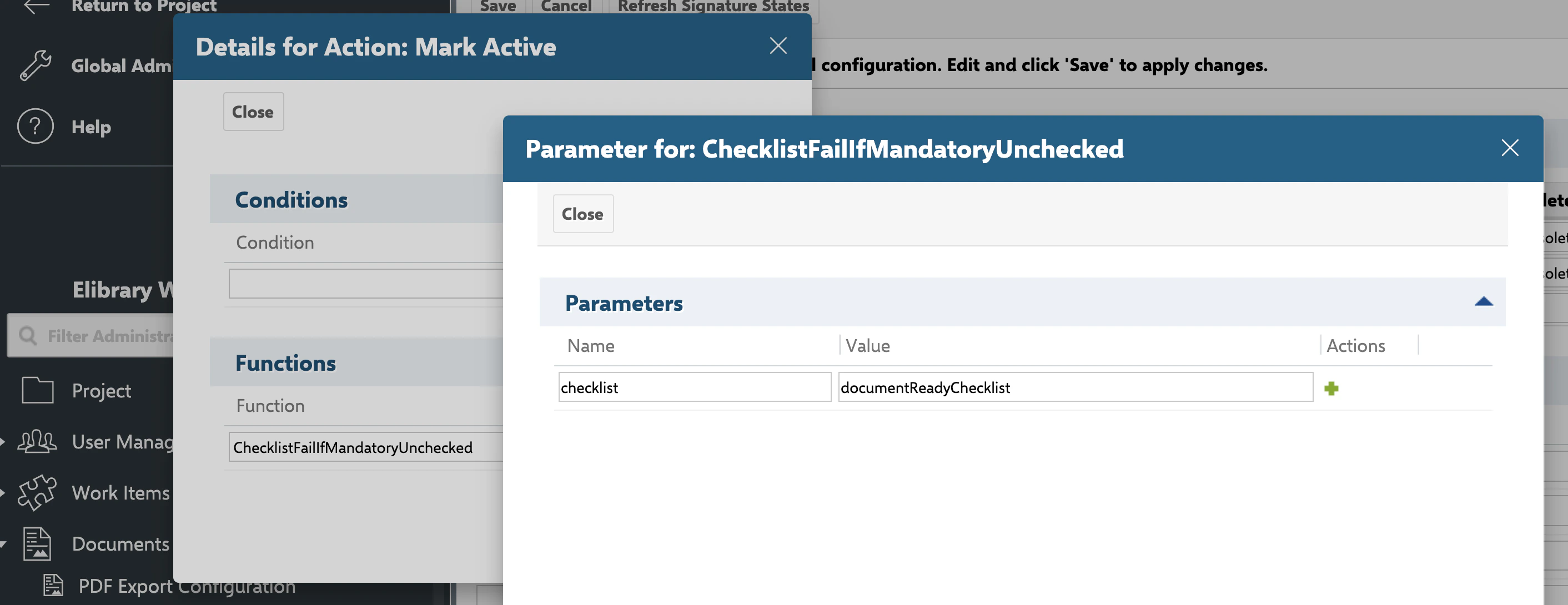
### ChecklistFailIfMandatoryUnchecked
| Field | Value |
| ------------------- | ----------------------------------------------------- |
| Type | Workflow function (`IFunction`) |
| Supported targets | Work item, document (module/LiveDoc), test run |
| Behavior on failure | Throws a user-friendly error, blocking the transition |
**Parameters**
| Name | Type | Required | Default | Description |
| ----------- | ------------------------------------------- | -------- | --------------- | ------------------------------------------------------------------------------------------------------------------------------------------------------------------ |
| `checklist` | `string` (comma-separated custom field IDs) | Yes | See application | Custom field ID(s) of the checklist(s) to validate. Missing this argument throws `checklist attribute missing for wf function: ChecklistFailIfMandatoryUnchecked`. |
Fails the transition if any mandatory item in any specified checklist is not checked. If the checklist's `allMandatory` configuration is enabled (see [Template Configuration Properties](/checklist/reference/configuration/template-properties)), the transition is also blocked unless **every** item is checked, not only mandatory-flagged ones. On failure, the error message names the specific checklist field (its custom field display name) so users can identify which checklist blocked the transition.
```xml theme={null}
dod
```
## Workflow Functions
Workflow functions are attached to a transition's action list in `workflow.xml`. They execute when the transition runs.
### ChecklistFailIfMandatoryUnchecked
| Field | Value |
| ------------------- | ----------------------------------------------------- |
| Type | Workflow function (`IFunction`) |
| Supported targets | Work item, document (module/LiveDoc), test run |
| Behavior on failure | Throws a user-friendly error, blocking the transition |
**Parameters**
| Name | Type | Required | Default | Description |
| ----------- | ------------------------------------------- | -------- | --------------- | ------------------------------------------------------------------------------------------------------------------------------------------------------------------ |
| `checklist` | `string` (comma-separated custom field IDs) | Yes | See application | Custom field ID(s) of the checklist(s) to validate. Missing this argument throws `checklist attribute missing for wf function: ChecklistFailIfMandatoryUnchecked`. |
Fails the transition if any mandatory item in any specified checklist is not checked. If the checklist's `allMandatory` configuration is enabled (see [Template Configuration Properties](/checklist/reference/configuration/template-properties)), the transition is also blocked unless **every** item is checked, not only mandatory-flagged ones. On failure, the error message names the specific checklist field (its custom field display name) so users can identify which checklist blocked the transition.
```xml theme={null}
dod
```
 ### ChecklistFailIfAnyUnchecked
| Field | Value |
| ------------------- | ----------------------------------------------------- |
| Type | Workflow function (`IFunction`) |
| Supported targets | Work item, document (module/LiveDoc), test run |
| Behavior on failure | Throws a user-friendly error, blocking the transition |
**Parameters**
| Name | Type | Required | Default | Description |
| ----------- | ------------------------------------------- | -------- | --------------- | --------------------------------------------------- |
| `checklist` | `string` (comma-separated custom field IDs) | Yes | See application | Custom field ID(s) of the checklist(s) to validate. |
Throws an error if the specified checklist has **any** item not checked (stricter than `ChecklistFailIfMandatoryUnchecked`, which only requires mandatory items).
```xml theme={null}
dor
```
### ChecklistUncheckAll
| Field | Value |
| ----------------- | ------------------------------------------------------------------------------------------------------------------------------------------------------------------------------------------------------------------------------------------------ |
| Type | Workflow function (`IFunction`) |
| Supported targets | Work item, document (module/LiveDoc), test run — confirmed from `context.getTarget()` plus an `instanceof IWorkItem`/`IModule`/`ITestRun` branch below, the same pattern used by the other functions/conditions on this page (no `IPlan` branch) |
| Behavior | Clears the checked/result state of every item in the specified checklist(s) |
**Parameters**
| Name | Type | Required | Default | Description |
| ----------- | ------------------------------------------- | -------- | --------------- | --------------------------------------------------------------------------------------------------------------------------------------------------- |
| `checklist` | `string` (comma-separated custom field IDs) | Yes | See application | Custom field ID(s) of the checklist(s) to uncheck. Missing this argument throws `checklist attribute missing for wf function: ChecklistUncheckAll`. |
Unchecks all checklist items, clearing their result state so the checklist reads as not checked, without removing the item definitions themselves.
```xml theme={null}
dod,dor
```
Underlying implementation (for reference — resolves and stores the checklist via the checklist service, once per supported target type):
```java theme={null}
public void execute(ICallContext context, IArguments arguments) {
String chlField = arguments.getAsString("checklist");
if (chlField == null) {
throw new RuntimeException("checklist attribute missing for wf function: ChecklistUncheckAll ");
}
IWorkflowObject workflowObject = context.getTarget();
if (workflowObject instanceof IWorkItem) {
IWorkItem wi = (IWorkItem) workflowObject;
String[] fields = chlField.split(",");
for (int i = 0; i < fields.length; i++) {
Checklist chl = checklistService.parse(wi, fields[i]);
chl.uncheckAll();
checklistService.store(chl, wi, fields[i]);
}
}
if (workflowObject instanceof IModule) {
IModule module = (IModule) workflowObject;
String[] fields = chlField.split(",");
for (int i = 0; i < fields.length; i++) {
Checklist chl = checklistService.parse(module, fields[i]);
chl.uncheckAll();
checklistService.store(chl, module, fields[i]);
}
}
if (workflowObject instanceof ITestRun) {
ITestRun testRun = (ITestRun) workflowObject;
String[] fields = chlField.split(",");
for (int i = 0; i < fields.length; i++) {
Checklist chl = checklistService.parse(testRun, fields[i]);
chl.uncheckAll();
checklistService.store(chl, testRun, fields[i]);
}
}
}
```
### ChecklistResetToTemplate
| Field | Value |
| ----------------- | ---------------------------------------------------------------------------- |
| Type | Workflow function (`IFunction`) |
| Supported targets | Work item, document (module/LiveDoc), test run |
| Behavior | Destructive — replaces current checklist content with the template's content |
**Parameters**
| Name | Type | Required | Default | Description |
| -------------- | ------------------------------------------- | -------- | ------------------------------------- | -------------------------------------------------------------------------------------------------------------------------------------------------------------------------------------------------------------------------------------------------------------------------------------- |
| `checklist` | `string` (comma-separated custom field IDs) | Yes | See application | Custom field ID(s) of the checklist(s) to reset. |
| `skipForUsers` | `string` (comma-separated user IDs) | No | *(unset — reset applies to everyone)* | User IDs for whom the reset is **skipped**: if the user triggering the transition is in this list, the function returns without resetting. Entries are trimmed and empty entries ignored; a malformed value fails open (the reset proceeds). Available from Checklist version 25.10.0. |
Resets the checklist to the state defined by its template, removing all local additions and discarding any recorded progress.
```xml theme={null}
dod
```
**Init-action workaround for built-in Polarion templates**
Adding `ChecklistResetToTemplate` to a work item type's **init** action, with the `checklist` parameter set to the checklist field name, is the documented workaround for a Polarion platform bug that corrupts checklist field formatting when Polarion's own built-in item templates are used. See [Template Configuration Properties](/checklist/reference/configuration/template-properties) for the full workaround procedure.
### ChecklistApplyTemplate
| Field | Value |
| ----------------- | ------------------------------------------------------------- |
| Type | Workflow function (`IFunction`) |
| Supported targets | Work item, document (module/LiveDoc), test run |
| Lifecycle | Executes as an action during a transition, not as a condition |
**Parameters**
| Name | Type | Required | Default | Description |
| ----------- | ------------------------------------------- | -------- | --------------- | -------------------------------------------------------------------------------------------------------------------------------------------- |
| `checklist` | `string` (comma-separated custom field IDs) | Yes | See application | Custom field ID(s) that should have their checklist template (re)applied. A missing value throws a configuration error when the action runs. |
Applies the configured checklist template to the specified checklist field(s) on the target object by re-parsing the field (which merges the template into whatever content is already stored) and immediately saving the result.
```xml theme={null}
dod
```
**Merge semantics confirmed — not destructive**
Confirmed directly from `IChecklistService.applyTempate`'s implementation (`store(parse(target, field), target, field)`): calling `ChecklistApplyTemplate` on a field that already has data does **not** discard existing progress. It performs the same merge-on-parse behavior as a normal read (see [Template Merge Behavior](/checklist/reference/configuration/template-properties)) — items matched by id keep their recorded result, while label/mandatory/description are refreshed from the template — then persists that merged result. This is distinct from `ChecklistResetToTemplate` above, which discards all existing content unconditionally.
## Workflow Conditions
Workflow conditions are attached to a transition's condition list. They evaluate to true/false and can gate whether the transition is even offered to the user.
### ChecklistAllChecked
| Field | Value |
| ----------------- | ------------------------------------------------------------------ |
| Type | Workflow condition |
| Supported targets | Work item, document (module/LiveDoc), test run |
| Behavior | Enables the transition only if the checklist has all items checked |
**Parameters**
| Name | Type | Required | Default | Description |
| ----------- | ------------------------------------------- | -------- | --------------- | --------------------------------------------------- |
| `checklist` | `string` (comma-separated custom field IDs) | Yes | See application | Custom field ID(s) of the checklist(s) to evaluate. |
```xml theme={null}
dor
```
### ChecklistMandatoryChecked
| Field | Value |
| ----------------- | ------------------------------------------------------------------------------- |
| Type | Workflow condition |
| Supported targets | Work item, document (module/LiveDoc), test run |
| Behavior | Enables the transition only if all mandatory items in the checklist are checked |
**Parameters**
| Name | Type | Required | Default | Description |
| ----------- | ------------------------------------------- | -------- | --------------- | ----------------------------------------------------------------------------------------------------------------------------------------------------------- |
| `checklist` | `string` (comma-separated custom field IDs) | Yes | See application | Custom field ID(s) of the checklist(s) to evaluate. Missing this argument throws `checklist attribute missing for wf condition: ChecklistMandatoryChecked`. |
If the checklist's `allMandatory` configuration is enabled, this condition requires **all** items to be checked, not only mandatory-flagged ones — matching the corresponding behavior of `ChecklistFailIfMandatoryUnchecked`.
```xml theme={null}
dod
```
**User-visible failure messages**
`ChecklistMandatoryChecked` (and conditions like it) can supply a human-readable message naming the incomplete checklist, which Polarion surfaces as a tooltip/explanation on a disabled transition button.
## Practical Example — DoD Gate on Transition to "Done"
```xml theme={null}
dod
dod
```
Combining a condition and a function for the same checklist is a common pattern: the condition hides/disables the transition in the UI until the gate is satisfied, while the function provides a hard server-side guarantee in case the transition is triggered through another path (for example, the REST API).
## Comma-Separated Multi-Checklist Syntax
All functions and conditions on this page accept more than one checklist field by comma-separating custom field IDs in the `checklist` argument:
```text theme={null}
nextedy.checklist multi-field argument example:
checklist=dod,dor,reviewChecklist
```
Each listed checklist field is evaluated independently; for functions, all specified checklists must satisfy the required condition (for example, all-mandatory-checked) for the function to succeed without error.
## Accessing Checklist State Programmatically
Workflow functions and conditions are built on the same checklist service accessible from custom Java code:
```java theme={null}
PlatformContext.getPlatform().lookupService(IChecklistService.class);
```
This is the same access pattern used internally by `ChecklistUncheckAll` and the other built-in functions on this page, and is the documented path for writing **custom** workflow functions or conditions — for example, to check that all checklist questions are answered as either ok or not-ok, since no predefined function currently covers that specific gate. See [IChecklistService and Velocity Rendering API](/checklist/reference/api-service) for the full service reference and additional code examples (parsing a checklist field, reading `ChecklistItem.checked`/`label`, and calling `reset()` from a custom function).
**Known limitation — no built-in 'all answered ok or not-ok' condition**
There is no predefined workflow function or condition that verifies every checklist item has been answered as either ok or not-ok (as distinct from "checked at all"). Achieving this currently requires a custom scripted function or condition written against `IChecklistService`.
## Related Configuration
* [Template Configuration Properties](/checklist/reference/configuration/template-properties) — `workItemTemplateId`, `documentTemplateId`, and `allMandatory`, which interact with `ChecklistApplyTemplate` and `ChecklistResetToTemplate`.
* [Permission, Freeze, and Read-Only Properties](/checklist/reference/configuration/permission-and-freeze-properties) — `adminPermission` properties controlling who can edit checklist structure, distinct from workflow gating.
* [IChecklistService and Velocity Rendering API](/checklist/reference/api-service) — the underlying service API used both internally by these functions and for custom scripting.
* [Checklist, ChecklistItem, and CheckItemResult](/checklist/reference/api-model) — the data model these functions operate on.
* [Summary Field Reference](/checklist/reference/summary-field) — how checklist completion is aggregated for reporting outside of workflow gates.
**KB Articles**
* IChecklistService API Documentation
* Checklist workflow functions and conditions
* How to create checklist template?
**Support Tickets**
* [#6706](https://support.nextedy.com/helpdesk/tickets/6706)
* [#187](https://support.nextedy.com/helpdesk/tickets/187)
* [#5912](https://support.nextedy.com/helpdesk/tickets/5912)
**Source Code**
* `proc-checklist-src/com.nextedy.polarion.checklist/src/com/nextedy/polarion/checklist/internal/ChecklistFormExtension.java`
* `proc-checklist-src/com.nextedy.polarion.checklist/src/com/nextedy/polarion/checklist/wf/ChecklistApplyTemplate.java`
* `proc-checklist-src/com.nextedy.polarion.checklist/src/com/nextedy/polarion/checklist/Checklist.java`
* `proc-checklist-src/com.nextedy.polarion.checklist/src/com/nextedy/polarion/checklist/wf/ChecklistFailIfMandatoryUnchecked.java`
* `proc-checklist-src/com.nextedy.polarion.checklist/src/com/nextedy/polarion/checklist/wf/ChecklistFailIfAnyUnchecked.java`
* `proc-checklist-src/com.nextedy.polarion.checklist/src/com/nextedy/polarion/checklist/wf/ChecklistUncheckAll.java`
* `proc-checklist-src/com.nextedy.polarion.checklist/src/com/nextedy/polarion/checklist/wf/ChecklistResetToTemplate.java`
* `proc-checklist-src/com.nextedy.polarion.checklist/src/com/nextedy/polarion/checklist/wf/ChecklistAllChecked.java`
* `proc-checklist-src/com.nextedy.polarion.checklist/src/com/nextedy/polarion/checklist/wf/ChecklistMandatoryChecked.java`
* `proc-checklist-src/com.nextedy.polarion.checklist/src/com/nextedy/polarion/checklist/internal/ChecklistService.java`
### ChecklistFailIfAnyUnchecked
| Field | Value |
| ------------------- | ----------------------------------------------------- |
| Type | Workflow function (`IFunction`) |
| Supported targets | Work item, document (module/LiveDoc), test run |
| Behavior on failure | Throws a user-friendly error, blocking the transition |
**Parameters**
| Name | Type | Required | Default | Description |
| ----------- | ------------------------------------------- | -------- | --------------- | --------------------------------------------------- |
| `checklist` | `string` (comma-separated custom field IDs) | Yes | See application | Custom field ID(s) of the checklist(s) to validate. |
Throws an error if the specified checklist has **any** item not checked (stricter than `ChecklistFailIfMandatoryUnchecked`, which only requires mandatory items).
```xml theme={null}
dor
```
### ChecklistUncheckAll
| Field | Value |
| ----------------- | ------------------------------------------------------------------------------------------------------------------------------------------------------------------------------------------------------------------------------------------------ |
| Type | Workflow function (`IFunction`) |
| Supported targets | Work item, document (module/LiveDoc), test run — confirmed from `context.getTarget()` plus an `instanceof IWorkItem`/`IModule`/`ITestRun` branch below, the same pattern used by the other functions/conditions on this page (no `IPlan` branch) |
| Behavior | Clears the checked/result state of every item in the specified checklist(s) |
**Parameters**
| Name | Type | Required | Default | Description |
| ----------- | ------------------------------------------- | -------- | --------------- | --------------------------------------------------------------------------------------------------------------------------------------------------- |
| `checklist` | `string` (comma-separated custom field IDs) | Yes | See application | Custom field ID(s) of the checklist(s) to uncheck. Missing this argument throws `checklist attribute missing for wf function: ChecklistUncheckAll`. |
Unchecks all checklist items, clearing their result state so the checklist reads as not checked, without removing the item definitions themselves.
```xml theme={null}
dod,dor
```
Underlying implementation (for reference — resolves and stores the checklist via the checklist service, once per supported target type):
```java theme={null}
public void execute(ICallContext context, IArguments arguments) {
String chlField = arguments.getAsString("checklist");
if (chlField == null) {
throw new RuntimeException("checklist attribute missing for wf function: ChecklistUncheckAll ");
}
IWorkflowObject workflowObject = context.getTarget();
if (workflowObject instanceof IWorkItem) {
IWorkItem wi = (IWorkItem) workflowObject;
String[] fields = chlField.split(",");
for (int i = 0; i < fields.length; i++) {
Checklist chl = checklistService.parse(wi, fields[i]);
chl.uncheckAll();
checklistService.store(chl, wi, fields[i]);
}
}
if (workflowObject instanceof IModule) {
IModule module = (IModule) workflowObject;
String[] fields = chlField.split(",");
for (int i = 0; i < fields.length; i++) {
Checklist chl = checklistService.parse(module, fields[i]);
chl.uncheckAll();
checklistService.store(chl, module, fields[i]);
}
}
if (workflowObject instanceof ITestRun) {
ITestRun testRun = (ITestRun) workflowObject;
String[] fields = chlField.split(",");
for (int i = 0; i < fields.length; i++) {
Checklist chl = checklistService.parse(testRun, fields[i]);
chl.uncheckAll();
checklistService.store(chl, testRun, fields[i]);
}
}
}
```
### ChecklistResetToTemplate
| Field | Value |
| ----------------- | ---------------------------------------------------------------------------- |
| Type | Workflow function (`IFunction`) |
| Supported targets | Work item, document (module/LiveDoc), test run |
| Behavior | Destructive — replaces current checklist content with the template's content |
**Parameters**
| Name | Type | Required | Default | Description |
| -------------- | ------------------------------------------- | -------- | ------------------------------------- | -------------------------------------------------------------------------------------------------------------------------------------------------------------------------------------------------------------------------------------------------------------------------------------- |
| `checklist` | `string` (comma-separated custom field IDs) | Yes | See application | Custom field ID(s) of the checklist(s) to reset. |
| `skipForUsers` | `string` (comma-separated user IDs) | No | *(unset — reset applies to everyone)* | User IDs for whom the reset is **skipped**: if the user triggering the transition is in this list, the function returns without resetting. Entries are trimmed and empty entries ignored; a malformed value fails open (the reset proceeds). Available from Checklist version 25.10.0. |
Resets the checklist to the state defined by its template, removing all local additions and discarding any recorded progress.
```xml theme={null}
dod
```
**Init-action workaround for built-in Polarion templates**
Adding `ChecklistResetToTemplate` to a work item type's **init** action, with the `checklist` parameter set to the checklist field name, is the documented workaround for a Polarion platform bug that corrupts checklist field formatting when Polarion's own built-in item templates are used. See [Template Configuration Properties](/checklist/reference/configuration/template-properties) for the full workaround procedure.
### ChecklistApplyTemplate
| Field | Value |
| ----------------- | ------------------------------------------------------------- |
| Type | Workflow function (`IFunction`) |
| Supported targets | Work item, document (module/LiveDoc), test run |
| Lifecycle | Executes as an action during a transition, not as a condition |
**Parameters**
| Name | Type | Required | Default | Description |
| ----------- | ------------------------------------------- | -------- | --------------- | -------------------------------------------------------------------------------------------------------------------------------------------- |
| `checklist` | `string` (comma-separated custom field IDs) | Yes | See application | Custom field ID(s) that should have their checklist template (re)applied. A missing value throws a configuration error when the action runs. |
Applies the configured checklist template to the specified checklist field(s) on the target object by re-parsing the field (which merges the template into whatever content is already stored) and immediately saving the result.
```xml theme={null}
dod
```
**Merge semantics confirmed — not destructive**
Confirmed directly from `IChecklistService.applyTempate`'s implementation (`store(parse(target, field), target, field)`): calling `ChecklistApplyTemplate` on a field that already has data does **not** discard existing progress. It performs the same merge-on-parse behavior as a normal read (see [Template Merge Behavior](/checklist/reference/configuration/template-properties)) — items matched by id keep their recorded result, while label/mandatory/description are refreshed from the template — then persists that merged result. This is distinct from `ChecklistResetToTemplate` above, which discards all existing content unconditionally.
## Workflow Conditions
Workflow conditions are attached to a transition's condition list. They evaluate to true/false and can gate whether the transition is even offered to the user.
### ChecklistAllChecked
| Field | Value |
| ----------------- | ------------------------------------------------------------------ |
| Type | Workflow condition |
| Supported targets | Work item, document (module/LiveDoc), test run |
| Behavior | Enables the transition only if the checklist has all items checked |
**Parameters**
| Name | Type | Required | Default | Description |
| ----------- | ------------------------------------------- | -------- | --------------- | --------------------------------------------------- |
| `checklist` | `string` (comma-separated custom field IDs) | Yes | See application | Custom field ID(s) of the checklist(s) to evaluate. |
```xml theme={null}
dor
```
### ChecklistMandatoryChecked
| Field | Value |
| ----------------- | ------------------------------------------------------------------------------- |
| Type | Workflow condition |
| Supported targets | Work item, document (module/LiveDoc), test run |
| Behavior | Enables the transition only if all mandatory items in the checklist are checked |
**Parameters**
| Name | Type | Required | Default | Description |
| ----------- | ------------------------------------------- | -------- | --------------- | ----------------------------------------------------------------------------------------------------------------------------------------------------------- |
| `checklist` | `string` (comma-separated custom field IDs) | Yes | See application | Custom field ID(s) of the checklist(s) to evaluate. Missing this argument throws `checklist attribute missing for wf condition: ChecklistMandatoryChecked`. |
If the checklist's `allMandatory` configuration is enabled, this condition requires **all** items to be checked, not only mandatory-flagged ones — matching the corresponding behavior of `ChecklistFailIfMandatoryUnchecked`.
```xml theme={null}
dod
```
**User-visible failure messages**
`ChecklistMandatoryChecked` (and conditions like it) can supply a human-readable message naming the incomplete checklist, which Polarion surfaces as a tooltip/explanation on a disabled transition button.
## Practical Example — DoD Gate on Transition to "Done"
```xml theme={null}
dod
dod
```
Combining a condition and a function for the same checklist is a common pattern: the condition hides/disables the transition in the UI until the gate is satisfied, while the function provides a hard server-side guarantee in case the transition is triggered through another path (for example, the REST API).
## Comma-Separated Multi-Checklist Syntax
All functions and conditions on this page accept more than one checklist field by comma-separating custom field IDs in the `checklist` argument:
```text theme={null}
nextedy.checklist multi-field argument example:
checklist=dod,dor,reviewChecklist
```
Each listed checklist field is evaluated independently; for functions, all specified checklists must satisfy the required condition (for example, all-mandatory-checked) for the function to succeed without error.
## Accessing Checklist State Programmatically
Workflow functions and conditions are built on the same checklist service accessible from custom Java code:
```java theme={null}
PlatformContext.getPlatform().lookupService(IChecklistService.class);
```
This is the same access pattern used internally by `ChecklistUncheckAll` and the other built-in functions on this page, and is the documented path for writing **custom** workflow functions or conditions — for example, to check that all checklist questions are answered as either ok or not-ok, since no predefined function currently covers that specific gate. See [IChecklistService and Velocity Rendering API](/checklist/reference/api-service) for the full service reference and additional code examples (parsing a checklist field, reading `ChecklistItem.checked`/`label`, and calling `reset()` from a custom function).
**Known limitation — no built-in 'all answered ok or not-ok' condition**
There is no predefined workflow function or condition that verifies every checklist item has been answered as either ok or not-ok (as distinct from "checked at all"). Achieving this currently requires a custom scripted function or condition written against `IChecklistService`.
## Related Configuration
* [Template Configuration Properties](/checklist/reference/configuration/template-properties) — `workItemTemplateId`, `documentTemplateId`, and `allMandatory`, which interact with `ChecklistApplyTemplate` and `ChecklistResetToTemplate`.
* [Permission, Freeze, and Read-Only Properties](/checklist/reference/configuration/permission-and-freeze-properties) — `adminPermission` properties controlling who can edit checklist structure, distinct from workflow gating.
* [IChecklistService and Velocity Rendering API](/checklist/reference/api-service) — the underlying service API used both internally by these functions and for custom scripting.
* [Checklist, ChecklistItem, and CheckItemResult](/checklist/reference/api-model) — the data model these functions operate on.
* [Summary Field Reference](/checklist/reference/summary-field) — how checklist completion is aggregated for reporting outside of workflow gates.
**KB Articles**
* IChecklistService API Documentation
* Checklist workflow functions and conditions
* How to create checklist template?
**Support Tickets**
* [#6706](https://support.nextedy.com/helpdesk/tickets/6706)
* [#187](https://support.nextedy.com/helpdesk/tickets/187)
* [#5912](https://support.nextedy.com/helpdesk/tickets/5912)
**Source Code**
* `proc-checklist-src/com.nextedy.polarion.checklist/src/com/nextedy/polarion/checklist/internal/ChecklistFormExtension.java`
* `proc-checklist-src/com.nextedy.polarion.checklist/src/com/nextedy/polarion/checklist/wf/ChecklistApplyTemplate.java`
* `proc-checklist-src/com.nextedy.polarion.checklist/src/com/nextedy/polarion/checklist/Checklist.java`
* `proc-checklist-src/com.nextedy.polarion.checklist/src/com/nextedy/polarion/checklist/wf/ChecklistFailIfMandatoryUnchecked.java`
* `proc-checklist-src/com.nextedy.polarion.checklist/src/com/nextedy/polarion/checklist/wf/ChecklistFailIfAnyUnchecked.java`
* `proc-checklist-src/com.nextedy.polarion.checklist/src/com/nextedy/polarion/checklist/wf/ChecklistUncheckAll.java`
* `proc-checklist-src/com.nextedy.polarion.checklist/src/com/nextedy/polarion/checklist/wf/ChecklistResetToTemplate.java`
* `proc-checklist-src/com.nextedy.polarion.checklist/src/com/nextedy/polarion/checklist/wf/ChecklistAllChecked.java`
* `proc-checklist-src/com.nextedy.polarion.checklist/src/com/nextedy/polarion/checklist/wf/ChecklistMandatoryChecked.java`
* `proc-checklist-src/com.nextedy.polarion.checklist/src/com/nextedy/polarion/checklist/internal/ChecklistService.java`