> ## Documentation Index
> Fetch the complete documentation index at: https://learn.nextedy.com/llms.txt
> Use this file to discover all available pages before exploring further.
# Summary Field Reference
> Documentation for the summary field, a custom field that holds a rendered snapshot of checklist completion, computed automatically on every save.
export const LastReviewed = ({date}) => {
if (!date) return null;
const formatted = new Date(`${date}T00:00:00Z`).toLocaleDateString("en-US", {
year: "numeric",
month: "long",
day: "numeric",
timeZone: "UTC"
});
return
Last reviewed on {formatted}
;
};
Documentation for the summary field, a custom field that holds a rendered snapshot of checklist completion, computed automatically on every save.
 ## Purpose
A summary field is a separate custom field that holds the completion state of a checklist (for example, a count of checked vs. total mandatory items), so that checklist status can be shown or queried without opening the checklist itself.
## Setup
Setting up a summary field is optional and requires three steps.
### Step 1 — Create the summary custom field
| Name | Type | Default | Description |
| ----------------- | ------------------------------------------ | ------- | ------------------------------------------------------------------------------------- |
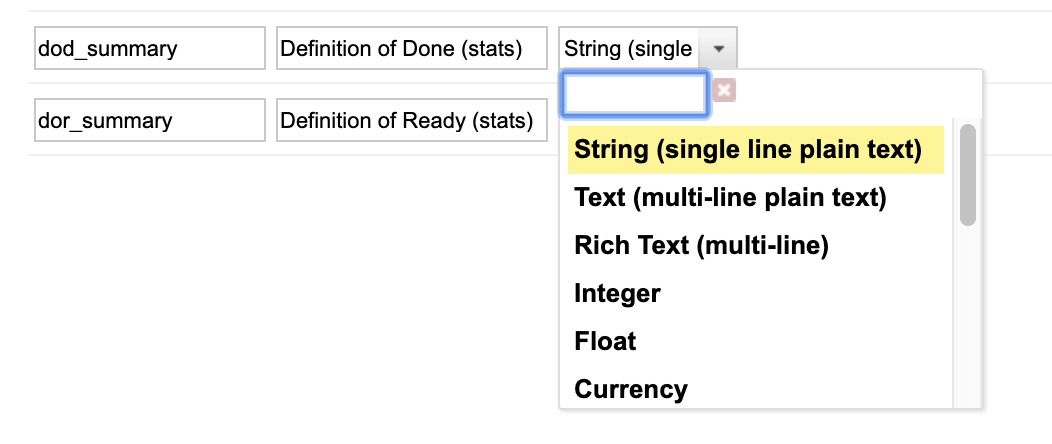
| Custom field ID | Naming convention: `_summary` | n/a | If the checklist custom field is `dod`, the summary field's ID must be `dod_summary`. |
| Custom field type | `String (single line plain text)` | n/a | Must be a single-line string field, not multi-line text. |
## Purpose
A summary field is a separate custom field that holds the completion state of a checklist (for example, a count of checked vs. total mandatory items), so that checklist status can be shown or queried without opening the checklist itself.
## Setup
Setting up a summary field is optional and requires three steps.
### Step 1 — Create the summary custom field
| Name | Type | Default | Description |
| ----------------- | ------------------------------------------ | ------- | ------------------------------------------------------------------------------------- |
| Custom field ID | Naming convention: `_summary` | n/a | If the checklist custom field is `dod`, the summary field's ID must be `dod_summary`. |
| Custom field type | `String (single line plain text)` | n/a | Must be a single-line string field, not multi-line text. |

 ### Step 2 — Make the field read-only
The summary field must be made read-only using the read-only fields configuration page, not via permissions.
**Use the read-only fields configuration, not permissions**
The source material distinguishes these two mechanisms explicitly. The summary field's value is computed by the save hook and must not be user-editable, and the supported way to enforce that is the dedicated read-only fields configuration page.
### Step 3 — Enable summary calculation via configuration property
| Name | Type | Default | Description |
| ---------------------------------------------------- | ----------------------------------------------- | -------------------------------------------------------- | ------------------------------------------------------------------------------------------------------------------------------------------------------------------------------ |
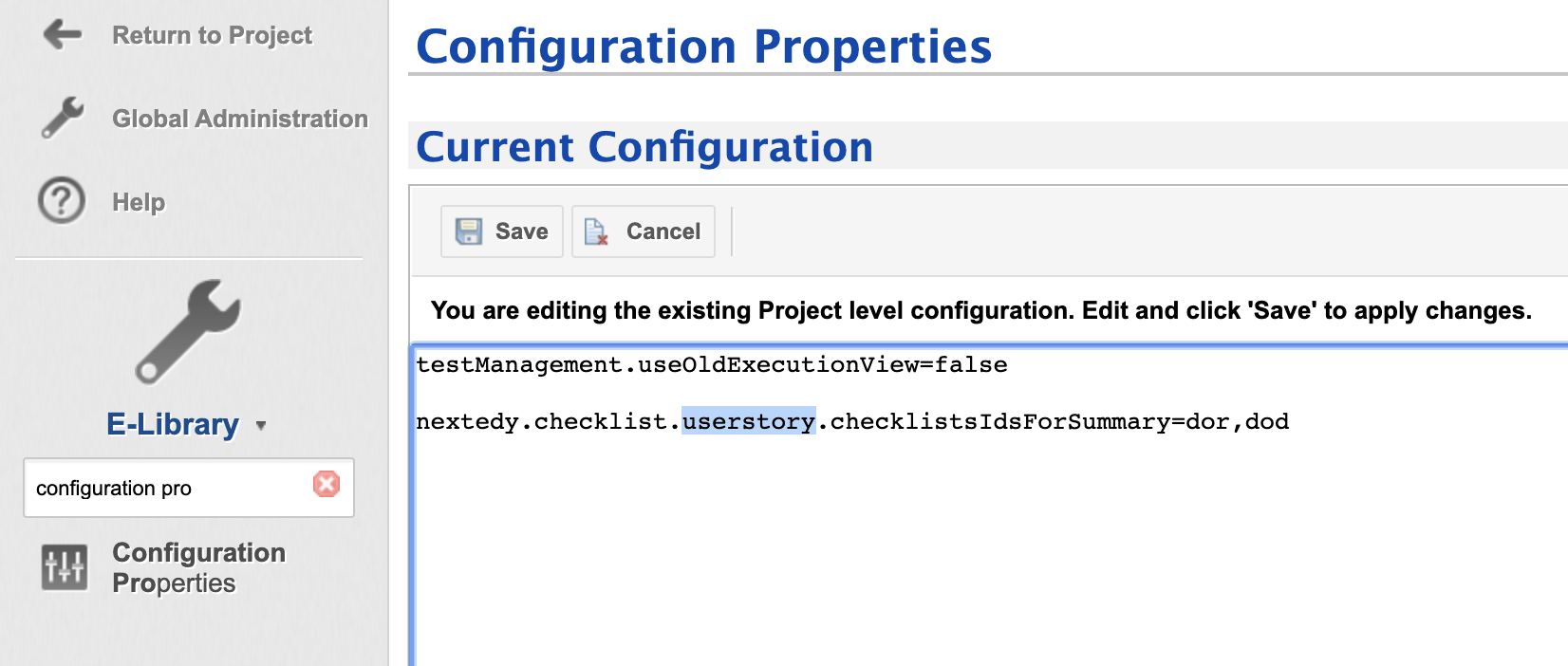
| `nextedy.checklist._TYPEID_.checklistsIdsForSummary` | Configuration property (comma-separated string) | `""` (empty — no checklists summarized until configured) | Mandatory to enable summary computation. Lists which checklist field IDs should be summarized for this work item type. Set via **Project Administration > Config Properties**. |
Example, for the `userstory` work item type summarizing the `dor` checklist:
```properties theme={null}
nextedy.checklist.userstory.checklistsIdsForSummary=dor
```
### Step 2 — Make the field read-only
The summary field must be made read-only using the read-only fields configuration page, not via permissions.
**Use the read-only fields configuration, not permissions**
The source material distinguishes these two mechanisms explicitly. The summary field's value is computed by the save hook and must not be user-editable, and the supported way to enforce that is the dedicated read-only fields configuration page.
### Step 3 — Enable summary calculation via configuration property
| Name | Type | Default | Description |
| ---------------------------------------------------- | ----------------------------------------------- | -------------------------------------------------------- | ------------------------------------------------------------------------------------------------------------------------------------------------------------------------------ |
| `nextedy.checklist._TYPEID_.checklistsIdsForSummary` | Configuration property (comma-separated string) | `""` (empty — no checklists summarized until configured) | Mandatory to enable summary computation. Lists which checklist field IDs should be summarized for this work item type. Set via **Project Administration > Config Properties**. |
Example, for the `userstory` work item type summarizing the `dor` checklist:
```properties theme={null}
nextedy.checklist.userstory.checklistsIdsForSummary=dor
```
 **One entry per checklist field ID**
List each distinct checklist field ID you want summarized, separated by commas (for example `dor,dod` to summarize two checklists on the same type). An earlier KB example listed the same ID twice (`dor,dor`); the property does not deduplicate values, so repeating an ID has no effect beyond redundancy.
## How the summary is computed
Summary computation happens automatically on every save of the work item, via a save hook that intercepts persistence.
| Name | Type | Default | Description |
| ------------------------------- | ------------------ | ---------- | ------------------------------------------------------------------------------------------------------------------------------------------------------------------------------------------------------------------ |
| Summary field suffix convention | Naming convention | `_summary` | Every checklist field with summary calculation enabled gets its computed value written to a same-named field with a `_summary` suffix. |
| Computation trigger | Automatic, on save | n/a | The summary value is recomputed and stored every time the work item is saved. No manual recalculation step is needed. |
| Error handling | See application | n/a | If summary computation (or the type-change reset check below) throws, the error is logged but the save still completes — the save hook's own processing runs in a `try`/`finally` around the underlying save call. |
**Automatic reset on type change — only for checklists listed in checklistsIdsForTypeChanges**
When a work item's type changes and the previously saved revision had a different type, the save hook resets (clears) any checklist field that both (a) currently holds data and (b) is listed in `nextedy.checklist._TYPEID_.checklistsIdsForTypeChanges` for the work item's type (see [Property Hierarchy and Precedence Reference](/checklist/reference/configuration/property-hierarchy-reference#type-scoped-property-checklistsidsfortypechanges)) — not every checklist field on the work item unconditionally. This prevents checklist state from a prior type from lingering after a type change.
## Advanced — disabling summary and save-hook processing
| Name | Type | Default | Description |
| -------------------------------- | ----------------------------- | ------- | --------------------------------------------------------------------------------------------------------------------------------------------------------------------------------------------------------------------------------------------------------------------------- |
| `nextedy.checklist.disable.hook` | JVM system property (Boolean) | `false` | When set to `true`, disables all checklist save-hook processing, including summary field computation and reset-on-type-change, globally. Must be set as a JVM system property, not a Polarion project configuration property, and requires a server restart to take effect. |
**Server-wide, not per-project**
This property is not scoped to a project or work item type. It is a JVM-level switch affecting checklist save-hook behavior across the entire server. Use only for troubleshooting or advanced administrative scenarios.
## Reporting and export limitations
Ticket insights document recurring requests to surface checklist completion outside the individual work item, in LiveReport tables, dashboards, or exports, without a confirmed built-in mechanism beyond the summary field itself.
**Limitations confirmed by support tickets**
* Users evaluating Checklist for demos have asked for a way to get checklist item counts and status into a report or table without opening each work item individually. The summary field, once configured per the steps above, is the confirmed mechanism for this: it is a normal custom field and can be added as a column or field like any other work item field.
* Separately, users have asked to visualize progress (for example `1/7 completed`) in a LiveReport page and to query individual item checked-state via Velocity. There is no confirmed native LiveReport table-field integration for per-item checked-state. The confirmed approach is scripting against `IChecklistService.parse()` in a Velocity block on the LiveReport or wiki page. See [IChecklistService and Velocity Rendering API](/checklist/reference/api-service).
* Whether the summary counter shown at the top of the checklist form extension itself, as opposed to the `_summary` custom field, can be surfaced via reporting, columns, or export is not currently supported based on available evidence.
## Summary field vs. Velocity scripting
| Approach | Best for | Limitation |
| -------------------------------------------------- | ------------------------------------------------------------------------------------------------------------------------- | ------------------------------------------------------------------------------------------------ |
| Summary field (`_summary` custom field) | Showing checklist completion as a normal field or column value, usable in tables and standard reports without scripting | Only reflects whatever text the save hook renders into the field, not a live, per-item breakdown |
| Velocity scripting via `$checklistService.parse()` | Per-item checked-state, custom progress formatting (for example `X/Y completed`), or logic beyond a static summary string | Requires a LiveReport or wiki page with a Velocity script block, not a plain table column |
## See also
* [Checklist, ChecklistItem, and CheckItemResult](/checklist/reference/api-model) — the `getSummaryText()` method and `summaryMessageFormat` tokens underlying summary rendering.
* [IChecklistService and Velocity Rendering API](/checklist/reference/api-service) — scripting access for per-item progress not covered by the summary field.
* [Template Configuration Properties](/checklist/reference/configuration/template-properties) — related configuration property hierarchy.
**KB Articles**
* IChecklistService API Documentation
* Checklist workflow functions and conditions
* Setup new Work Items checklist
**Support Tickets**
* [#6706](https://support.nextedy.com/helpdesk/tickets/6706)
* [#187](https://support.nextedy.com/helpdesk/tickets/187)
* [#51](https://support.nextedy.com/helpdesk/tickets/51)
**Source Code**
* `proc-checklist-src/com.nextedy.polarion.checklist/src/com/nextedy/polarion/checklist/internal/ChecklistFormExtension.java`
* `proc-checklist-src/com.nextedy.polarion.checklist/src/com/nextedy/polarion/checklist/Checklist.java`
* `proc-checklist-src/com.nextedy.polarion.checklist/src/com/nextedy/polarion/checklist/IChecklistService.java`
* `proc-checklist-src/com.nextedy.polarion.checklist/src/com/nextedy/polarion/checklist/internal/ChecklistService.java`
* `proc-checklist-src/com.nextedy.polarion.checklist/src/com/nextedy/polarion/checklist/ChecklistItem.java`
* `proc-checklist-src/com.nextedy.polarion.checklist/src/com/nextedy/polarion/checklist/internal/hook/SaveHandler.java`
**One entry per checklist field ID**
List each distinct checklist field ID you want summarized, separated by commas (for example `dor,dod` to summarize two checklists on the same type). An earlier KB example listed the same ID twice (`dor,dor`); the property does not deduplicate values, so repeating an ID has no effect beyond redundancy.
## How the summary is computed
Summary computation happens automatically on every save of the work item, via a save hook that intercepts persistence.
| Name | Type | Default | Description |
| ------------------------------- | ------------------ | ---------- | ------------------------------------------------------------------------------------------------------------------------------------------------------------------------------------------------------------------ |
| Summary field suffix convention | Naming convention | `_summary` | Every checklist field with summary calculation enabled gets its computed value written to a same-named field with a `_summary` suffix. |
| Computation trigger | Automatic, on save | n/a | The summary value is recomputed and stored every time the work item is saved. No manual recalculation step is needed. |
| Error handling | See application | n/a | If summary computation (or the type-change reset check below) throws, the error is logged but the save still completes — the save hook's own processing runs in a `try`/`finally` around the underlying save call. |
**Automatic reset on type change — only for checklists listed in checklistsIdsForTypeChanges**
When a work item's type changes and the previously saved revision had a different type, the save hook resets (clears) any checklist field that both (a) currently holds data and (b) is listed in `nextedy.checklist._TYPEID_.checklistsIdsForTypeChanges` for the work item's type (see [Property Hierarchy and Precedence Reference](/checklist/reference/configuration/property-hierarchy-reference#type-scoped-property-checklistsidsfortypechanges)) — not every checklist field on the work item unconditionally. This prevents checklist state from a prior type from lingering after a type change.
## Advanced — disabling summary and save-hook processing
| Name | Type | Default | Description |
| -------------------------------- | ----------------------------- | ------- | --------------------------------------------------------------------------------------------------------------------------------------------------------------------------------------------------------------------------------------------------------------------------- |
| `nextedy.checklist.disable.hook` | JVM system property (Boolean) | `false` | When set to `true`, disables all checklist save-hook processing, including summary field computation and reset-on-type-change, globally. Must be set as a JVM system property, not a Polarion project configuration property, and requires a server restart to take effect. |
**Server-wide, not per-project**
This property is not scoped to a project or work item type. It is a JVM-level switch affecting checklist save-hook behavior across the entire server. Use only for troubleshooting or advanced administrative scenarios.
## Reporting and export limitations
Ticket insights document recurring requests to surface checklist completion outside the individual work item, in LiveReport tables, dashboards, or exports, without a confirmed built-in mechanism beyond the summary field itself.
**Limitations confirmed by support tickets**
* Users evaluating Checklist for demos have asked for a way to get checklist item counts and status into a report or table without opening each work item individually. The summary field, once configured per the steps above, is the confirmed mechanism for this: it is a normal custom field and can be added as a column or field like any other work item field.
* Separately, users have asked to visualize progress (for example `1/7 completed`) in a LiveReport page and to query individual item checked-state via Velocity. There is no confirmed native LiveReport table-field integration for per-item checked-state. The confirmed approach is scripting against `IChecklistService.parse()` in a Velocity block on the LiveReport or wiki page. See [IChecklistService and Velocity Rendering API](/checklist/reference/api-service).
* Whether the summary counter shown at the top of the checklist form extension itself, as opposed to the `_summary` custom field, can be surfaced via reporting, columns, or export is not currently supported based on available evidence.
## Summary field vs. Velocity scripting
| Approach | Best for | Limitation |
| -------------------------------------------------- | ------------------------------------------------------------------------------------------------------------------------- | ------------------------------------------------------------------------------------------------ |
| Summary field (`_summary` custom field) | Showing checklist completion as a normal field or column value, usable in tables and standard reports without scripting | Only reflects whatever text the save hook renders into the field, not a live, per-item breakdown |
| Velocity scripting via `$checklistService.parse()` | Per-item checked-state, custom progress formatting (for example `X/Y completed`), or logic beyond a static summary string | Requires a LiveReport or wiki page with a Velocity script block, not a plain table column |
## See also
* [Checklist, ChecklistItem, and CheckItemResult](/checklist/reference/api-model) — the `getSummaryText()` method and `summaryMessageFormat` tokens underlying summary rendering.
* [IChecklistService and Velocity Rendering API](/checklist/reference/api-service) — scripting access for per-item progress not covered by the summary field.
* [Template Configuration Properties](/checklist/reference/configuration/template-properties) — related configuration property hierarchy.
**KB Articles**
* IChecklistService API Documentation
* Checklist workflow functions and conditions
* Setup new Work Items checklist
**Support Tickets**
* [#6706](https://support.nextedy.com/helpdesk/tickets/6706)
* [#187](https://support.nextedy.com/helpdesk/tickets/187)
* [#51](https://support.nextedy.com/helpdesk/tickets/51)
**Source Code**
* `proc-checklist-src/com.nextedy.polarion.checklist/src/com/nextedy/polarion/checklist/internal/ChecklistFormExtension.java`
* `proc-checklist-src/com.nextedy.polarion.checklist/src/com/nextedy/polarion/checklist/Checklist.java`
* `proc-checklist-src/com.nextedy.polarion.checklist/src/com/nextedy/polarion/checklist/IChecklistService.java`
* `proc-checklist-src/com.nextedy.polarion.checklist/src/com/nextedy/polarion/checklist/internal/ChecklistService.java`
* `proc-checklist-src/com.nextedy.polarion.checklist/src/com/nextedy/polarion/checklist/ChecklistItem.java`
* `proc-checklist-src/com.nextedy.polarion.checklist/src/com/nextedy/polarion/checklist/internal/hook/SaveHandler.java`