> ## Documentation Index
> Fetch the complete documentation index at: https://learn.nextedy.com/llms.txt
> Use this file to discover all available pages before exploring further.
# Permission, Freeze, and Read-Only Properties
> Reference for configuration properties and standard Polarion permission mechanisms controlling who can change checklist content and when its structure can be modified.
export const LastReviewed = ({date}) => {
if (!date) return null;
const formatted = new Date(`${date}T00:00:00Z`).toLocaleDateString("en-US", {
year: "numeric",
month: "long",
day: "numeric",
timeZone: "UTC"
});
return
Last reviewed on {formatted}
;
};
Reference for configuration properties and standard Polarion permission mechanisms that control **who can change checklist content**, and **when** a checklist's structure or item results can be modified.
There are two distinct use cases covered by this page:
1. Who can mark items as checked/unchecked (change item **results**).
2. Who can define the checklist **structure** — add or remove checklist items (freeze/admin permission).
## Controlling Who Can Check/Uncheck Items
| Mechanism | Type | Default | Description |
| --------------------------------------------------------------------------------------- | -------------------------------------- | --------------- | ----------------------------------------------------------------------------------------------------------------------------- |
| Read-only fields (**Administration > Work Items > Readonly Fields**) | Polarion standard permission mechanism | See application | Marks the checklist custom field as read-only so no user can modify it, including checking/unchecking items. |
| Field-based permissions (**Administration > User Management > Permissions Management**) | Polarion standard permission mechanism | See application | Grants or restricts write access to the checklist custom field per role, controlling who can mark checklist items as checked. |
**Standard Polarion permissions, not Checklist-specific**
Marking items as checked is simply a modification of the underlying custom field. This is controlled entirely by standard Polarion field permission mechanisms — not by a `nextedy.checklist.*` configuration property.
## Controlling Who Can Define the Checklist Structure
| Name | Type | Default | Description |
| --------------------------------------------------------------- | -------- | --------------- | -------------------------------------------------------------------------------------------------------------------------------------------------------------------------------------------------------------------------------------------- |
| `nextedy.checklist._TYPEID_._FIELDID_._STATUS_.adminPermission` | `string` | See application | Controls which users/roles may add, remove, or otherwise edit the **structure** of a checklist (as opposed to just checking items). Commonly tied to a workflow status so the structure can be frozen once a work item leaves a given state. |
`_TYPEID_`, `_FIELDID_`, and `_STATUS_` are all optional segments, giving four levels of specificity (matching the wider [Property Hierarchy and Precedence Reference](/checklist/reference/configuration/property-hierarchy-reference)) plus status-scoping.
### Accepted Values
| Value | Meaning |
| ---------------------------------- | ------------------------------------------------------------------------------------------------------ |
| `@none` | No user, regardless of role, may edit the checklist structure. |
| `@all` | Any user may edit the checklist structure. |
| Comma-separated list of user roles | Only users holding one of the listed roles (including project roles) may edit the checklist structure. |
### Example — Definition of Done / Definition of Ready gating
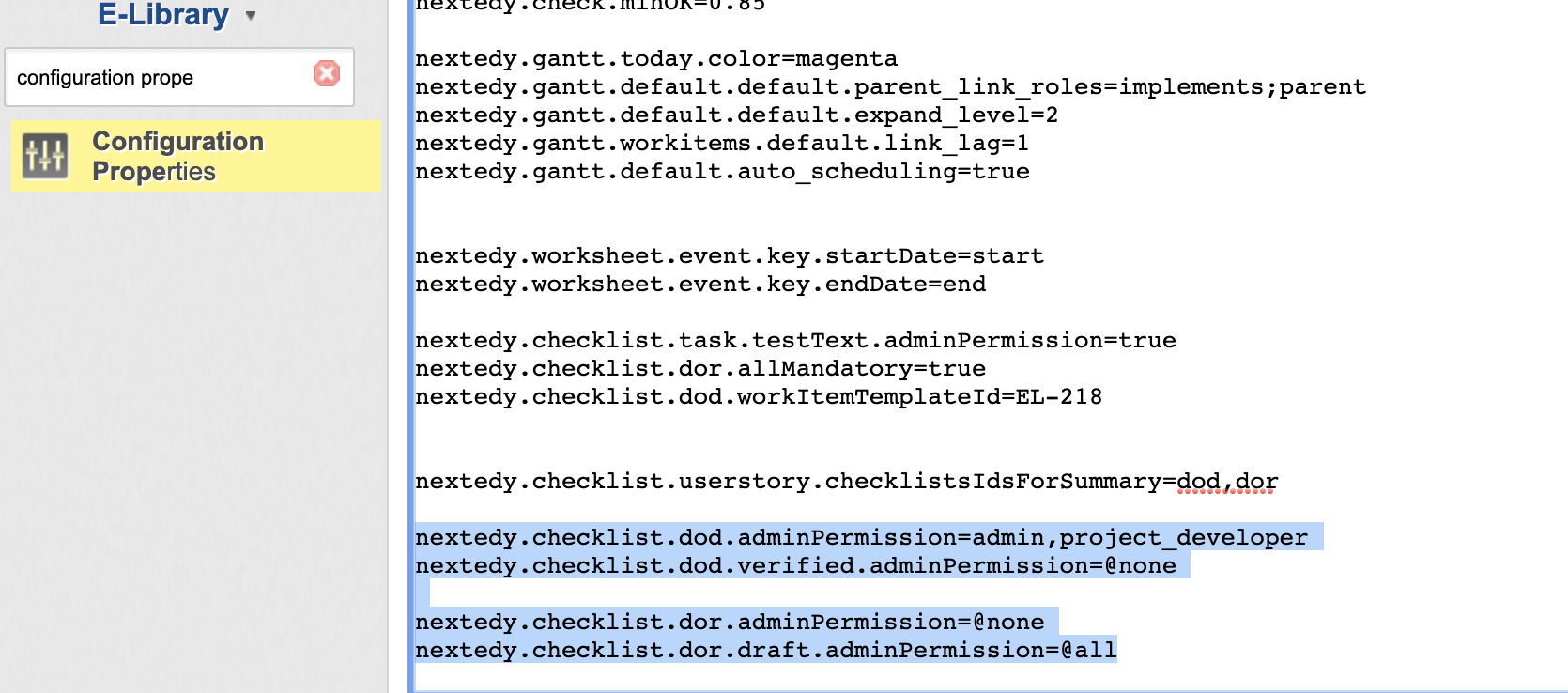
```text theme={null}
# 'dod' checklist can be controlled by global admin and project_developer roles
nextedy.checklist.dod.adminPermission=admin,project_developer
# but when 'userstory' is in status 'verified' the checklist definition cannot be changed at all
nextedy.checklist.dod.verified.adminPermission=@none
# 'dor' checklist cannot be adjusted at all, unless overridden below
nextedy.checklist.userstory.dor.adminPermission=@none
# 'dor' checklist can be changed by anyone only when the work item is in status 'draft'
nextedy.checklist.userstory.dor.draft.adminPermission=@all
```
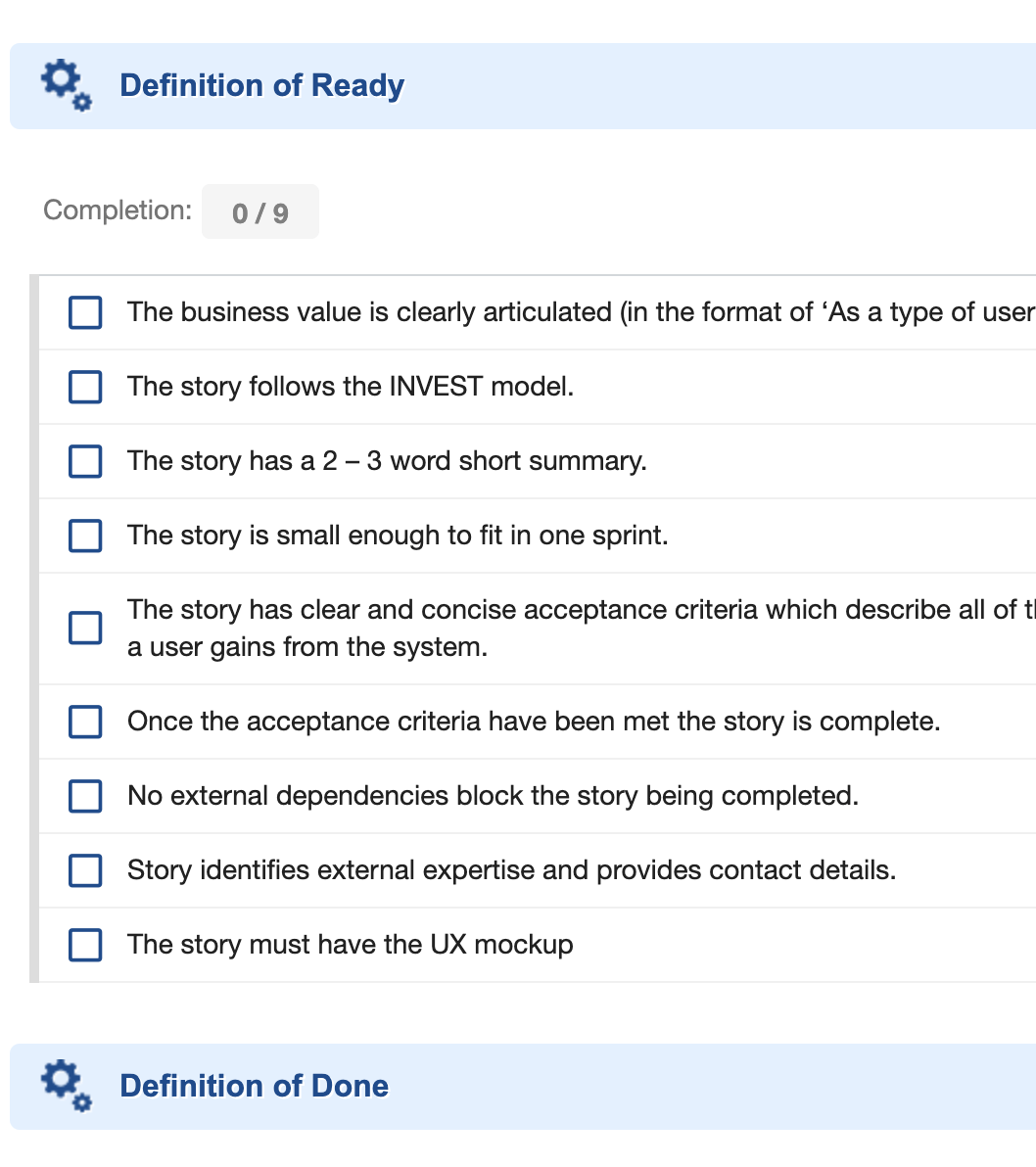
 After configuring the properties above, the checklist form extension hides the controls for adding, deleting, or editing items whenever the current status does not grant `adminPermission` — but users can still mark existing items as checked:
 **Version 25.7.0 and later**
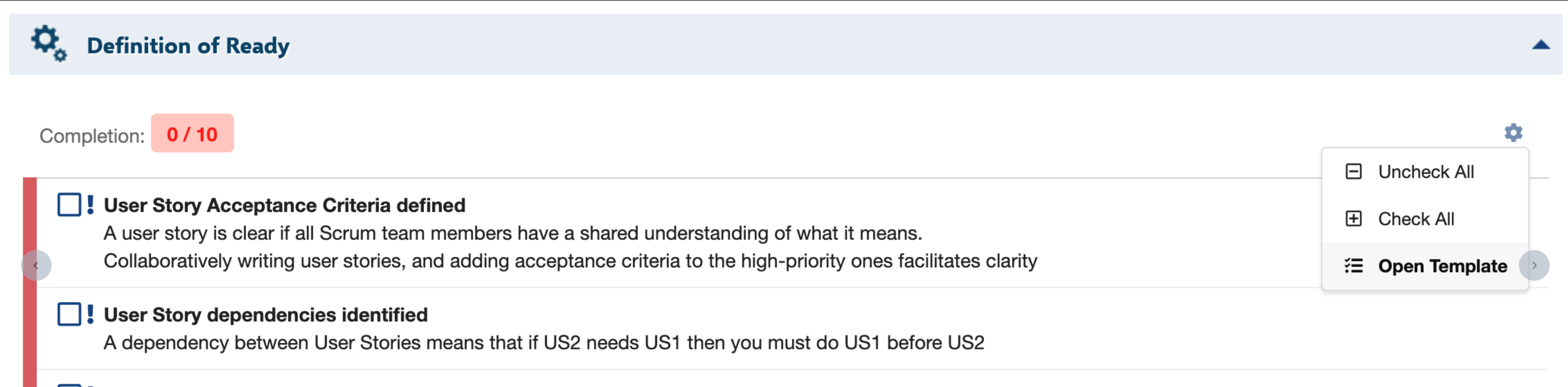
Starting with **version 25.7.0**, regular users without admin permission for the current condition also cannot clear the checklist structure — the **Clear** action is no longer available under the gear menu icon.
**Version 25.7.0 and later**
Starting with **version 25.7.0**, regular users without admin permission for the current condition also cannot clear the checklist structure — the **Clear** action is no longer available under the gear menu icon.
 ## Order of Evaluation — `adminPermission`
The system evaluates the `adminPermission` key in the following order, most specific first, for a given type, checklist field, and status (example: type `userstory`, checklist `dod`, status `accepted`):
## Order of Evaluation — `adminPermission`
The system evaluates the `adminPermission` key in the following order, most specific first, for a given type, checklist field, and status (example: type `userstory`, checklist `dod`, status `accepted`):
 The first property key that has a value set wins; evaluation stops at that level.
## Read-Only and Admin Permission Flags (Runtime)
| Name | Type | Default | Description |
| --------------------------------- | --------- | --------------- | ------------------------------------------------------------------------------------------------------------------------------------------------------------------------------------------------------ |
| `adminPermission` (resolved flag) | `boolean` | See application | The resolved flag, computed from the `adminPermission` property chain above, indicating whether the current user/context has administrative permission over the checklist's structure. |
| `readonly` (resolved flag) | `boolean` | See application | Indicates whether the checklist rendering widget treats the checklist as read-only. There is no dedicated `nextedy.checklist.*.readonly` configuration property — see the confirmed computation below. |
**readonly computation confirmed via source — and it differs by target type**
Confirmed directly from `ChecklistService.java` (`getChecklistConf`): there is no dedicated `readonly` configuration property. For a **work item**, `readonly` is computed purely from Checklist license authorization (`!ChecklistProduct.getInstance().isCurrentUserAuthorized()`) — it does **not** factor in Polarion's own field permissions or workflow state at that layer. For a **document, test run, or plan**, `readonly` additionally factors in the standard Polarion `can().modify()` check for that target (`!target.can().modify() || !isCurrentUserAuthorized()`). In all cases, actual enforcement of who can check/uncheck items on a **work item** checklist field still goes through the standard Polarion field-permission mechanisms described under "Controlling Who Can Check/Uncheck Items" above, independently of this resolved flag.
## Document-Level Checklists — Known Limitation
**Freeze and permission syntax for document checklists needs confirmation**
Whether the `adminPermission` freeze/permission syntax documented above (designed around work item type, field, and status) applies identically to **document-level** checklists — or requires different syntax — has been raised as an open question and is not confirmed in the gathered context. A document acting as its own template is known to automatically grant administrative permission on its own checklist, but the general freeze/permission configuration path for document checklists is not yet documented separately.
## Related Configuration
* [Property Hierarchy and Precedence Reference](/checklist/reference/configuration/property-hierarchy-reference) — the general 4-level precedence model that `adminPermission` extends with a status dimension.
* [Template Configuration Properties](/checklist/reference/configuration/template-properties) — template resolution properties that interact with structure-editing permissions.
* [Icon, Feature-Toggle, and Baseline Properties](/checklist/reference/configuration/appearance-and-feature-properties) — appearance and baseline-related properties.
* [Workflow Functions and Conditions](/checklist/reference/workflow) — workflow functions and conditions that gate transitions based on checklist completion, distinct from structure-edit permissions.
**KB Articles**
* How to control who can change the list and when ?
**Support Tickets**
* [#3346](https://support.nextedy.com/helpdesk/tickets/3346)
**Source Code**
* `proc-checklist-src/com.nextedy.polarion.checklist/src/com/nextedy/polarion/checklist/ChecklistConf.java`
* `proc-checklist-src/com.nextedy.polarion.checklist/src/com/nextedy/polarion/checklist/ChecklistAdminServlet.java`
* `proc-checklist-src/com.nextedy.polarion.checklist/src/com/nextedy/polarion/checklist/ChecklistSettings.java`
* `proc-checklist-src/com.nextedy.polarion.checklist/src/com/nextedy/polarion/checklist/internal/ChecklistSetupService.java`
* `proc-checklist-src/com.nextedy.polarion.checklist/src/com/nextedy/polarion/checklist/internal/ChecklistService.java`
The first property key that has a value set wins; evaluation stops at that level.
## Read-Only and Admin Permission Flags (Runtime)
| Name | Type | Default | Description |
| --------------------------------- | --------- | --------------- | ------------------------------------------------------------------------------------------------------------------------------------------------------------------------------------------------------ |
| `adminPermission` (resolved flag) | `boolean` | See application | The resolved flag, computed from the `adminPermission` property chain above, indicating whether the current user/context has administrative permission over the checklist's structure. |
| `readonly` (resolved flag) | `boolean` | See application | Indicates whether the checklist rendering widget treats the checklist as read-only. There is no dedicated `nextedy.checklist.*.readonly` configuration property — see the confirmed computation below. |
**readonly computation confirmed via source — and it differs by target type**
Confirmed directly from `ChecklistService.java` (`getChecklistConf`): there is no dedicated `readonly` configuration property. For a **work item**, `readonly` is computed purely from Checklist license authorization (`!ChecklistProduct.getInstance().isCurrentUserAuthorized()`) — it does **not** factor in Polarion's own field permissions or workflow state at that layer. For a **document, test run, or plan**, `readonly` additionally factors in the standard Polarion `can().modify()` check for that target (`!target.can().modify() || !isCurrentUserAuthorized()`). In all cases, actual enforcement of who can check/uncheck items on a **work item** checklist field still goes through the standard Polarion field-permission mechanisms described under "Controlling Who Can Check/Uncheck Items" above, independently of this resolved flag.
## Document-Level Checklists — Known Limitation
**Freeze and permission syntax for document checklists needs confirmation**
Whether the `adminPermission` freeze/permission syntax documented above (designed around work item type, field, and status) applies identically to **document-level** checklists — or requires different syntax — has been raised as an open question and is not confirmed in the gathered context. A document acting as its own template is known to automatically grant administrative permission on its own checklist, but the general freeze/permission configuration path for document checklists is not yet documented separately.
## Related Configuration
* [Property Hierarchy and Precedence Reference](/checklist/reference/configuration/property-hierarchy-reference) — the general 4-level precedence model that `adminPermission` extends with a status dimension.
* [Template Configuration Properties](/checklist/reference/configuration/template-properties) — template resolution properties that interact with structure-editing permissions.
* [Icon, Feature-Toggle, and Baseline Properties](/checklist/reference/configuration/appearance-and-feature-properties) — appearance and baseline-related properties.
* [Workflow Functions and Conditions](/checklist/reference/workflow) — workflow functions and conditions that gate transitions based on checklist completion, distinct from structure-edit permissions.
**KB Articles**
* How to control who can change the list and when ?
**Support Tickets**
* [#3346](https://support.nextedy.com/helpdesk/tickets/3346)
**Source Code**
* `proc-checklist-src/com.nextedy.polarion.checklist/src/com/nextedy/polarion/checklist/ChecklistConf.java`
* `proc-checklist-src/com.nextedy.polarion.checklist/src/com/nextedy/polarion/checklist/ChecklistAdminServlet.java`
* `proc-checklist-src/com.nextedy.polarion.checklist/src/com/nextedy/polarion/checklist/ChecklistSettings.java`
* `proc-checklist-src/com.nextedy.polarion.checklist/src/com/nextedy/polarion/checklist/internal/ChecklistSetupService.java`
* `proc-checklist-src/com.nextedy.polarion.checklist/src/com/nextedy/polarion/checklist/internal/ChecklistService.java`