> ## Documentation Index
> Fetch the complete documentation index at: https://learn.nextedy.com/llms.txt
> Use this file to discover all available pages before exploring further.
# Workflow Gates and Validation
> Enforce checklist completion before allowing workflow transitions by configuring Checklist workflow functions and conditions in Polarion.
export const LastReviewed = ({date}) => {
if (!date) return null;
const formatted = new Date(`${date}T00:00:00Z`).toLocaleDateString("en-US", {
year: "numeric",
month: "long",
day: "numeric",
timeZone: "UTC"
});
return
Last reviewed on {formatted}
;
};
## Available Workflow Functions and Conditions
Checklist provides the following workflow functions and conditions for gate enforcement:
 | Name | Type | Behavior |
| ----------------------------------- | --------- | ---------------------------------------------------------------- |
| `ChecklistFailIfAnyUnchecked` | Function | Blocks transition if **any** checklist item is unchecked |
| `ChecklistFailIfMandatoryUnchecked` | Function | Blocks transition if any **mandatory** item is unchecked |
| `ChecklistApplyTemplate` | Function | Applies the configured template to checklist fields |
| `ChecklistResetToTemplate` | Function | Resets checklist fields to the template state (discards changes) |
| `ChecklistUncheckAll` | Function | Clears all result states in the checklist |
| `ChecklistAllChecked` | Condition | Enables transition only if **all** items are checked |
| `ChecklistMandatoryChecked` | Condition | Enables transition only if all **mandatory** items are checked |
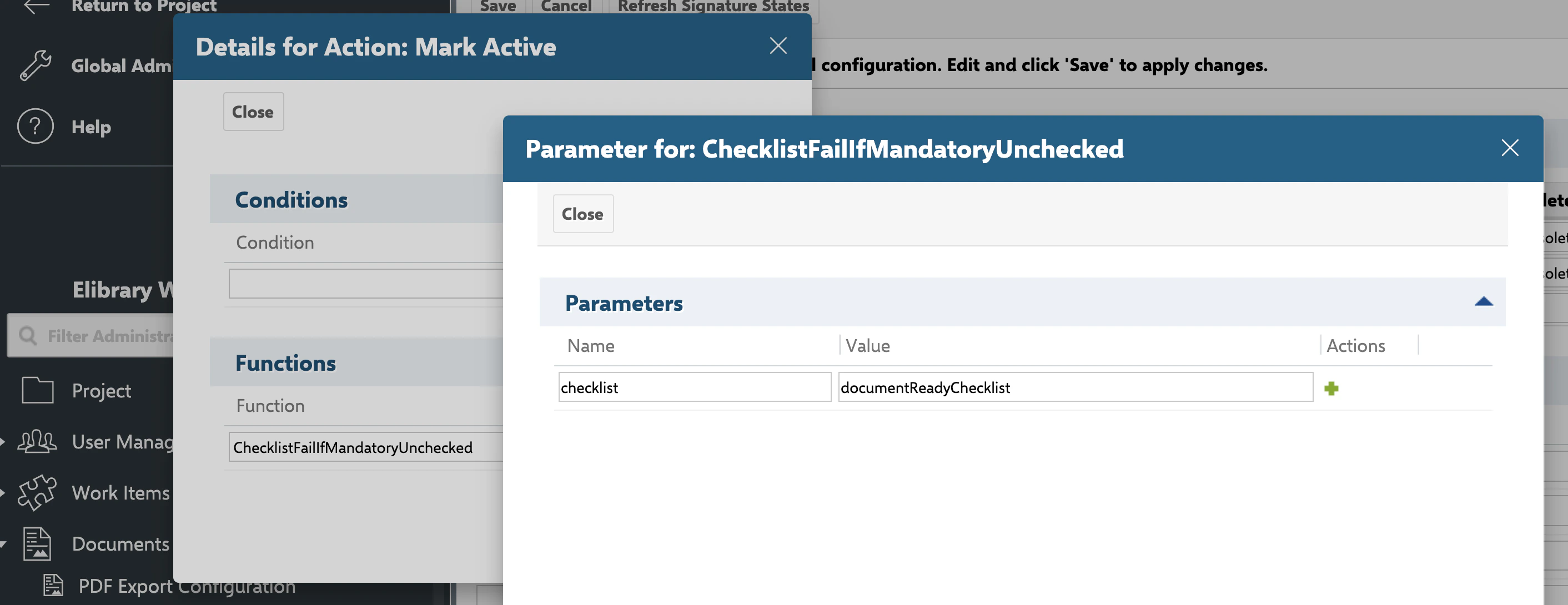
All functions and conditions accept a mandatory `checklist` parameter containing the custom field ID(s) to validate.
1. Navigate to **Polarion Administration > Work Items > Workflow** (or the equivalent for documents/test runs)
2. Select the work item type whose workflow you want to configure
3. Open the workflow editor
To block a transition when checklist items are incomplete, add a workflow function to the target transition.
### Block if Any Item Is Unchecked
Use `ChecklistFailIfAnyUnchecked` when every checklist item must be completed:
1. Select the transition (for example, "Mark as Done")
2. Add a workflow function: `ChecklistFailIfAnyUnchecked`
3. Set the `checklist` parameter to the custom field ID
```
checklist = dod
```
When a user attempts the transition, Checklist validates that every item in the specified field has a result state of OK. If any item is unchecked, the transition is blocked with a user-friendly error message showing the field name.
### Block if Mandatory Items Are Unchecked
Use `ChecklistFailIfMandatoryUnchecked` when only mandatory items must be completed:
```
checklist = dod
```
This allows the transition as long as all items flagged as mandatory are checked, even if optional items remain unchecked.
Conditions control whether a transition appears as available to the user. Unlike functions (which show an error on attempt), conditions hide the transition entirely when not satisfied.
### Require All Items Checked
Add the `ChecklistAllChecked` condition to a transition:
```
checklist = dod
```
The transition button is visible only when every item in the checklist is checked.
### Require Mandatory Items Checked
Add the `ChecklistMandatoryChecked` condition:
```
checklist = dod
```
The transition button appears once all mandatory items are checked.
Use a condition to hide the transition when incomplete, and a function as a safety net to block it if the user somehow reaches it (for example, through API calls). This provides both a clean UI and strict enforcement.
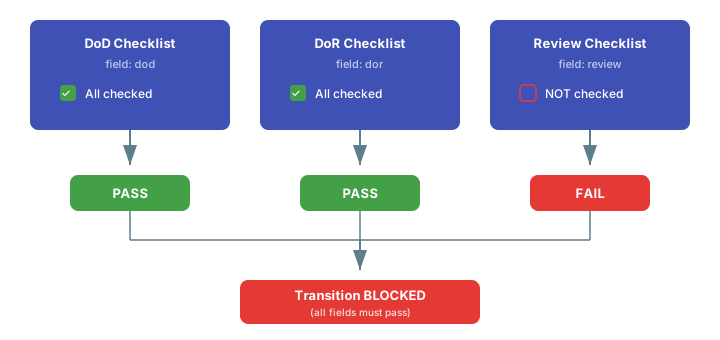
You can validate multiple checklist fields in a single function or condition by providing a comma-separated list:
```
checklist = dod,dor,reviewChecklist
```
When you specify multiple checklist fields, **all** of them must pass validation. If any single checklist has unchecked items, the transition is blocked. There is no OR logic -- every listed field must be fully satisfied.
| Name | Type | Behavior |
| ----------------------------------- | --------- | ---------------------------------------------------------------- |
| `ChecklistFailIfAnyUnchecked` | Function | Blocks transition if **any** checklist item is unchecked |
| `ChecklistFailIfMandatoryUnchecked` | Function | Blocks transition if any **mandatory** item is unchecked |
| `ChecklistApplyTemplate` | Function | Applies the configured template to checklist fields |
| `ChecklistResetToTemplate` | Function | Resets checklist fields to the template state (discards changes) |
| `ChecklistUncheckAll` | Function | Clears all result states in the checklist |
| `ChecklistAllChecked` | Condition | Enables transition only if **all** items are checked |
| `ChecklistMandatoryChecked` | Condition | Enables transition only if all **mandatory** items are checked |
All functions and conditions accept a mandatory `checklist` parameter containing the custom field ID(s) to validate.
1. Navigate to **Polarion Administration > Work Items > Workflow** (or the equivalent for documents/test runs)
2. Select the work item type whose workflow you want to configure
3. Open the workflow editor
To block a transition when checklist items are incomplete, add a workflow function to the target transition.
### Block if Any Item Is Unchecked
Use `ChecklistFailIfAnyUnchecked` when every checklist item must be completed:
1. Select the transition (for example, "Mark as Done")
2. Add a workflow function: `ChecklistFailIfAnyUnchecked`
3. Set the `checklist` parameter to the custom field ID
```
checklist = dod
```
When a user attempts the transition, Checklist validates that every item in the specified field has a result state of OK. If any item is unchecked, the transition is blocked with a user-friendly error message showing the field name.
### Block if Mandatory Items Are Unchecked
Use `ChecklistFailIfMandatoryUnchecked` when only mandatory items must be completed:
```
checklist = dod
```
This allows the transition as long as all items flagged as mandatory are checked, even if optional items remain unchecked.
Conditions control whether a transition appears as available to the user. Unlike functions (which show an error on attempt), conditions hide the transition entirely when not satisfied.
### Require All Items Checked
Add the `ChecklistAllChecked` condition to a transition:
```
checklist = dod
```
The transition button is visible only when every item in the checklist is checked.
### Require Mandatory Items Checked
Add the `ChecklistMandatoryChecked` condition:
```
checklist = dod
```
The transition button appears once all mandatory items are checked.
Use a condition to hide the transition when incomplete, and a function as a safety net to block it if the user somehow reaches it (for example, through API calls). This provides both a clean UI and strict enforcement.
You can validate multiple checklist fields in a single function or condition by providing a comma-separated list:
```
checklist = dod,dor,reviewChecklist
```
When you specify multiple checklist fields, **all** of them must pass validation. If any single checklist has unchecked items, the transition is blocked. There is no OR logic -- every listed field must be fully satisfied.
 Use `ChecklistApplyTemplate` to populate or refresh checklist items when a transition occurs:
```
checklist = dod,dor
```
This merges the configured template into each listed field. Template items that already exist are preserved; missing items are added.
**Common use case:** Attach `ChecklistApplyTemplate` to a "Start Work" transition to ensure the checklist is populated when an engineer begins a task.
Use `ChecklistResetToTemplate` to discard all changes and restore the template state:
| Parameter | Required | Description |
| -------------- | -------- | --------------------------------------------- |
| `checklist` | Yes | Comma-separated field IDs to reset |
| `skipForUsers` | No | Comma-separated user IDs who bypass the reset |
```
checklist = dod,dor
skipForUsers = admin,migrationUser
```
Unlike `ChecklistApplyTemplate` (which merges), `ChecklistResetToTemplate` replaces the entire checklist. All manually added items, result states, and notes are lost.
When performing bulk updates or data migrations, add your administrator account to `skipForUsers` to prevent the workflow from resetting checklists you are importing.
Use `ChecklistUncheckAll` to clear all result states without removing items:
```
checklist = dod
```
This sets every item back to Empty, which is useful for "reopen" or "rework" transitions where the user must re-verify all items.
## Object Type Support
All workflow functions and conditions work with:
* **Work items** -- requirements, tasks, defects, test cases, and all custom types
* **Documents** (LiveDocs) -- useful for document review and approval gates
* **Test runs** -- enforce pre-execution or post-execution checklists
| Function/Condition | Work Items | Documents | Test Runs |
| ----------------------------------- | ---------- | --------- | --------- |
| `ChecklistFailIfAnyUnchecked` | ✅ | ✅ | ✅ |
| `ChecklistFailIfMandatoryUnchecked` | ✅ | ✅ | ✅ |
| `ChecklistApplyTemplate` | ✅ | ✅ | ✅ |
| `ChecklistResetToTemplate` | ✅ | ✅ | ✅ |
| `ChecklistUncheckAll` | ✅ | ✅ | ✅ |
| `ChecklistAllChecked` | ✅ | ✅ | ✅ |
| `ChecklistMandatoryChecked` | ✅ | ✅ | ✅ |
## Verification
After configuring workflow gates:
1. Open a work item with an incomplete checklist
2. Attempt the protected transition
3. You should now see an error message (for functions) indicating which checklist field has unchecked items, or the transition button hidden entirely (for conditions)
4. Complete all checklist items (or all mandatory items) and retry
5. The transition should succeed
## See Also
* [Creating and Managing Templates](/checklist/guides/templates) -- set up templates referenced by workflow functions
* [Freezing Checklists by Status](/checklist/guides/freeze-by-status) -- stop template merging at specific statuses
* [Controlling Access and Permissions](/checklist/guides/permissions) -- restrict who can modify checklists
* [Read-Only Mode](/checklist/guides/readonly-mode) -- lock checklists after workflow gates pass
Use `ChecklistApplyTemplate` to populate or refresh checklist items when a transition occurs:
```
checklist = dod,dor
```
This merges the configured template into each listed field. Template items that already exist are preserved; missing items are added.
**Common use case:** Attach `ChecklistApplyTemplate` to a "Start Work" transition to ensure the checklist is populated when an engineer begins a task.
Use `ChecklistResetToTemplate` to discard all changes and restore the template state:
| Parameter | Required | Description |
| -------------- | -------- | --------------------------------------------- |
| `checklist` | Yes | Comma-separated field IDs to reset |
| `skipForUsers` | No | Comma-separated user IDs who bypass the reset |
```
checklist = dod,dor
skipForUsers = admin,migrationUser
```
Unlike `ChecklistApplyTemplate` (which merges), `ChecklistResetToTemplate` replaces the entire checklist. All manually added items, result states, and notes are lost.
When performing bulk updates or data migrations, add your administrator account to `skipForUsers` to prevent the workflow from resetting checklists you are importing.
Use `ChecklistUncheckAll` to clear all result states without removing items:
```
checklist = dod
```
This sets every item back to Empty, which is useful for "reopen" or "rework" transitions where the user must re-verify all items.
## Object Type Support
All workflow functions and conditions work with:
* **Work items** -- requirements, tasks, defects, test cases, and all custom types
* **Documents** (LiveDocs) -- useful for document review and approval gates
* **Test runs** -- enforce pre-execution or post-execution checklists
| Function/Condition | Work Items | Documents | Test Runs |
| ----------------------------------- | ---------- | --------- | --------- |
| `ChecklistFailIfAnyUnchecked` | ✅ | ✅ | ✅ |
| `ChecklistFailIfMandatoryUnchecked` | ✅ | ✅ | ✅ |
| `ChecklistApplyTemplate` | ✅ | ✅ | ✅ |
| `ChecklistResetToTemplate` | ✅ | ✅ | ✅ |
| `ChecklistUncheckAll` | ✅ | ✅ | ✅ |
| `ChecklistAllChecked` | ✅ | ✅ | ✅ |
| `ChecklistMandatoryChecked` | ✅ | ✅ | ✅ |
## Verification
After configuring workflow gates:
1. Open a work item with an incomplete checklist
2. Attempt the protected transition
3. You should now see an error message (for functions) indicating which checklist field has unchecked items, or the transition button hidden entirely (for conditions)
4. Complete all checklist items (or all mandatory items) and retry
5. The transition should succeed
## See Also
* [Creating and Managing Templates](/checklist/guides/templates) -- set up templates referenced by workflow functions
* [Freezing Checklists by Status](/checklist/guides/freeze-by-status) -- stop template merging at specific statuses
* [Controlling Access and Permissions](/checklist/guides/permissions) -- restrict who can modify checklists
* [Read-Only Mode](/checklist/guides/readonly-mode) -- lock checklists after workflow gates pass