> ## Documentation Index
> Fetch the complete documentation index at: https://learn.nextedy.com/llms.txt
> Use this file to discover all available pages before exploring further.
# Configure Gate Enforcement (DoD / DoR) and Freeze on Status
> Block a workflow transition until mandatory checklist items are checked, and freeze a checklist's definition once it reaches a given status.
export const LastReviewed = ({date}) => {
if (!date) return null;
const formatted = new Date(`${date}T00:00:00Z`).toLocaleDateString("en-US", {
year: "numeric",
month: "long",
day: "numeric",
timeZone: "UTC"
});
return
Last reviewed on {formatted}
;
};
## Enforce mandatory items on a transition (DoD / DoR gate)
1. Open the workflow configuration for the work item type (or document/test run type) that carries your Definition of Done (`dod`) or Definition of Ready (`dor`) checklist.
2. On the transition that should be gated, add the workflow function `ChecklistFailIfMandatoryUnchecked`.
3. Set the `checklist` argument to the ID of the checklist custom field. Use a comma-separated list to validate more than one checklist field on the same transition.
```text theme={null}
checklist=dod
```
This function blocks the transition with an error message naming the checklist field if any mandatory item is left unchecked. It runs on work items, documents (LiveDocs), and test runs.
**Verify in application**
The gathered context does not confirm the exact wording of the blocking error message. Note it during setup so you can add it to your own troubleshooting notes. The gathered context does not confirm the exact wording of the blocking error message. Note it during setup so you can add it to your own troubleshooting notes.
### Require every item, not just mandatory ones
If a checklist should block the transition unless **all** items are checked (not only the ones flagged mandatory), enable the checklist's `allMandatory` configuration so `ChecklistFailIfMandatoryUnchecked` treats every item as gating.
 ## Apply or re-apply a template as a gate action
Use `ChecklistApplyTemplate` on a transition to (re)populate a checklist field from its configured template as part of the transition action:
```text theme={null}
checklist=dod
```
Calling this on a field that already has data re-applies the template content, so place it on transitions where you intend to reset/refresh the checklist (for example, an "init" action when a work item is created).
## Freeze the checklist definition on a status
By default, a checklist's structure keeps re-syncing to its template. To stop that once a work item (or document/test run) reaches a specific status — so the checklist "freezes" at whatever content was recorded so far — set:
```text theme={null}
nextedy.checklist._TYPEID_._FIELDID_._STATUS_.mergeTemplate
nextedy.checklist._TYPEID_._FIELDID_.mergeTemplateResolved
```
For example, to freeze the `dod` checklist once a work item reaches status `reviewed`:
```text theme={null}
nextedy.checklist.dod.reviewed.mergeTemplate=false
nextedy.checklist.dod.mergeTemplateResolved=false
```
**Freezing only affects future syncs — initialize the checklist first**
A frozen checklist shows only the data already stored on the work item. If you add new items to the template but never re-sync the work item's checklist before it reaches the frozen status, those new items will never appear. Make sure the checklist template has been applied (synchronized) to the work item **before** it reaches the frozen status — for example, by attaching `ChecklistApplyTemplate` to the transition that leads into that status.
## Restrict who can change the checklist structure while frozen
Freezing the merge behavior stops automatic template re-sync, but users can still edit the checklist manually unless you also restrict who can change its structure. Combine freeze with the `adminPermission` configuration property:
```text theme={null}
nextedy.checklist._TYPEID_._FIELDID_._STATUS_.adminPermission
```
Example — the `dor` checklist for `userstory` items can only be changed by anyone while still in `draft`, then locks down:
```text theme={null}
nextedy.checklist.userstory.dor.draft.adminPermission=@all
nextedy.checklist.userstory.dor.adminPermission=@none
```
For the full permission property hierarchy and evaluation order, see [Control Who Can Change the Checklist](/checklist/guides/permissions).
## Reset the checklist to template on a status change
To make an approval-style transition also guarantee the checklist reflects the latest template before locking it down, attach `ChecklistApplyTemplate` to that transition's function list, then apply the freeze properties above on the destination status.
## Apply or re-apply a template as a gate action
Use `ChecklistApplyTemplate` on a transition to (re)populate a checklist field from its configured template as part of the transition action:
```text theme={null}
checklist=dod
```
Calling this on a field that already has data re-applies the template content, so place it on transitions where you intend to reset/refresh the checklist (for example, an "init" action when a work item is created).
## Freeze the checklist definition on a status
By default, a checklist's structure keeps re-syncing to its template. To stop that once a work item (or document/test run) reaches a specific status — so the checklist "freezes" at whatever content was recorded so far — set:
```text theme={null}
nextedy.checklist._TYPEID_._FIELDID_._STATUS_.mergeTemplate
nextedy.checklist._TYPEID_._FIELDID_.mergeTemplateResolved
```
For example, to freeze the `dod` checklist once a work item reaches status `reviewed`:
```text theme={null}
nextedy.checklist.dod.reviewed.mergeTemplate=false
nextedy.checklist.dod.mergeTemplateResolved=false
```
**Freezing only affects future syncs — initialize the checklist first**
A frozen checklist shows only the data already stored on the work item. If you add new items to the template but never re-sync the work item's checklist before it reaches the frozen status, those new items will never appear. Make sure the checklist template has been applied (synchronized) to the work item **before** it reaches the frozen status — for example, by attaching `ChecklistApplyTemplate` to the transition that leads into that status.
## Restrict who can change the checklist structure while frozen
Freezing the merge behavior stops automatic template re-sync, but users can still edit the checklist manually unless you also restrict who can change its structure. Combine freeze with the `adminPermission` configuration property:
```text theme={null}
nextedy.checklist._TYPEID_._FIELDID_._STATUS_.adminPermission
```
Example — the `dor` checklist for `userstory` items can only be changed by anyone while still in `draft`, then locks down:
```text theme={null}
nextedy.checklist.userstory.dor.draft.adminPermission=@all
nextedy.checklist.userstory.dor.adminPermission=@none
```
For the full permission property hierarchy and evaluation order, see [Control Who Can Change the Checklist](/checklist/guides/permissions).
## Reset the checklist to template on a status change
To make an approval-style transition also guarantee the checklist reflects the latest template before locking it down, attach `ChecklistApplyTemplate` to that transition's function list, then apply the freeze properties above on the destination status.
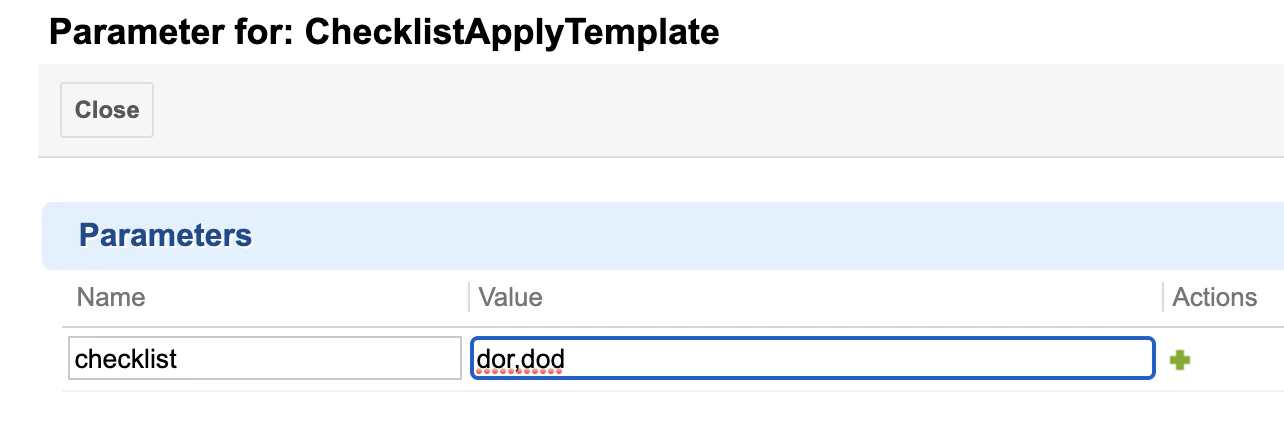
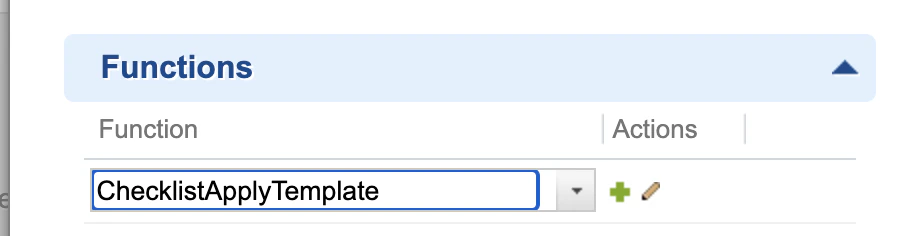 Set the function's `checklist` parameter to a comma-separated list of the checklist custom field IDs you want the transition to (re)apply the template to.
 **Verify the checklist is synchronized before marking an item approved**
Attach `ChecklistApplyTemplate` to the same workflow function that marks an item approved (or whatever status triggers the freeze). This guarantees the checklist is synchronized to the latest template version at the moment it becomes frozen, rather than relying on someone having manually refreshed it earlier.
## Make the checklist field fully read-only
In addition to permission-based structure locking, you can mark the underlying custom field itself as read-only using **Administration > Work Items > Readonly Fields**, or field-based permissions under **Administration > User Management > Permissions Management**. A fully read-only field blocks both structure changes and item checking — use this when no further interaction should be possible at all, rather than only blocking structure edits.
## Verification
You should now see:
* The gated transition rejected with an error when mandatory items (or, with `allMandatory` enabled, any item) are left unchecked.
* The checklist structure on a work item in the frozen status staying unchanged even after the template is edited, until the freeze status is reverted or the checklist is explicitly re-applied.
## See also
* [Control Who Can Change the Checklist](/checklist/guides/permissions)
* [Create a Checklist Template](/checklist/guides/templates/create-a-template)
* [Multiple Templates per Type and Reset on Type Change](/checklist/guides/templates/multiple-templates-per-type)
* [Track and Compare Checklist Baselines](/checklist/guides/baselines)
**KB Articles**
* Freeze the checklist on some statuses
* How to control who can change the list and when ?
* Setup New Plan Checklist
**Support Tickets**
* [#235](https://support.nextedy.com/helpdesk/tickets/235)
* [#3346](https://support.nextedy.com/helpdesk/tickets/3346)
* [#6323](https://support.nextedy.com/helpdesk/tickets/6323)
**Source Code**
* `proc-checklist-src/com.nextedy.polarion.checklist/src/com/nextedy/polarion/checklist/ChecklistView.java`
* `proc-checklist-src/com.nextedy.polarion.checklist/src/com/nextedy/polarion/checklist/DocumentChecklistView.java`
* `proc-checklist-src/com.nextedy.polarion.checklist/src/com/nextedy/polarion/checklist/ChecklistAdminServlet.java`
* `proc-checklist-src/com.nextedy.polarion.checklist/src/com/nextedy/polarion/checklist/IChecklistService.java`
* `proc-checklist-src/com.nextedy.polarion.checklist/src/com/nextedy/polarion/checklist/internal/ChecklistAdminService.java`
**Verify the checklist is synchronized before marking an item approved**
Attach `ChecklistApplyTemplate` to the same workflow function that marks an item approved (or whatever status triggers the freeze). This guarantees the checklist is synchronized to the latest template version at the moment it becomes frozen, rather than relying on someone having manually refreshed it earlier.
## Make the checklist field fully read-only
In addition to permission-based structure locking, you can mark the underlying custom field itself as read-only using **Administration > Work Items > Readonly Fields**, or field-based permissions under **Administration > User Management > Permissions Management**. A fully read-only field blocks both structure changes and item checking — use this when no further interaction should be possible at all, rather than only blocking structure edits.
## Verification
You should now see:
* The gated transition rejected with an error when mandatory items (or, with `allMandatory` enabled, any item) are left unchecked.
* The checklist structure on a work item in the frozen status staying unchanged even after the template is edited, until the freeze status is reverted or the checklist is explicitly re-applied.
## See also
* [Control Who Can Change the Checklist](/checklist/guides/permissions)
* [Create a Checklist Template](/checklist/guides/templates/create-a-template)
* [Multiple Templates per Type and Reset on Type Change](/checklist/guides/templates/multiple-templates-per-type)
* [Track and Compare Checklist Baselines](/checklist/guides/baselines)
**KB Articles**
* Freeze the checklist on some statuses
* How to control who can change the list and when ?
* Setup New Plan Checklist
**Support Tickets**
* [#235](https://support.nextedy.com/helpdesk/tickets/235)
* [#3346](https://support.nextedy.com/helpdesk/tickets/3346)
* [#6323](https://support.nextedy.com/helpdesk/tickets/6323)
**Source Code**
* `proc-checklist-src/com.nextedy.polarion.checklist/src/com/nextedy/polarion/checklist/ChecklistView.java`
* `proc-checklist-src/com.nextedy.polarion.checklist/src/com/nextedy/polarion/checklist/DocumentChecklistView.java`
* `proc-checklist-src/com.nextedy.polarion.checklist/src/com/nextedy/polarion/checklist/ChecklistAdminServlet.java`
* `proc-checklist-src/com.nextedy.polarion.checklist/src/com/nextedy/polarion/checklist/IChecklistService.java`
* `proc-checklist-src/com.nextedy.polarion.checklist/src/com/nextedy/polarion/checklist/internal/ChecklistAdminService.java`