> ## Documentation Index
> Fetch the complete documentation index at: https://learn.nextedy.com/llms.txt
> Use this file to discover all available pages before exploring further.
# Checklist Is Marked Read-Only
> Diagnose why a checklist item can't be changed and fix the cause — standard Polarion field permissions, a misconfigured checklist form extension, or a workflow status freeze.
export const LastReviewed = ({date}) => {
if (!date) return null;
const formatted = new Date(`${date}T00:00:00Z`).toLocaleDateString("en-US", {
year: "numeric",
month: "long",
day: "numeric",
timeZone: "UTC"
});
return
Last reviewed on {formatted}
;
};
A checklist can appear read-only for three distinct reasons, and they require different fixes. Work through them in order.
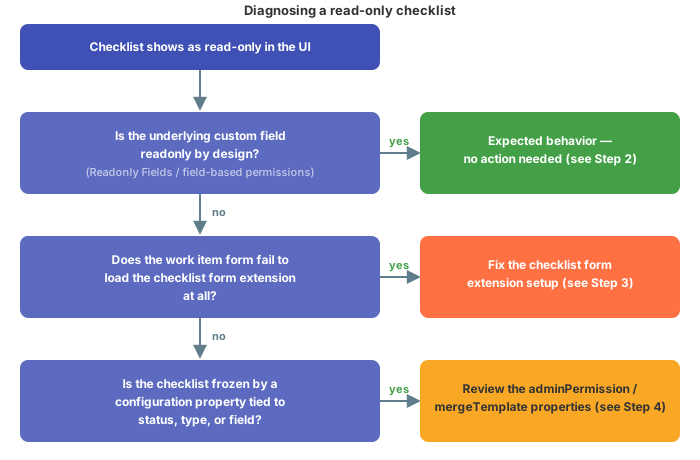 This is expected behavior, not a defect. The checklist custom field can be made read-only the same way any other custom field can:
* **Administration > Work Items > Readonly Fields**
* Field-based permissions in **Administration > User Management > Permissions Management**
If either of these marks the checklist's custom field as read-only, the checklist form extension correctly reflects that — there is nothing to fix in the checklist configuration itself.
**Distinguish checklist-level control from field-level permissions**
A checklist can look read-only in the checklist UI while the same underlying custom field still appears editable when displayed elsewhere (for example, in document columns). If you see that mismatch, don't assume the checklist configuration is broken — check both layers separately: the field's Polarion permissions/read-only-fields setting, and the checklist configuration properties described in Step 4.
If the work item extension responsible for rendering the checklist editor isn't configured correctly, it can't locate the editor on the work item form, and the field renders as if it were read-only even though no permission is blocking it.
Confirm the checklist form extension is set up correctly by following the object-type setup guide for the item you're working with:
* [Set Up a Work Item Checklist](/checklist/guides/setup/work-items)
* [Set Up a Document (LiveDoc) Checklist](/checklist/guides/setup/documents)
* [Set Up a Test Run Checklist](/checklist/guides/setup/test-runs)
* [Set Up a Plan Checklist](/checklist/guides/setup/plans)
**Verify in application**
The exact form-layout XML that wires the checklist form extension into a given work item type isn't covered in this article — confirm your form layout against the relevant setup guide above rather than assuming the extension is present by default.
If Steps 2 and 3 don't explain what you're seeing, the checklist may be intentionally frozen through configuration properties rather than through Polarion permissions.
### Freeze on workflow status
You can freeze the checklist definition so that, once a work item or document reaches a given status, the template is no longer reapplied and the checklist keeps whatever content it already has:
```text theme={null}
nextedy.checklist._TYPEID_._FIELDID_._STATUS_.mergeTemplate
nextedy.checklist._TYPEID_._FIELDID_.mergeTemplateResolved
```
Example — freezing the `dod` checklist once a work item reaches status `reviewed`:
```text theme={null}
nextedy.checklist.dod.reviewed.mergeTemplate=false
nextedy.checklist.dod.mergeTemplateResolved=false
```
**The checklist must be initialized before you freeze it**
Once frozen, the checklist shows only the data stored so far. If you add new template items but never trigger a save that touches the checklist status, those new items will not appear — the work item still has the old, unsynchronized data. Make sure the checklist template has been applied (synchronized into the work item) **before** the status transition that freezes it, for example by attaching the `ChecklistApplyTemplate` workflow function to the transition (see [Configure Gate Enforcement (DoD / DoR) and Freeze on Status](/checklist/guides/workflow-gates-and-freeze)).
### Restrict who can change the checklist structure
Separately from freezing on status, you can restrict who is allowed to add, remove, or edit checklist items (as opposed to simply checking/unchecking them) using:
```text theme={null}
nextedy.checklist._TYPEID_._FIELDID_._STATUS_.adminPermission
```
Accepted values are `@none`, `@all`, or a comma-separated list of user roles (including project roles).
Example — `dod` checklist manageable by `admin` and `project_developer`, but locked once a `userstory` reaches `verified`; `dor` checklist locked except while the `userstory` is in `draft`:
```text theme={null}
# 'dod' checklist can be controlled by global admin and project_developer roles
nextedy.checklist.dod.adminPermission=admin,project_developer
# but when 'userstory' is in status 'verified' the checklist definition cannot be changed at all
nextedy.checklist.dod.verified.adminPermission=@none
# 'dor' checklist cannot be adjusted at all, unless overridden below
nextedy.checklist.userstory.dor.adminPermission=@none
# 'dor' checklist can be changed by anyone only when the work item is in status 'draft'
nextedy.checklist.userstory.dor.draft.adminPermission=@all
```
When `adminPermission` evaluates to `@none` for the current context, users lose the controls to add or delete checklist items, but — unless the field itself is also read-only per Step 2 — they can still mark existing items as checked.
The system evaluates `adminPermission` using the full 4-level precedence, most specific first (shown here for type `userstory`, checklist `dod`, status `accepted`):
1. `nextedy.checklist.userstory.dod.accepted.adminPermission`
2. `nextedy.checklist.dod.accepted.adminPermission`
3. `nextedy.checklist.userstory.dod.adminPermission`
4. `nextedy.checklist.dod.adminPermission`
5. `nextedy.checklist.userstory.accepted.adminPermission`
6. `nextedy.checklist.accepted.adminPermission`
7. `nextedy.checklist.userstory.adminPermission`
8. `nextedy.checklist.adminPermission`
**Starting with version 25.7.0**
Regular users without admin permission for the evaluated context can no longer clear the checklist structure — the **Clear** action is removed from the gear menu icon in that case.
For the full picture of how these properties combine with Polarion permissions, see [Control Who Can Change the Checklist](/checklist/guides/permissions).
## Known limitation: type change can leave the checklist stuck read-only
**Changing a work item or document type after creation can leave the checklist permanently read-only**
Support tickets describe a recurring case: a work item or document is created from scratch (or created with the wrong type, e.g. a generic type) and its type is later changed to the correct one. After the type change — sometimes triggered by a subsequent status transition such as moving from Draft to InReview — the checklist can remain stuck in read-only mode even though other fields on the same item remain editable. This has been reported more than once, including as a reopened ticket, and does not currently have a confirmed fix. If you hit this, first rule out Steps 2–4 above (field permissions, form extension setup, and `adminPermission`/`mergeTemplate` properties) — if none of those explain it, treat it as this known limitation rather than a new configuration issue, and capture the exact type-change sequence for support.
## Verification
You should now see one of the following:
* The checklist field is intentionally read-only per **Readonly Fields** or field-based permissions, and this is expected — no further action needed.
* The checklist form extension correctly locates the editor and renders an editable checklist on the work item, document, test run, or plan form.
* The checklist behaves according to your `mergeTemplate` / `mergeTemplateResolved` and `adminPermission` configuration properties — editable when the evaluated context allows it, and frozen only where you intended.
If the checklist is still unexpectedly read-only after working through all four steps, and no type change is involved, continue with [Save Errors and Version Compatibility](/checklist/guides/troubleshooting/save-errors-and-compatibility).
## See also
* [Control Who Can Change the Checklist](/checklist/guides/permissions)
* [Configure Gate Enforcement (DoD / DoR) and Freeze on Status](/checklist/guides/workflow-gates-and-freeze)
* [Set Up a Work Item Checklist](/checklist/guides/setup/work-items)
* [Duplicate, Type-Change, and Formatting Issues](/checklist/guides/troubleshooting/duplicate-and-type-change-issues)
**KB Articles**
* Checklist is marked as readonly.
* Freeze the checklist on some statuses
* How to control who can change the list and when ?
**Support Tickets**
* [#6781](https://support.nextedy.com/helpdesk/tickets/6781)
* [#6408](https://support.nextedy.com/helpdesk/tickets/6408)
* [#6355](https://support.nextedy.com/helpdesk/tickets/6355)
**Source Code**
* `proc-checklist-src/com.nextedy.polarion.checklist/src/com/nextedy/polarion/checklist/ChecklistConf.java`
* `proc-checklist-src/com.nextedy.polarion.checklist/src/com/nextedy/polarion/checklist/wf/ChecklistResetToTemplate.java`
* `proc-checklist-src/com.nextedy.polarion.checklist/src/com/nextedy/polarion/checklist/internal/hook/SaveHandler.java`
* `proc-checklist-src/com.nextedy.polarion.checklist/src/com/nextedy/polarion/checklist/IChecklistService.java`
* `proc-checklist-src/com.nextedy.polarion.checklist/src/com/nextedy/polarion/checklist/internal/ChecklistService.java`
This is expected behavior, not a defect. The checklist custom field can be made read-only the same way any other custom field can:
* **Administration > Work Items > Readonly Fields**
* Field-based permissions in **Administration > User Management > Permissions Management**
If either of these marks the checklist's custom field as read-only, the checklist form extension correctly reflects that — there is nothing to fix in the checklist configuration itself.
**Distinguish checklist-level control from field-level permissions**
A checklist can look read-only in the checklist UI while the same underlying custom field still appears editable when displayed elsewhere (for example, in document columns). If you see that mismatch, don't assume the checklist configuration is broken — check both layers separately: the field's Polarion permissions/read-only-fields setting, and the checklist configuration properties described in Step 4.
If the work item extension responsible for rendering the checklist editor isn't configured correctly, it can't locate the editor on the work item form, and the field renders as if it were read-only even though no permission is blocking it.
Confirm the checklist form extension is set up correctly by following the object-type setup guide for the item you're working with:
* [Set Up a Work Item Checklist](/checklist/guides/setup/work-items)
* [Set Up a Document (LiveDoc) Checklist](/checklist/guides/setup/documents)
* [Set Up a Test Run Checklist](/checklist/guides/setup/test-runs)
* [Set Up a Plan Checklist](/checklist/guides/setup/plans)
**Verify in application**
The exact form-layout XML that wires the checklist form extension into a given work item type isn't covered in this article — confirm your form layout against the relevant setup guide above rather than assuming the extension is present by default.
If Steps 2 and 3 don't explain what you're seeing, the checklist may be intentionally frozen through configuration properties rather than through Polarion permissions.
### Freeze on workflow status
You can freeze the checklist definition so that, once a work item or document reaches a given status, the template is no longer reapplied and the checklist keeps whatever content it already has:
```text theme={null}
nextedy.checklist._TYPEID_._FIELDID_._STATUS_.mergeTemplate
nextedy.checklist._TYPEID_._FIELDID_.mergeTemplateResolved
```
Example — freezing the `dod` checklist once a work item reaches status `reviewed`:
```text theme={null}
nextedy.checklist.dod.reviewed.mergeTemplate=false
nextedy.checklist.dod.mergeTemplateResolved=false
```
**The checklist must be initialized before you freeze it**
Once frozen, the checklist shows only the data stored so far. If you add new template items but never trigger a save that touches the checklist status, those new items will not appear — the work item still has the old, unsynchronized data. Make sure the checklist template has been applied (synchronized into the work item) **before** the status transition that freezes it, for example by attaching the `ChecklistApplyTemplate` workflow function to the transition (see [Configure Gate Enforcement (DoD / DoR) and Freeze on Status](/checklist/guides/workflow-gates-and-freeze)).
### Restrict who can change the checklist structure
Separately from freezing on status, you can restrict who is allowed to add, remove, or edit checklist items (as opposed to simply checking/unchecking them) using:
```text theme={null}
nextedy.checklist._TYPEID_._FIELDID_._STATUS_.adminPermission
```
Accepted values are `@none`, `@all`, or a comma-separated list of user roles (including project roles).
Example — `dod` checklist manageable by `admin` and `project_developer`, but locked once a `userstory` reaches `verified`; `dor` checklist locked except while the `userstory` is in `draft`:
```text theme={null}
# 'dod' checklist can be controlled by global admin and project_developer roles
nextedy.checklist.dod.adminPermission=admin,project_developer
# but when 'userstory' is in status 'verified' the checklist definition cannot be changed at all
nextedy.checklist.dod.verified.adminPermission=@none
# 'dor' checklist cannot be adjusted at all, unless overridden below
nextedy.checklist.userstory.dor.adminPermission=@none
# 'dor' checklist can be changed by anyone only when the work item is in status 'draft'
nextedy.checklist.userstory.dor.draft.adminPermission=@all
```
When `adminPermission` evaluates to `@none` for the current context, users lose the controls to add or delete checklist items, but — unless the field itself is also read-only per Step 2 — they can still mark existing items as checked.
The system evaluates `adminPermission` using the full 4-level precedence, most specific first (shown here for type `userstory`, checklist `dod`, status `accepted`):
1. `nextedy.checklist.userstory.dod.accepted.adminPermission`
2. `nextedy.checklist.dod.accepted.adminPermission`
3. `nextedy.checklist.userstory.dod.adminPermission`
4. `nextedy.checklist.dod.adminPermission`
5. `nextedy.checklist.userstory.accepted.adminPermission`
6. `nextedy.checklist.accepted.adminPermission`
7. `nextedy.checklist.userstory.adminPermission`
8. `nextedy.checklist.adminPermission`
**Starting with version 25.7.0**
Regular users without admin permission for the evaluated context can no longer clear the checklist structure — the **Clear** action is removed from the gear menu icon in that case.
For the full picture of how these properties combine with Polarion permissions, see [Control Who Can Change the Checklist](/checklist/guides/permissions).
## Known limitation: type change can leave the checklist stuck read-only
**Changing a work item or document type after creation can leave the checklist permanently read-only**
Support tickets describe a recurring case: a work item or document is created from scratch (or created with the wrong type, e.g. a generic type) and its type is later changed to the correct one. After the type change — sometimes triggered by a subsequent status transition such as moving from Draft to InReview — the checklist can remain stuck in read-only mode even though other fields on the same item remain editable. This has been reported more than once, including as a reopened ticket, and does not currently have a confirmed fix. If you hit this, first rule out Steps 2–4 above (field permissions, form extension setup, and `adminPermission`/`mergeTemplate` properties) — if none of those explain it, treat it as this known limitation rather than a new configuration issue, and capture the exact type-change sequence for support.
## Verification
You should now see one of the following:
* The checklist field is intentionally read-only per **Readonly Fields** or field-based permissions, and this is expected — no further action needed.
* The checklist form extension correctly locates the editor and renders an editable checklist on the work item, document, test run, or plan form.
* The checklist behaves according to your `mergeTemplate` / `mergeTemplateResolved` and `adminPermission` configuration properties — editable when the evaluated context allows it, and frozen only where you intended.
If the checklist is still unexpectedly read-only after working through all four steps, and no type change is involved, continue with [Save Errors and Version Compatibility](/checklist/guides/troubleshooting/save-errors-and-compatibility).
## See also
* [Control Who Can Change the Checklist](/checklist/guides/permissions)
* [Configure Gate Enforcement (DoD / DoR) and Freeze on Status](/checklist/guides/workflow-gates-and-freeze)
* [Set Up a Work Item Checklist](/checklist/guides/setup/work-items)
* [Duplicate, Type-Change, and Formatting Issues](/checklist/guides/troubleshooting/duplicate-and-type-change-issues)
**KB Articles**
* Checklist is marked as readonly.
* Freeze the checklist on some statuses
* How to control who can change the list and when ?
**Support Tickets**
* [#6781](https://support.nextedy.com/helpdesk/tickets/6781)
* [#6408](https://support.nextedy.com/helpdesk/tickets/6408)
* [#6355](https://support.nextedy.com/helpdesk/tickets/6355)
**Source Code**
* `proc-checklist-src/com.nextedy.polarion.checklist/src/com/nextedy/polarion/checklist/ChecklistConf.java`
* `proc-checklist-src/com.nextedy.polarion.checklist/src/com/nextedy/polarion/checklist/wf/ChecklistResetToTemplate.java`
* `proc-checklist-src/com.nextedy.polarion.checklist/src/com/nextedy/polarion/checklist/internal/hook/SaveHandler.java`
* `proc-checklist-src/com.nextedy.polarion.checklist/src/com/nextedy/polarion/checklist/IChecklistService.java`
* `proc-checklist-src/com.nextedy.polarion.checklist/src/com/nextedy/polarion/checklist/internal/ChecklistService.java`