> ## Documentation Index
> Fetch the complete documentation index at: https://learn.nextedy.com/llms.txt
> Use this file to discover all available pages before exploring further.
# Multiple Templates per Type and Reset on Type Change
> Configure different checklist templates for the same checklist ID based on a work item type or a custom field value, and automatically reset a checklist to the correct template when a work item's type changes.
export const LastReviewed = ({date}) => {
if (!date) return null;
const formatted = new Date(`${date}T00:00:00Z`).toLocaleDateString("en-US", {
year: "numeric",
month: "long",
day: "numeric",
timeZone: "UTC"
});
return
Last reviewed on {formatted}
;
};
**Version requirement**
Control-field-based multiple templates require **Checklist 2.6.0** or later. Resetting a checklist on work item type change requires **Checklist 25.1.0** or later.
## Multiple templates for the same checklist ID, keyed by work item type
By default, the system loads a checklist template depending on the work item or document type:
```text theme={null}
nextedy.checklist.YOUR_WI_TYPE.YOUR_CHECKLIST_ID.workItemTemplateId=EL-120
```
You can specify different template IDs per work item type while keeping the same checklist ID:
```text theme={null}
nextedy.checklist.userstory.testChecklist.workItemTemplateId=CHEC-287
nextedy.checklist.requirement.testChecklist.workItemTemplateId=CHEC-288
```
The checklist ID (`testChecklist`) is identical in both properties — only the work item type prefix (`userstory`, `requirement`) differs, so each type resolves its own template.
## Multiple templates for the same type, keyed by a custom field value
You can also reconfigure which built-in or custom field controls the template selection, so that two work items of the *same* type can load different templates depending on a field value.
**Example scenario:** a work item custom field `requirementType` is an enumeration with two options, `system` or `software`. You want the checklist `requirementReady` to load a different template depending on that value.
### 1. Designate the control field
Set the control field for all work item types:
```text theme={null}
nextedy.checklist.workitem.requirementReady.controlField=requirementType
```
Or scope it to a specific work item type only (here, `requirement`):
```text theme={null}
nextedy.checklist.workitem.requirement.requirementReady.controlField=requirementType
```
### 2. Define a template per control-field value
```text theme={null}
nextedy.checklist.system.requirementReady.workItemTemplateId=EL-120
nextedy.checklist.software.requirementReady.workItemTemplateId=EL-121
```
The value of the `requirementType` field (`system` or `software`) becomes the prefix used to look up the template ID.
### 3. Do the same for documents
The equivalent property for documents is:
```text theme={null}
nextedy.checklist.document.CHECKLIST_ID.controlField=DOCUMENT_CUSTOM_FIELD_ID
```
**All of this lives in Configuration Properties**
All of these configuration properties are stored under **Project Administration > Configuration Properties** — there's no separate template-mapping UI.
 **Templates are not automatically shared across work item types**
Configuring a checklist template for one work item type (e.g. User Story) does not make that same checklist ID populate for another type (e.g. Epic). Each work item type needing the checklist must have its own explicit template reference — either a direct `workItemTemplateId` or a `controlField`-based mapping — even when the intent is to reuse the same template content across types.
## Reset the checklist to the template on work item type change
When a work item's type is changed to a different type that has its own checklist template, the existing checklist content (from the old type's template) does not automatically get replaced. To handle this, monitor specific checklist IDs for type-change resets.
### 1. Add the monitoring property
In **Polarion Administration > Configuration Properties**, add a comma-separated list of checklist IDs to monitor on type change:
```text theme={null}
nextedy.checklist.checklistsIdsForTypeChanges=testChecklist,dor
```
If a monitored checklist is not empty and the work item's type changes, the checklist is reset to the template configured for the **new** type.
### 2. Example walkthrough
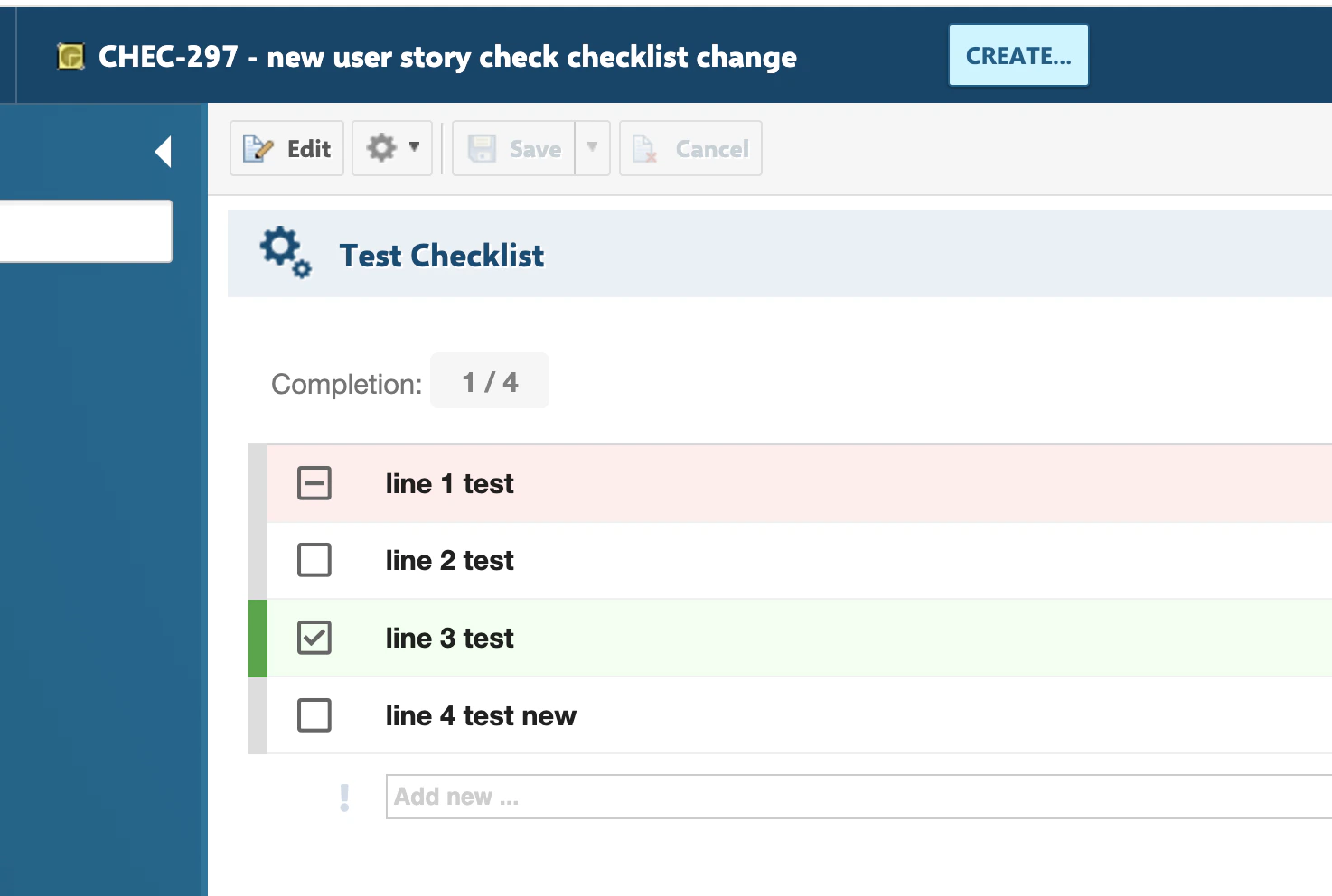
* A **Userstory** work item uses the checklist `testChecklist` and has some entries checked.
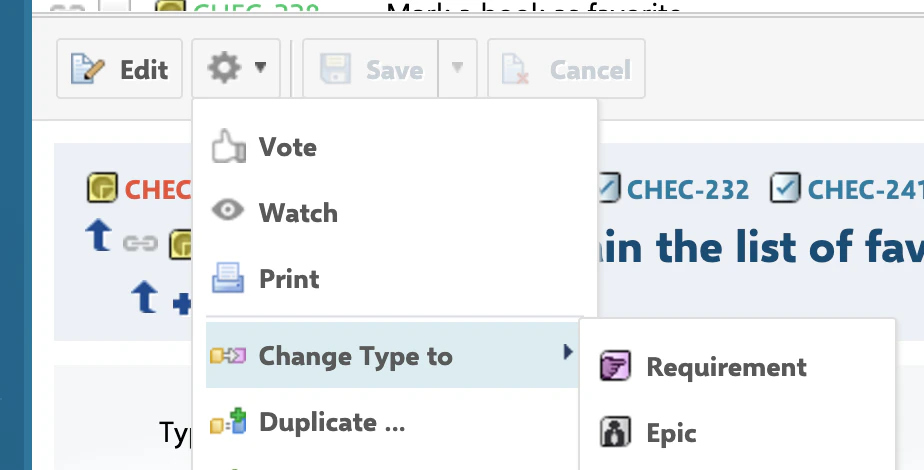
* The work item's type is changed to **Requirement**, which has its own `testChecklist` template (per the type-specific `workItemTemplateId` properties shown above).
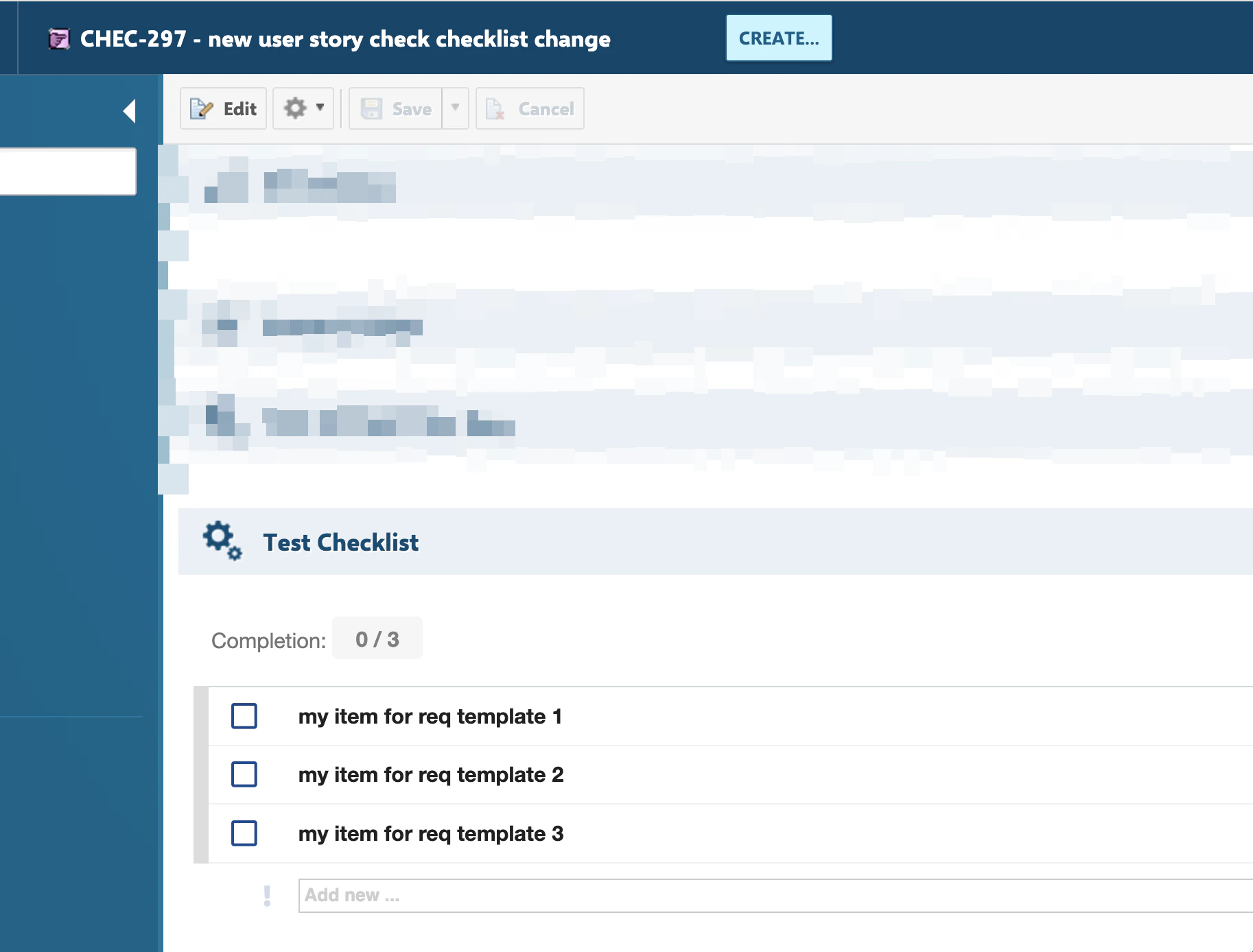
* After the type-change action completes, `testChecklist` is reset to the Requirement template, because `testChecklist` was listed in `checklistsIdsForTypeChanges`.
* The checklist now shows only the entries relevant to the Requirement type.
**Templates are not automatically shared across work item types**
Configuring a checklist template for one work item type (e.g. User Story) does not make that same checklist ID populate for another type (e.g. Epic). Each work item type needing the checklist must have its own explicit template reference — either a direct `workItemTemplateId` or a `controlField`-based mapping — even when the intent is to reuse the same template content across types.
## Reset the checklist to the template on work item type change
When a work item's type is changed to a different type that has its own checklist template, the existing checklist content (from the old type's template) does not automatically get replaced. To handle this, monitor specific checklist IDs for type-change resets.
### 1. Add the monitoring property
In **Polarion Administration > Configuration Properties**, add a comma-separated list of checklist IDs to monitor on type change:
```text theme={null}
nextedy.checklist.checklistsIdsForTypeChanges=testChecklist,dor
```
If a monitored checklist is not empty and the work item's type changes, the checklist is reset to the template configured for the **new** type.
### 2. Example walkthrough
* A **Userstory** work item uses the checklist `testChecklist` and has some entries checked.
* The work item's type is changed to **Requirement**, which has its own `testChecklist` template (per the type-specific `workItemTemplateId` properties shown above).
* After the type-change action completes, `testChecklist` is reset to the Requirement template, because `testChecklist` was listed in `checklistsIdsForTypeChanges`.
* The checklist now shows only the entries relevant to the Requirement type.
 **This exists to work around a Polarion issue**
The type-change reset feature was introduced because of a tracked Polarion issue: the type-change action itself can convert the checklist field from multi-line plain text into rich text. Nextedy has already reported this to Siemens; you may also report it yourself to help prioritize a fix. Until it's fixed, keep the relevant checklist IDs listed in `checklistsIdsForTypeChanges` if your project changes work item types across templates.
## Verification
* Configure two work item types with different `workItemTemplateId` values for the same checklist ID (or a `controlField` mapping) and confirm each type loads its own template content.
* Change a work item's type between two types whose checklist ID is listed in `checklistsIdsForTypeChanges`, and confirm the checklist resets to the new type's template.
* You should now see checklist content that always matches the work item's *current* type and field values, rather than stale content from a template that no longer applies.
## See also
* [Create a Checklist Template](/checklist/guides/templates/create-a-template)
* [Shared and Cross-Project Templates](/checklist/guides/templates/shared-and-document-templates)
* [Set Up a Work Item Checklist](/checklist/guides/setup/work-items)
* [Duplicate, Type-Change, and Formatting Issues](/checklist/guides/troubleshooting/duplicate-and-type-change-issues)
**KB Articles**
* How to create checklist template?
* Multiple templates per one work item/document type
* How to reset Checklist to the Template on WI type change
**Support Tickets**
* [#6955](https://support.nextedy.com/helpdesk/tickets/6955)
* [#6331](https://support.nextedy.com/helpdesk/tickets/6331)
* [#6344](https://support.nextedy.com/helpdesk/tickets/6344)
**Source Code**
* `proc-checklist-src/com.nextedy.polarion.checklist/src/com/nextedy/polarion/checklist/internal/ChecklistSetupService.java`
* `proc-checklist-src/com.nextedy.polarion.checklist/src/com/nextedy/polarion/checklist/ChecklistProduct.java`
* `proc-checklist-src/com.nextedy.polarion.checklist/src/com/nextedy/polarion/checklist/internal/ChecklistAdminService.java`
* `proc-checklist-src/com.nextedy.polarion.checklist/src/com/nextedy/polarion/checklist/internal/ChecklistService.java`
* `proc-checklist-src/com.nextedy.polarion.checklist/src/com/nextedy/polarion/checklist/wf/ChecklistResetToTemplate.java`
**This exists to work around a Polarion issue**
The type-change reset feature was introduced because of a tracked Polarion issue: the type-change action itself can convert the checklist field from multi-line plain text into rich text. Nextedy has already reported this to Siemens; you may also report it yourself to help prioritize a fix. Until it's fixed, keep the relevant checklist IDs listed in `checklistsIdsForTypeChanges` if your project changes work item types across templates.
## Verification
* Configure two work item types with different `workItemTemplateId` values for the same checklist ID (or a `controlField` mapping) and confirm each type loads its own template content.
* Change a work item's type between two types whose checklist ID is listed in `checklistsIdsForTypeChanges`, and confirm the checklist resets to the new type's template.
* You should now see checklist content that always matches the work item's *current* type and field values, rather than stale content from a template that no longer applies.
## See also
* [Create a Checklist Template](/checklist/guides/templates/create-a-template)
* [Shared and Cross-Project Templates](/checklist/guides/templates/shared-and-document-templates)
* [Set Up a Work Item Checklist](/checklist/guides/setup/work-items)
* [Duplicate, Type-Change, and Formatting Issues](/checklist/guides/troubleshooting/duplicate-and-type-change-issues)
**KB Articles**
* How to create checklist template?
* Multiple templates per one work item/document type
* How to reset Checklist to the Template on WI type change
**Support Tickets**
* [#6955](https://support.nextedy.com/helpdesk/tickets/6955)
* [#6331](https://support.nextedy.com/helpdesk/tickets/6331)
* [#6344](https://support.nextedy.com/helpdesk/tickets/6344)
**Source Code**
* `proc-checklist-src/com.nextedy.polarion.checklist/src/com/nextedy/polarion/checklist/internal/ChecklistSetupService.java`
* `proc-checklist-src/com.nextedy.polarion.checklist/src/com/nextedy/polarion/checklist/ChecklistProduct.java`
* `proc-checklist-src/com.nextedy.polarion.checklist/src/com/nextedy/polarion/checklist/internal/ChecklistAdminService.java`
* `proc-checklist-src/com.nextedy.polarion.checklist/src/com/nextedy/polarion/checklist/internal/ChecklistService.java`
* `proc-checklist-src/com.nextedy.polarion.checklist/src/com/nextedy/polarion/checklist/wf/ChecklistResetToTemplate.java`