> ## Documentation Index
> Fetch the complete documentation index at: https://learn.nextedy.com/llms.txt
> Use this file to discover all available pages before exploring further.
# Create a Checklist Template
> Define a checklist template so a checklist's content is centrally managed — changes to the template are promoted to every work item, document, test run, or plan that references it.
export const LastReviewed = ({date}) => {
if (!date) return null;
const formatted = new Date(`${date}T00:00:00Z`).toLocaleDateString("en-US", {
year: "numeric",
month: "long",
day: "numeric",
timeZone: "UTC"
});
return
Last reviewed on {formatted}
;
};
## Option 1: Use a checklist-only template (recommended)
This is the standard, dedicated template mechanism, driven entirely by configuration properties.
### 1. Open Configuration Properties
Go to **Project Administration > Configuration Properties**.
### 2. Add a template property for your checklist
Pick the property form that matches your scope:
**Type-specific — a checklist ID on a specific work item type:**
```text theme={null}
nextedy.checklist.requirement.chkApproved.workItemTemplateId=WI-124
```
Here `requirement` is the work item type and `chkApproved` is the checklist ID.
**Type-agnostic — a checklist ID that applies to any work item type:**
```text theme={null}
nextedy.checklist.chkDone.workItemTemplateId=WI-125
```
The work item type is omitted, so this template applies regardless of the work item's type.
**Document template — a checklist ID on a document type:**
```text theme={null}
nextedy.checklist.documentSpecification.documentReadyChecklist.documentTemplateId=Specification/Product Spec Template
```
Here `documentSpecification` is the LiveDoc type and `documentReadyChecklist` is the checklist ID. The value is a document path (`Space/DocumentName`), not a work item ID.
**Templates are live, not a one-time copy**
All changes to a checklist template are instantly promoted to every work item, document, test run, or plan referencing it. You don't need to re-apply anything after editing the template — this makes checklist-only templates the preferred option for centrally managed checklists.
### 3. Reference a template from another project (optional)
To reuse a template stored in a different project, prefix the template ID with the project ID:
```text theme={null}
nextedy.checklist.requirement.chkApproved.workItemTemplateId=myOtherProject:WI-124
```
The same pattern works for document templates:
```text theme={null}
nextedy.checklist.checklist.documentTemplateId=myOtherProject:Specification/SpecificationTemplate
```
## Option 2: Use a Polarion built-in work item template
You can also point a checklist at a Polarion built-in work item template, but this path has a known caveat — read the warning below before choosing it.
### 1. Create the template work item
Create a new work item, e.g. with title "TEMPLATE".
### 2. Resolve it out of default views
Mark the template item resolved so it disappears from default views.
### 3. Reference it from the work item type enum
Refer to this item from the `workitem-type-enum`.
 **Duplicated checklist items with Polarion built-in templates**
When you use a Polarion built-in work item template, there is a known Polarion bug (not a Nextedy Checklist bug) where copying data from the template to a new item changes the checklist field's format from Text to Richtext, which can produce duplicated checklist items. Nextedy has reported this to Siemens.
**Workaround:**
1. Open the workflow configuration for your work item type.
2. Select the **init** action.
**Duplicated checklist items with Polarion built-in templates**
When you use a Polarion built-in work item template, there is a known Polarion bug (not a Nextedy Checklist bug) where copying data from the template to a new item changes the checklist field's format from Text to Richtext, which can produce duplicated checklist items. Nextedy has reported this to Siemens.
**Workaround:**
1. Open the workflow configuration for your work item type.
2. Select the **init** action.
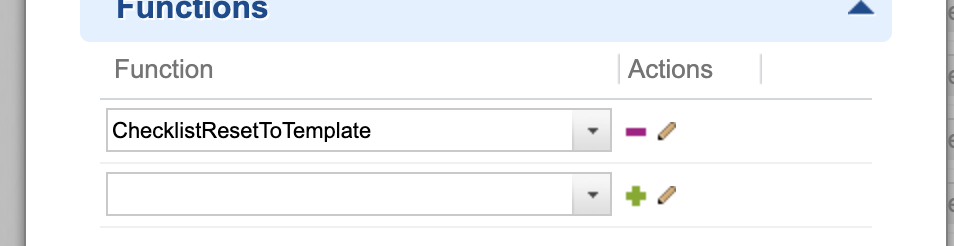
 3. Add a function: `ChecklistResetToTemplate`.
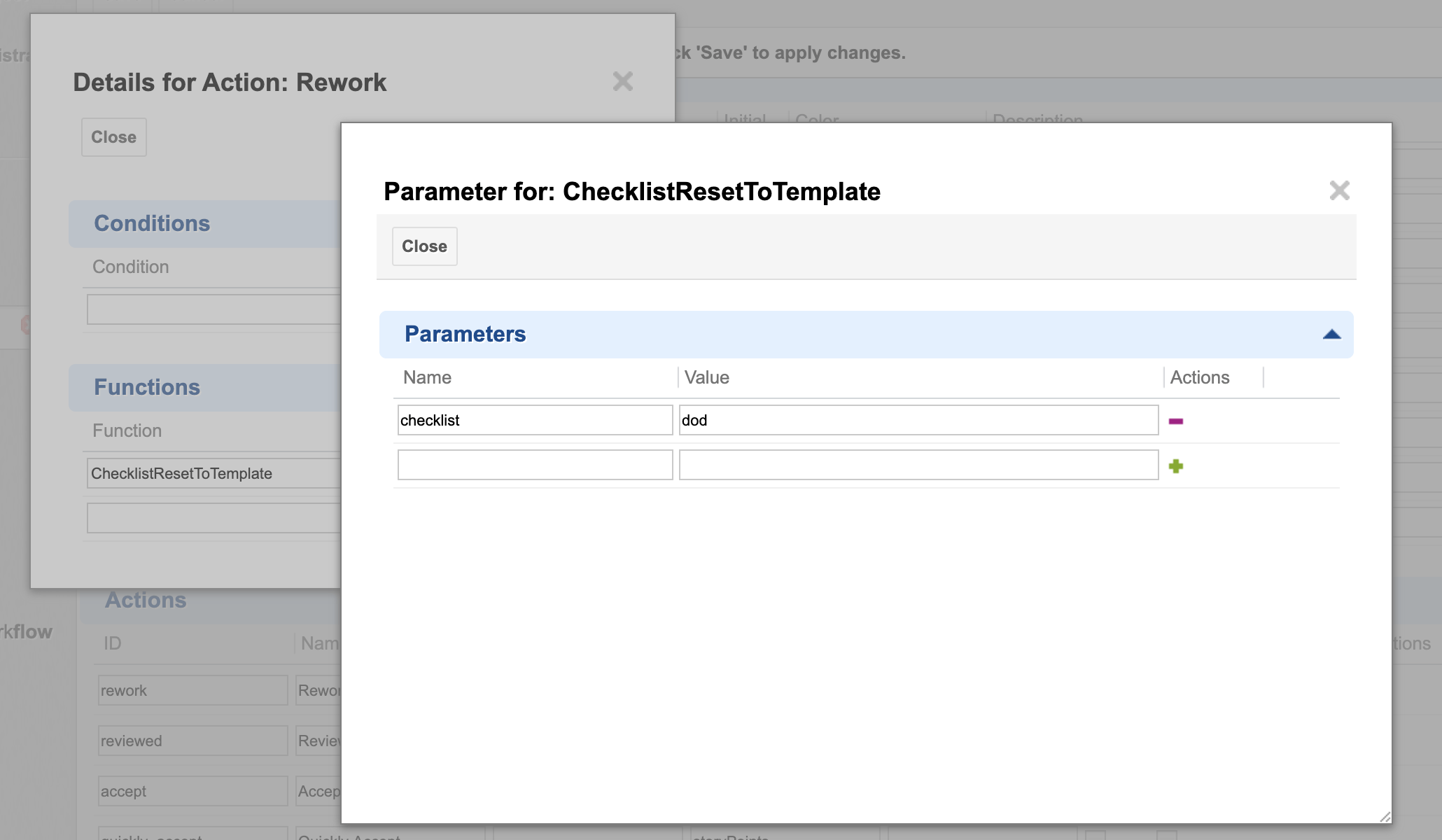
 4. Add a parameter `checklist` with the value set to the name of your checklist custom field.
 ```xml theme={null}
chkApproved
```
This resets the checklist immediately after the new item is created, which also fixes the field type. This workaround will no longer be necessary once the underlying Polarion bug is fixed.
## How the checklist syntax works
A checklist template's content is parsed from the referenced work item's, document's, test run's, or plan's field. Each line follows a defined syntax:
| Prefix / position | Meaning |
| ------------------------------------ | --------------------------------------------------------------- |
| (leading text, tab-separated result) | The item's result state and label |
| `/` (leading) | A description line — static, template-author-provided help text |
| `>` (leading) | A note — reviewer-editable, distinct from the description |
| `!` (trailing) | Marks the item as mandatory |
```xml theme={null}
chkApproved
```
This resets the checklist immediately after the new item is created, which also fixes the field type. This workaround will no longer be necessary once the underlying Polarion bug is fixed.
## How the checklist syntax works
A checklist template's content is parsed from the referenced work item's, document's, test run's, or plan's field. Each line follows a defined syntax:
| Prefix / position | Meaning |
| ------------------------------------ | --------------------------------------------------------------- |
| (leading text, tab-separated result) | The item's result state and label |
| `/` (leading) | A description line — static, template-author-provided help text |
| `>` (leading) | A note — reviewer-editable, distinct from the description |
| `!` (trailing) | Marks the item as mandatory |
 ## Common pitfalls
**A template is not automatically shared across work item types**
Support has confirmed that checklist templates are configured per work item type — a checklist populated for one type (e.g. User Story) does not automatically carry over to another type (e.g. Epic) using the same checklist ID. Each work item type needing a checklist must have its own explicit `workItemTemplateId` (or `controlField`-based) reference configured, even if the template content itself is reused.
**Reused document templates need per-project reconfiguration**
If you copy a document template between projects, the checklist template / document-type mapping (the configuration properties above) is project-scoped and is not automatically carried over. You need to reconfigure the mapping in each target project.
## Verification
* Open a work item, document, test run, or plan whose type matches your configured `workItemTemplateId` / `documentTemplateId` property.
* You should now see the checklist populated with the items defined in your template work item or template document, including any mandatory markers, descriptions, and notes carried from the template.
## See also
* [Multiple Templates per Type and Reset on Type Change](/checklist/guides/templates/multiple-templates-per-type)
* [Shared and Cross-Project Templates](/checklist/guides/templates/shared-and-document-templates)
* [Set Up a Work Item Checklist](/checklist/guides/setup/work-items)
* [Set Up a Document (LiveDoc) Checklist](/checklist/guides/setup/documents)
* [Configure Gate Enforcement (DoD / DoR) and Freeze on Status](/checklist/guides/workflow-gates-and-freeze)
**KB Articles**
* How to create checklist template?
* Multiple templates per one work item/document type
* How to reset Checklist to the Template on WI type change
**Support Tickets**
* [#6955](https://support.nextedy.com/helpdesk/tickets/6955)
* [#6331](https://support.nextedy.com/helpdesk/tickets/6331)
* [#6344](https://support.nextedy.com/helpdesk/tickets/6344)
**Source Code**
* `proc-checklist-src/com.nextedy.polarion.checklist/src/com/nextedy/polarion/checklist/internal/ChecklistSetupService.java`
* `proc-checklist-src/com.nextedy.polarion.checklist/src/com/nextedy/polarion/checklist/internal/ChecklistAdminService.java`
* `proc-checklist-src/com.nextedy.polarion.checklist/src/com/nextedy/polarion/checklist/ChecklistProduct.java`
* `proc-checklist-src/com.nextedy.polarion.checklist/src/com/nextedy/polarion/checklist/internal/ChecklistService.java`
* `proc-checklist-src/com.nextedy.polarion.checklist/src/com/nextedy/polarion/checklist/wf/ChecklistResetToTemplate.java`
## Common pitfalls
**A template is not automatically shared across work item types**
Support has confirmed that checklist templates are configured per work item type — a checklist populated for one type (e.g. User Story) does not automatically carry over to another type (e.g. Epic) using the same checklist ID. Each work item type needing a checklist must have its own explicit `workItemTemplateId` (or `controlField`-based) reference configured, even if the template content itself is reused.
**Reused document templates need per-project reconfiguration**
If you copy a document template between projects, the checklist template / document-type mapping (the configuration properties above) is project-scoped and is not automatically carried over. You need to reconfigure the mapping in each target project.
## Verification
* Open a work item, document, test run, or plan whose type matches your configured `workItemTemplateId` / `documentTemplateId` property.
* You should now see the checklist populated with the items defined in your template work item or template document, including any mandatory markers, descriptions, and notes carried from the template.
## See also
* [Multiple Templates per Type and Reset on Type Change](/checklist/guides/templates/multiple-templates-per-type)
* [Shared and Cross-Project Templates](/checklist/guides/templates/shared-and-document-templates)
* [Set Up a Work Item Checklist](/checklist/guides/setup/work-items)
* [Set Up a Document (LiveDoc) Checklist](/checklist/guides/setup/documents)
* [Configure Gate Enforcement (DoD / DoR) and Freeze on Status](/checklist/guides/workflow-gates-and-freeze)
**KB Articles**
* How to create checklist template?
* Multiple templates per one work item/document type
* How to reset Checklist to the Template on WI type change
**Support Tickets**
* [#6955](https://support.nextedy.com/helpdesk/tickets/6955)
* [#6331](https://support.nextedy.com/helpdesk/tickets/6331)
* [#6344](https://support.nextedy.com/helpdesk/tickets/6344)
**Source Code**
* `proc-checklist-src/com.nextedy.polarion.checklist/src/com/nextedy/polarion/checklist/internal/ChecklistSetupService.java`
* `proc-checklist-src/com.nextedy.polarion.checklist/src/com/nextedy/polarion/checklist/internal/ChecklistAdminService.java`
* `proc-checklist-src/com.nextedy.polarion.checklist/src/com/nextedy/polarion/checklist/ChecklistProduct.java`
* `proc-checklist-src/com.nextedy.polarion.checklist/src/com/nextedy/polarion/checklist/internal/ChecklistService.java`
* `proc-checklist-src/com.nextedy.polarion.checklist/src/com/nextedy/polarion/checklist/wf/ChecklistResetToTemplate.java`