> ## Documentation Index
> Fetch the complete documentation index at: https://learn.nextedy.com/llms.txt
> Use this file to discover all available pages before exploring further.
# Set Up a Plan Checklist
> Attach a checklist to a plan so teams can track plan-level checklist items (such as release-readiness or plan-closure criteria), using the same save, template, and workflow-gate mechanics as work items.
export const LastReviewed = ({date}) => {
if (!date) return null;
const formatted = new Date(`${date}T00:00:00Z`).toLocaleDateString("en-US", {
year: "numeric",
month: "long",
day: "numeric",
timeZone: "UTC"
});
return
Last reviewed on {formatted}
;
};
## Before you start
Nextedy CHECKLIST's save mechanism recognizes four target types: documents, test runs, plans, and work items. This guide covers the **plan** target. The examples below use `dod` as the checklist ID — replace it with your own.
**Verify in application**
The gathered context does not include a dedicated KB article walking through plan checklist setup step by step (unlike the existing articles for work items and documents). The steps below are grounded in the supported code paths (`IChecklistService`, `ChecklistServlet`) and the configuration property patterns documented for other object types. Confirm the exact UI steps for exposing a checklist on a plan page in your Polarion instance before rolling this out broadly.
## Steps
### 1. Identify the checklist field on your plan
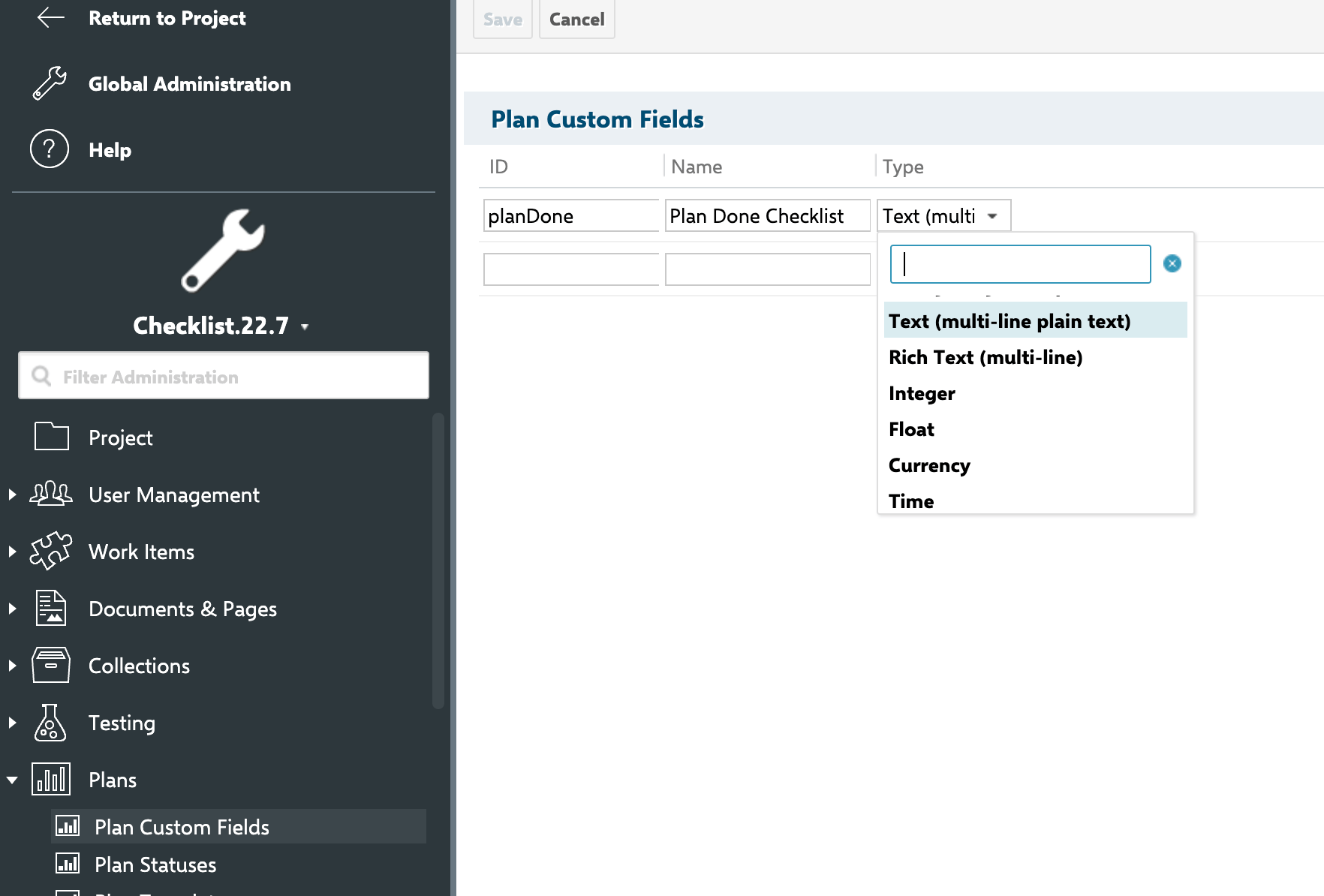
A checklist on a plan is parsed and stored via a field, the same way as on work items, documents, and test runs. `IChecklistService` exposes dedicated overloads for `IPlan` — `parse(IPlan plan, String field)` and the corresponding `store` and `reset` calls — so plan-level checklists are a first-class, supported path.
Confirm (or create) the custom field that will hold the checklist data for your plan configuration.
 ### 2. Render the checklist on the plan
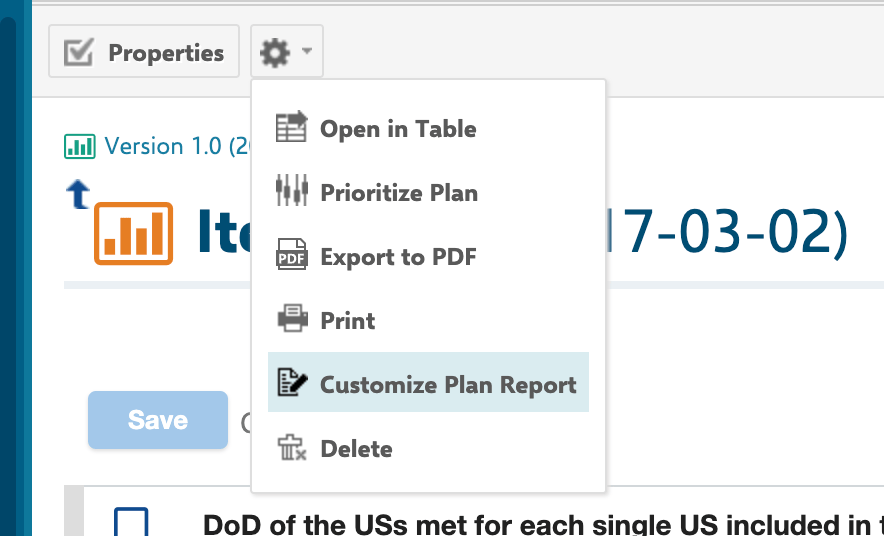
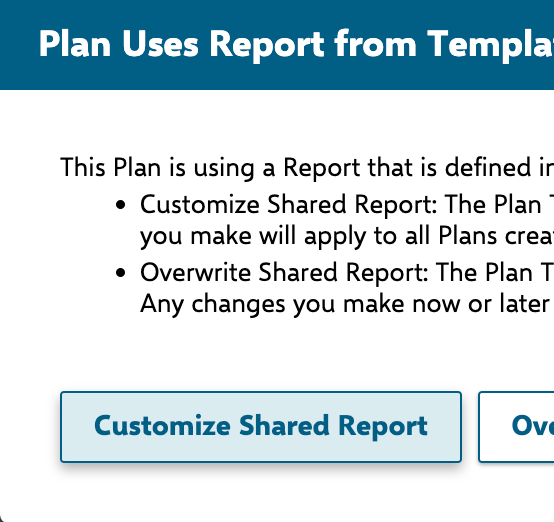
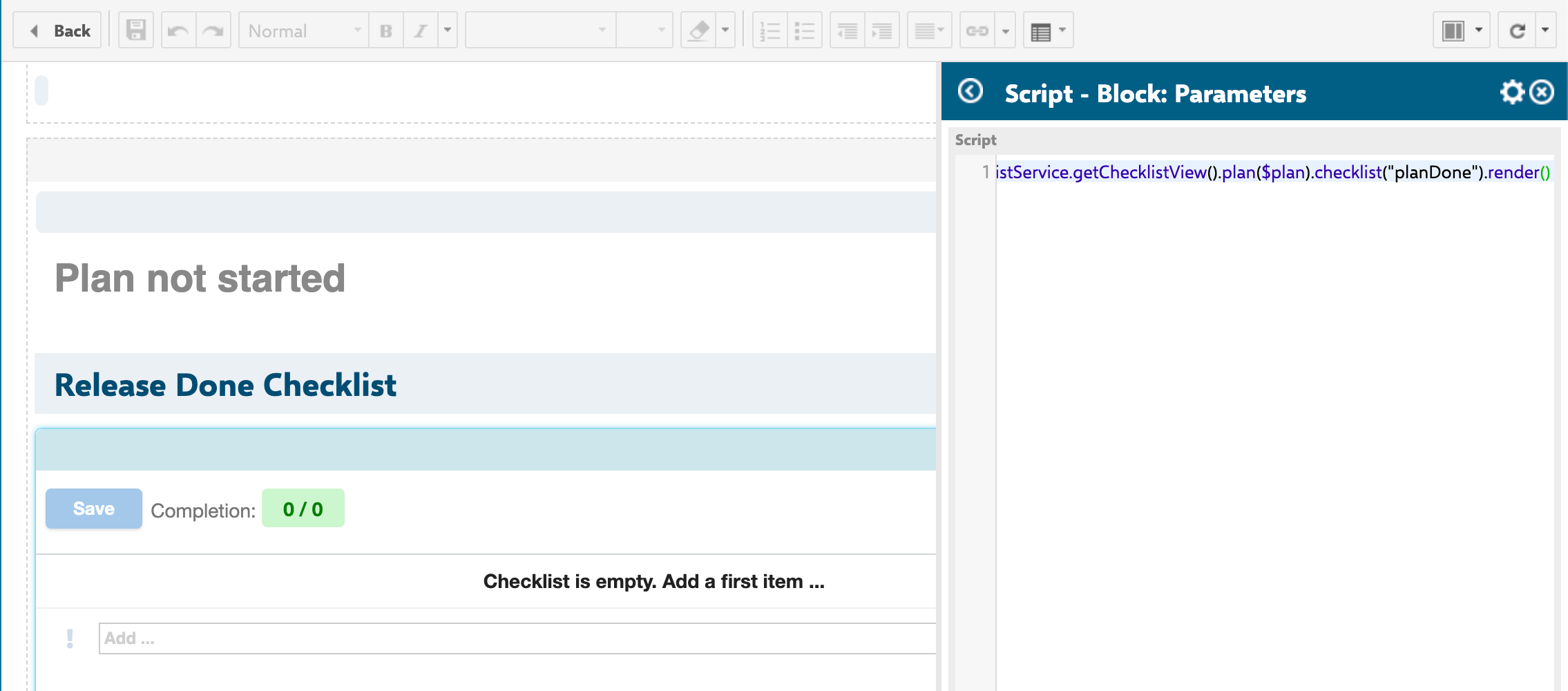
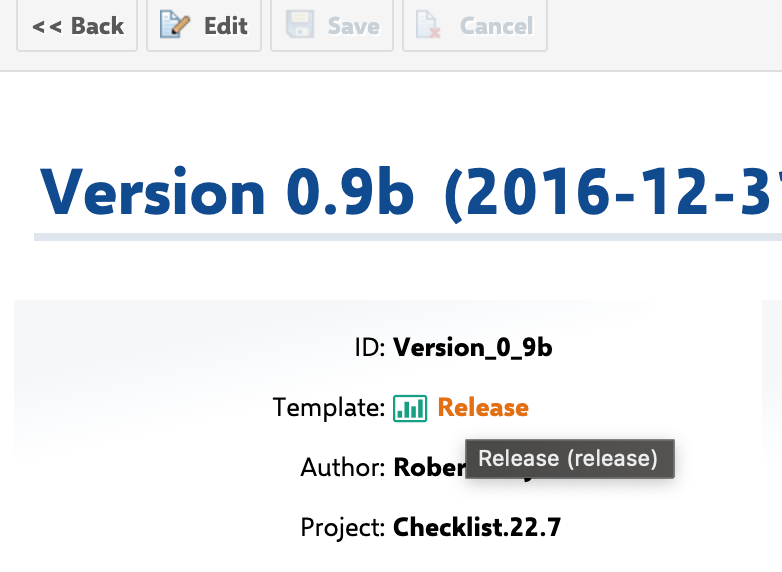
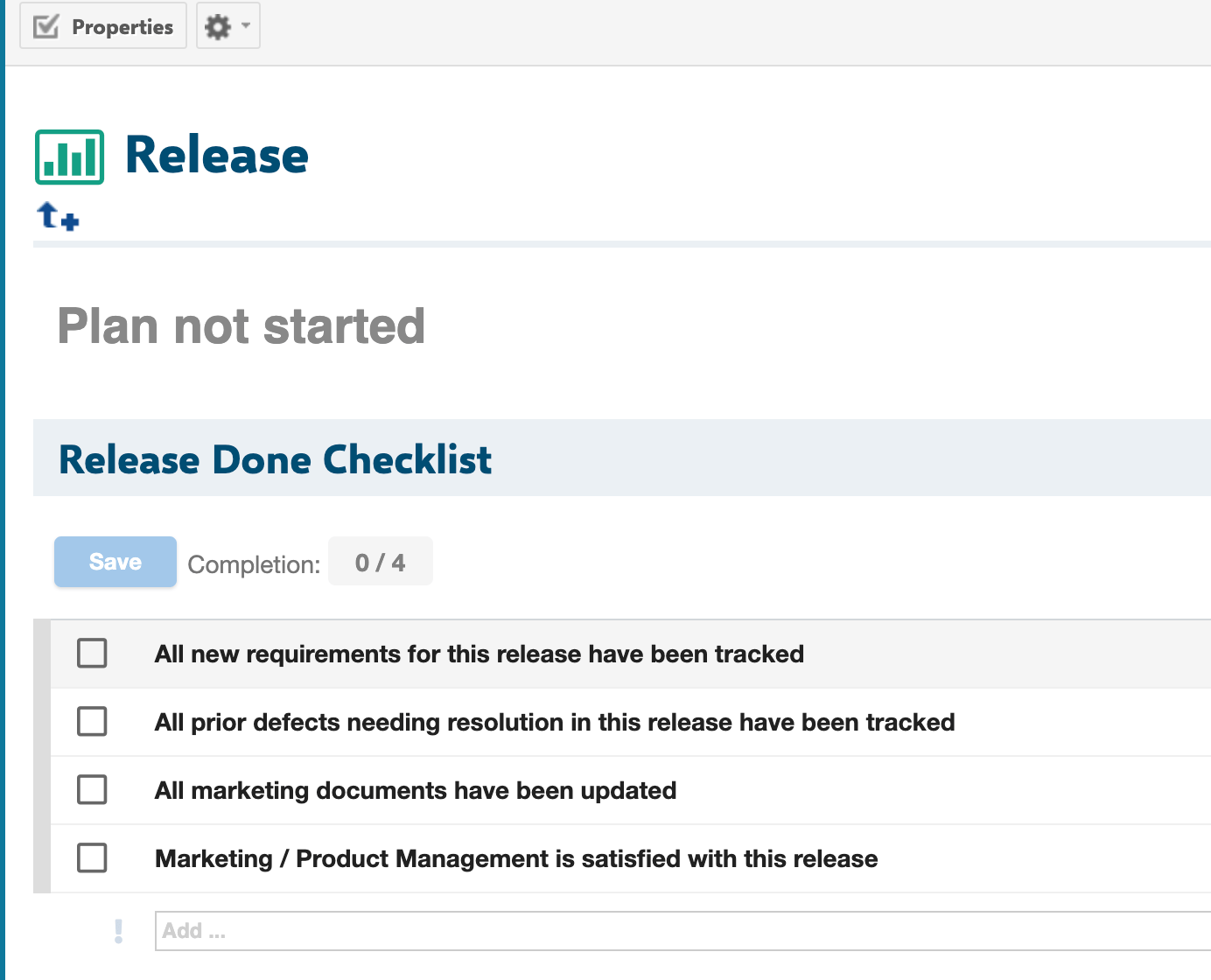
Plan checklists are rendered via `$checklistService.getChecklistView().plan($plan).checklist('planDone').render()` in a Velocity script block on the plan report page (see the screenshot below) — the same `getChecklistView` rendering entry point documented in [IChecklistService and Velocity Rendering API](/checklist/reference/api-service), fluently scoped to the target plan. The resulting configuration includes the `allMandatory` flag and a template URL that points at the **template plan** (in the `/plan?id=...` format), which implies:
* Plans support the same `allMandatory` semantics as work items, documents, and test runs (when enabled, all items — not only mandatory ones — must be checked for the checklist to be considered complete).
* A plan can have its own dedicated **template plan**, referenced by a `/plan?id=...` URL, distinct from the `workItemTemplateId` / `documentTemplateId` configuration-property resolution used for work items and documents.
**getChecklistConf has a dedicated IPlan overload**
[IChecklistService and Velocity Rendering API](/checklist/reference/api-service) confirms `getChecklistConf` has a dedicated `IPlan` overload (`getChecklistConf(IPlan plan, String field)`), computing `readonly`/`adminPermission` from the plan's own permission check (`plan.can().modify()`) rather than the work item path's license-authorization check. This is a first-class, supported path, not a workaround.
### 2. Render the checklist on the plan
Plan checklists are rendered via `$checklistService.getChecklistView().plan($plan).checklist('planDone').render()` in a Velocity script block on the plan report page (see the screenshot below) — the same `getChecklistView` rendering entry point documented in [IChecklistService and Velocity Rendering API](/checklist/reference/api-service), fluently scoped to the target plan. The resulting configuration includes the `allMandatory` flag and a template URL that points at the **template plan** (in the `/plan?id=...` format), which implies:
* Plans support the same `allMandatory` semantics as work items, documents, and test runs (when enabled, all items — not only mandatory ones — must be checked for the checklist to be considered complete).
* A plan can have its own dedicated **template plan**, referenced by a `/plan?id=...` URL, distinct from the `workItemTemplateId` / `documentTemplateId` configuration-property resolution used for work items and documents.
**getChecklistConf has a dedicated IPlan overload**
[IChecklistService and Velocity Rendering API](/checklist/reference/api-service) confirms `getChecklistConf` has a dedicated `IPlan` overload (`getChecklistConf(IPlan plan, String field)`), computing `readonly`/`adminPermission` from the plan's own permission check (`plan.can().modify()`) rather than the work item path's license-authorization check. This is a first-class, supported path, not a workaround.
 ### 3. \[Optional] Point the plan at a template plan
Checklist templates for plans are resolved from **the plan's own template plan** (`IPlan.getTemplate()`) — a different resolution path than the `workItemTemplateId` / `documentTemplateId` configuration properties used for work items and documents. Set up your template plan and confirm it's configured as the template for the plans you want to gate.
### 3. \[Optional] Point the plan at a template plan
Checklist templates for plans are resolved from **the plan's own template plan** (`IPlan.getTemplate()`) — a different resolution path than the `workItemTemplateId` / `documentTemplateId` configuration properties used for work items and documents. Set up your template plan and confirm it's configured as the template for the plans you want to gate.
 **Only POST is supported**
The checklist save endpoint only supports `doPost`. `doGet` and `doPut` requests to the same servlet always throw a `RuntimeException`. If you're probing the endpoint directly while diagnosing an integration issue, use POST.
### 4. Configure gate enforcement (optional)
If the checklist should block a plan's workflow transition until items are checked, note the source-code coverage here is narrower for plans than for work items, documents, and test runs:
* **`ChecklistFailIfMandatoryUnchecked`**, **`ChecklistMandatoryChecked`**, **`ChecklistApplyTemplate`**, and **`ChecklistResetToTemplate`** are all documented in the gathered context as supporting **work items, modules (documents), and test runs** as target types.
**Confirmed unsupported — no IPlan branch**
Confirmed directly in [IChecklistService and Velocity Rendering API](/checklist/reference/api-service) and [Workflow Functions and Conditions](/checklist/reference/workflow): each of these workflow functions/conditions resolves its target via `context.getTarget()` with an `instanceof IWorkItem`/`IModule`/`ITestRun` check — there is no `IPlan` branch. They do **not** execute against plan transitions. This is distinct from `getChecklistConf(IPlan, String)` and `parse(IPlan, String)`, which confirm plans are a supported checklist *storage* target — plan checklists can be read, stored, and rendered, but cannot currently be gated with these built-in workflow functions/conditions. A custom scripted function or condition against `IChecklistService` is the only path to plan-level gate enforcement today.
Example workflow snippet — shown for reference only; it fires on work item, document, and test run transitions, not on plan transitions:
```xml theme={null}
dod
```
The `checklist` argument is required and accepts a comma-separated list of checklist field IDs. Omitting it throws a `RuntimeException` with the message `checklist attribute missing for wf function: ChecklistFailIfMandatoryUnchecked`.
**Missing checklist argument fails loudly**
The same applies to `ChecklistMandatoryChecked`, which throws `checklist attribute missing for wf condition: ChecklistMandatoryChecked` if the argument is omitted.
## Common pitfalls
**Save failures surface as a generic HTTP 500**
If a checklist fails to save on a plan, the servlet returns a generic HTTP 500 and logs a full parameter dump (project, plan, checklist ID, data) to the server log for diagnostics. Check server logs first when troubleshooting failed saves.
**Reuse the template concept, but the resolution path differs per object type**
Work items and documents resolve templates via configuration properties (`nextedy.checklist._TYPEID_._FIELDID_.workItemTemplateId` / `documentTemplateId`). Plans instead resolve their template from the plan's own configured template plan (`IPlan.getTemplate()`). Don't assume the `workItemTemplateId` property pattern documented for work items applies to plans — confirm the plan-specific template linkage in your application.
## You should now see
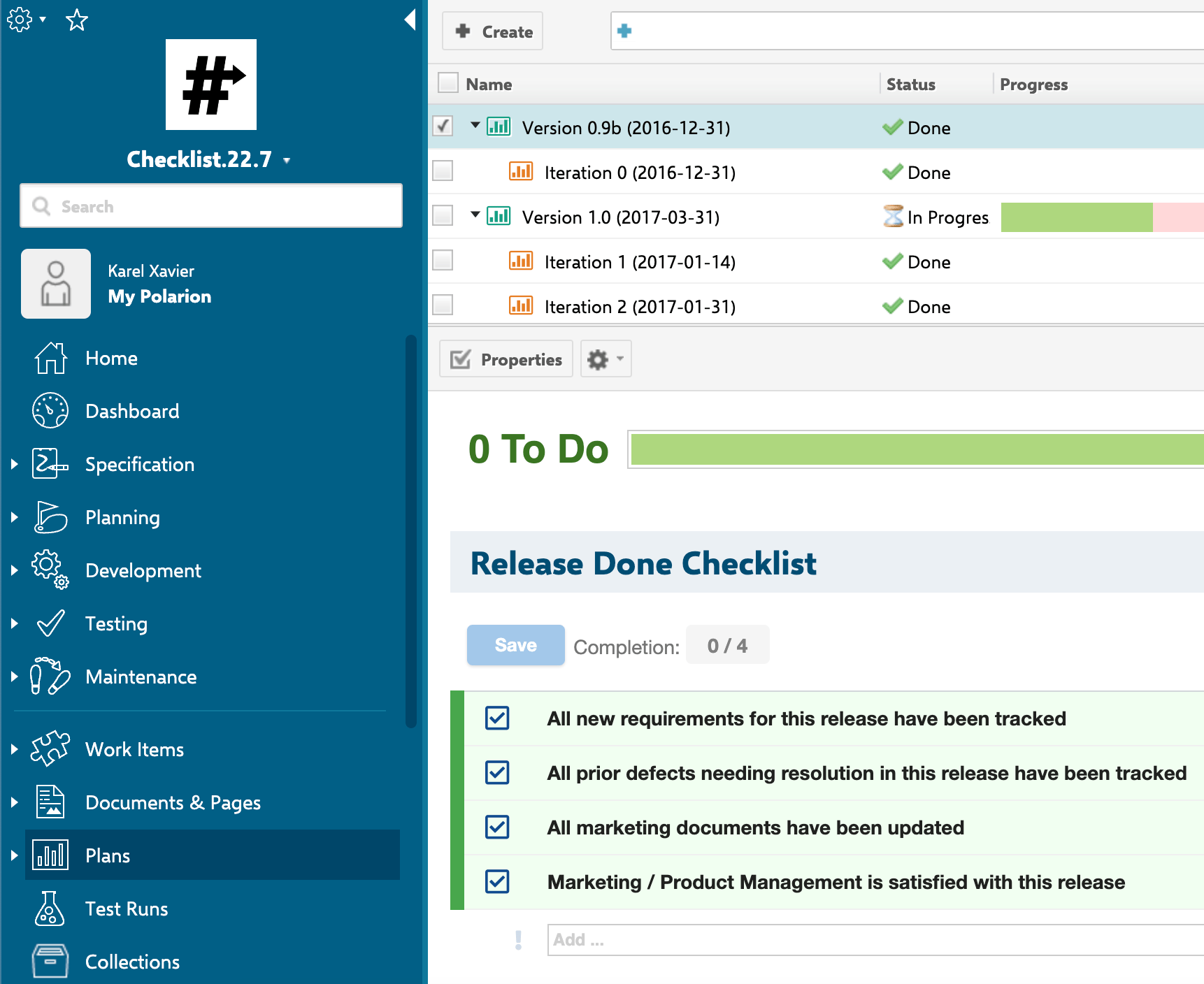
After wiring the checklist field to your plan and (optionally) linking it to a template plan, you should now see the checklist form extension rendered on the plan, with items checked/unchecked and saved back via POST, and the `allMandatory` behavior applied consistently with other checklist targets.
**Only POST is supported**
The checklist save endpoint only supports `doPost`. `doGet` and `doPut` requests to the same servlet always throw a `RuntimeException`. If you're probing the endpoint directly while diagnosing an integration issue, use POST.
### 4. Configure gate enforcement (optional)
If the checklist should block a plan's workflow transition until items are checked, note the source-code coverage here is narrower for plans than for work items, documents, and test runs:
* **`ChecklistFailIfMandatoryUnchecked`**, **`ChecklistMandatoryChecked`**, **`ChecklistApplyTemplate`**, and **`ChecklistResetToTemplate`** are all documented in the gathered context as supporting **work items, modules (documents), and test runs** as target types.
**Confirmed unsupported — no IPlan branch**
Confirmed directly in [IChecklistService and Velocity Rendering API](/checklist/reference/api-service) and [Workflow Functions and Conditions](/checklist/reference/workflow): each of these workflow functions/conditions resolves its target via `context.getTarget()` with an `instanceof IWorkItem`/`IModule`/`ITestRun` check — there is no `IPlan` branch. They do **not** execute against plan transitions. This is distinct from `getChecklistConf(IPlan, String)` and `parse(IPlan, String)`, which confirm plans are a supported checklist *storage* target — plan checklists can be read, stored, and rendered, but cannot currently be gated with these built-in workflow functions/conditions. A custom scripted function or condition against `IChecklistService` is the only path to plan-level gate enforcement today.
Example workflow snippet — shown for reference only; it fires on work item, document, and test run transitions, not on plan transitions:
```xml theme={null}
dod
```
The `checklist` argument is required and accepts a comma-separated list of checklist field IDs. Omitting it throws a `RuntimeException` with the message `checklist attribute missing for wf function: ChecklistFailIfMandatoryUnchecked`.
**Missing checklist argument fails loudly**
The same applies to `ChecklistMandatoryChecked`, which throws `checklist attribute missing for wf condition: ChecklistMandatoryChecked` if the argument is omitted.
## Common pitfalls
**Save failures surface as a generic HTTP 500**
If a checklist fails to save on a plan, the servlet returns a generic HTTP 500 and logs a full parameter dump (project, plan, checklist ID, data) to the server log for diagnostics. Check server logs first when troubleshooting failed saves.
**Reuse the template concept, but the resolution path differs per object type**
Work items and documents resolve templates via configuration properties (`nextedy.checklist._TYPEID_._FIELDID_.workItemTemplateId` / `documentTemplateId`). Plans instead resolve their template from the plan's own configured template plan (`IPlan.getTemplate()`). Don't assume the `workItemTemplateId` property pattern documented for work items applies to plans — confirm the plan-specific template linkage in your application.
## You should now see
After wiring the checklist field to your plan and (optionally) linking it to a template plan, you should now see the checklist form extension rendered on the plan, with items checked/unchecked and saved back via POST, and the `allMandatory` behavior applied consistently with other checklist targets.
 ## See also
* [Set Up a Work Item Checklist](/checklist/guides/setup/work-items)
* [Set Up a Document (LiveDoc) Checklist](/checklist/guides/setup/documents)
* [Set Up a Test Run Checklist](/checklist/guides/setup/test-runs)
* [Create a Checklist Template](/checklist/guides/templates/create-a-template)
* [Configure Gate Enforcement (DoD / DoR) and Freeze on Status](/checklist/guides/workflow-gates-and-freeze)
* [Save Errors and Version Compatibility](/checklist/guides/troubleshooting/save-errors-and-compatibility)
**KB Articles**
* Setup new document (LiveDoc) checklist
* How to create checklist template?
* Setup new Work Items checklist
**Support Tickets**
* [#332](https://support.nextedy.com/helpdesk/tickets/332)
* [#235](https://support.nextedy.com/helpdesk/tickets/235)
* [#418](https://support.nextedy.com/helpdesk/tickets/418)
**Source Code**
* `proc-checklist-src/com.nextedy.polarion.checklist/src/com/nextedy/polarion/checklist/ChecklistServlet.java`
* `proc-checklist-src/com.nextedy.polarion.checklist/src/com/nextedy/polarion/checklist/IChecklistService.java`
* `proc-checklist-src/com.nextedy.polarion.checklist/src/com/nextedy/polarion/checklist/internal/ChecklistAdminService.java`
* `proc-checklist-src/com.nextedy.polarion.checklist/src/com/nextedy/polarion/checklist/wf/ChecklistFailIfMandatoryUnchecked.java`
* `proc-checklist-src/com.nextedy.polarion.checklist/src/com/nextedy/polarion/checklist/wf/ChecklistApplyTemplate.java`
## See also
* [Set Up a Work Item Checklist](/checklist/guides/setup/work-items)
* [Set Up a Document (LiveDoc) Checklist](/checklist/guides/setup/documents)
* [Set Up a Test Run Checklist](/checklist/guides/setup/test-runs)
* [Create a Checklist Template](/checklist/guides/templates/create-a-template)
* [Configure Gate Enforcement (DoD / DoR) and Freeze on Status](/checklist/guides/workflow-gates-and-freeze)
* [Save Errors and Version Compatibility](/checklist/guides/troubleshooting/save-errors-and-compatibility)
**KB Articles**
* Setup new document (LiveDoc) checklist
* How to create checklist template?
* Setup new Work Items checklist
**Support Tickets**
* [#332](https://support.nextedy.com/helpdesk/tickets/332)
* [#235](https://support.nextedy.com/helpdesk/tickets/235)
* [#418](https://support.nextedy.com/helpdesk/tickets/418)
**Source Code**
* `proc-checklist-src/com.nextedy.polarion.checklist/src/com/nextedy/polarion/checklist/ChecklistServlet.java`
* `proc-checklist-src/com.nextedy.polarion.checklist/src/com/nextedy/polarion/checklist/IChecklistService.java`
* `proc-checklist-src/com.nextedy.polarion.checklist/src/com/nextedy/polarion/checklist/internal/ChecklistAdminService.java`
* `proc-checklist-src/com.nextedy.polarion.checklist/src/com/nextedy/polarion/checklist/wf/ChecklistFailIfMandatoryUnchecked.java`
* `proc-checklist-src/com.nextedy.polarion.checklist/src/com/nextedy/polarion/checklist/wf/ChecklistApplyTemplate.java`