> ## Documentation Index
> Fetch the complete documentation index at: https://learn.nextedy.com/llms.txt
> Use this file to discover all available pages before exploring further.
# Freezing Checklists by Status
> Prevent template items from being merged into a checklist once a work item reaches a specific workflow status, preserving the checklist state for audit compliance and review integrity.
export const LastReviewed = ({date}) => {
if (!date) return null;
const formatted = new Date(`${date}T00:00:00Z`).toLocaleDateString("en-US", {
year: "numeric",
month: "long",
day: "numeric",
timeZone: "UTC"
});
return
Last reviewed on {formatted}
;
};
## When to Freeze
Freezing is useful when you want the checklist to reflect exactly what was verified at a point in time. For example, once a work item is marked as "Approved", the checklist should not change even if the underlying template is updated.
Open **Polarion Administration > Configuration Properties** and add a property using this pattern:
```
nextedy.checklist._TYPEID._FIELDID._STATUS.mergeTemplate=false
```
Replace the placeholders:
* `_TYPEID` -- work item type ID (for example, `requirement`) or omit for all types
* `_FIELDID` -- checklist custom field ID (for example, `dod`)
* `_STATUS` -- workflow status ID where merging stops (for example, `reviewed`)
**Example -- freeze the "dod" checklist at the "reviewed" status:**
```properties theme={null}
nextedy.checklist.dod.reviewed.mergeTemplate=false
```
This tells Checklist to stop merging template items into the `dod` field when the work item has the `reviewed` status. The checklist displays only the data stored so far.
Alternatively, freeze the checklist when a work item receives any resolution (for example, "Done", "Won't Fix", "Duplicate"):
```properties theme={null}
nextedy.checklist._TYPEID._FIELDID.mergeTemplateResolved=false
```
**Example:**
```properties theme={null}
nextedy.checklist.dod.mergeTemplateResolved=false
```
| Property | Freeze Trigger | Scope |
| ---------------------------------------------------------- | ------------------------ | ------------------- |
| `nextedy.checklist._TYPEID._FIELDID._STATUS.mergeTemplate` | Specific workflow status | Per status |
| `nextedy.checklist._TYPEID._FIELDID.mergeTemplateResolved` | Any resolution set | All resolved states |
You can use status-based and resolution-based freezing together. For example, freeze at the "reviewed" status to lock the checklist during review, and also disable merge after resolution to prevent changes on closed items.
A frozen checklist shows only the data that was stored at the time of freezing. If the template was never applied, the checklist may appear empty.
To ensure the template is applied before the freeze takes effect, add the `ChecklistApplyTemplate` workflow function to the transition that moves the work item into the frozen status.
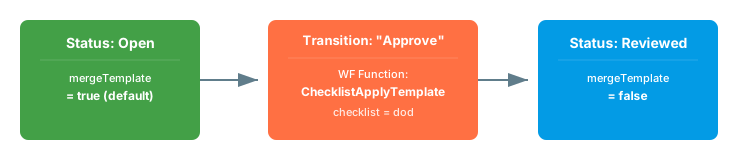 **Configure the workflow function:**
1. Open the workflow editor for the relevant work item type
2. Select the transition that leads to the frozen status (for example, "Approve")
3. Add the workflow function `ChecklistApplyTemplate`
4. Set the `checklist` parameter to the field ID(s):
```
checklist = dod
```
**Configure the workflow function:**
1. Open the workflow editor for the relevant work item type
2. Select the transition that leads to the frozen status (for example, "Approve")
3. Add the workflow function `ChecklistApplyTemplate`
4. Set the `checklist` parameter to the field ID(s):
```
checklist = dod
```
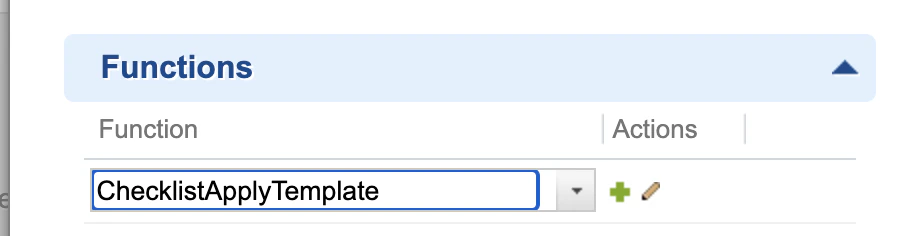
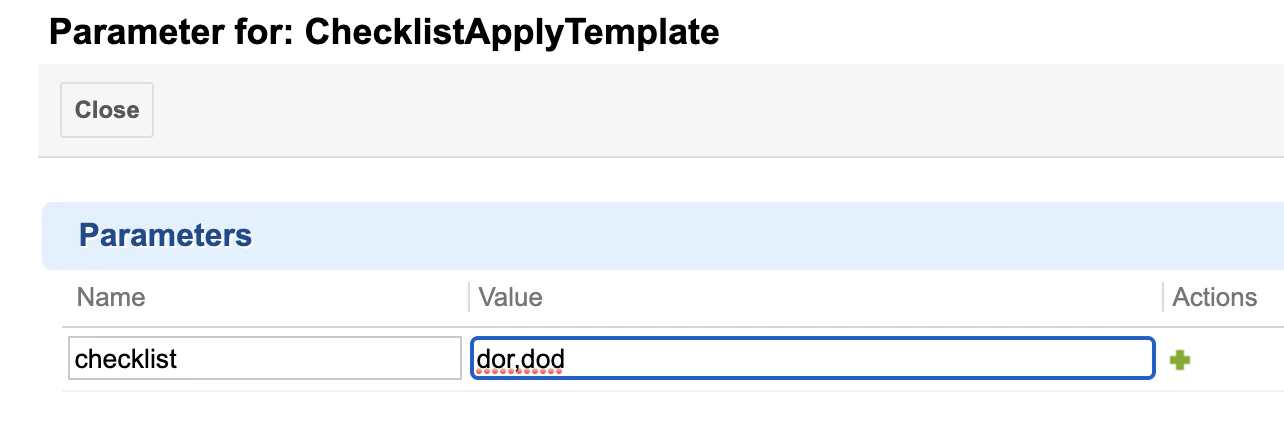 This ensures the latest template content is synchronized into the checklist immediately before the status changes and the freeze takes effect.
Freezing stops template merging, but users can still edit checklist items manually. To fully lock the checklist, combine freezing with read-only mode:
* Use Polarion's built-in read-only field configuration to make the custom field non-editable at certain statuses
* Use Polarion's field-based permissions to restrict write access by role
See [Read-Only Mode](/checklist/guides/readonly-mode) for complete configuration details.
The `mergeTemplate=false` property only disables automatic template merging. Users can still add, remove, or change checklist items manually. To fully protect the checklist, combine freezing with read-only mode or field permissions.
## Type-Specific Freeze Configuration
You can freeze checklists for specific work item types while leaving others unfrozen:
```properties theme={null}
# Freeze DoD for requirements at "reviewed" status
nextedy.checklist.requirement.dod.reviewed.mergeTemplate=false
# Freeze DoD for tasks at "closed" status
nextedy.checklist.task.dod.closed.mergeTemplate=false
# Keep DoD unfrozen for defects (no property needed -- merge is on by default)
```
## Multiple Checklists Freeze
If a work item has multiple checklist fields, configure each one independently:
```properties theme={null}
nextedy.checklist.dod.reviewed.mergeTemplate=false
nextedy.checklist.dor.reviewed.mergeTemplate=false
nextedy.checklist.reviewChecklist.approved.mergeTemplate=false
```
## Freeze and Baselines
Freezing works well alongside baseline tracking. The typical compliance workflow is:
1. **Apply template** at a workflow gate to ensure completeness
2. **Freeze** the checklist at the approval status to lock the template state
3. **Create a baseline** to capture a permanent record of the checklist at that point
This ensures auditors can verify exactly what was checked at each milestone. See [Baselines and Comparison](/checklist/guides/baselines) for details on creating and comparing baselines.
## Verification
After configuring the freeze properties:
1. Open a work item that is in the frozen status (for example, "Reviewed")
2. You should now see the checklist displaying only the items that were present when the status was reached
3. Modify the template work item by adding a new item
4. Reopen the frozen work item -- the new template item should **not** appear
5. Move the work item back to an unfrozen status (for example, "Open") -- the template items should merge again
## See Also
* [Workflow Gates and Validation](/checklist/guides/workflow-gates) -- enforce checklist completion before transitions
* [Read-Only Mode](/checklist/guides/readonly-mode) -- fully lock checklists from editing
* [Baselines and Comparison](/checklist/guides/baselines) -- capture frozen checklist states for audit
* [Creating and Managing Templates](/checklist/guides/templates) -- template setup fundamentals
This ensures the latest template content is synchronized into the checklist immediately before the status changes and the freeze takes effect.
Freezing stops template merging, but users can still edit checklist items manually. To fully lock the checklist, combine freezing with read-only mode:
* Use Polarion's built-in read-only field configuration to make the custom field non-editable at certain statuses
* Use Polarion's field-based permissions to restrict write access by role
See [Read-Only Mode](/checklist/guides/readonly-mode) for complete configuration details.
The `mergeTemplate=false` property only disables automatic template merging. Users can still add, remove, or change checklist items manually. To fully protect the checklist, combine freezing with read-only mode or field permissions.
## Type-Specific Freeze Configuration
You can freeze checklists for specific work item types while leaving others unfrozen:
```properties theme={null}
# Freeze DoD for requirements at "reviewed" status
nextedy.checklist.requirement.dod.reviewed.mergeTemplate=false
# Freeze DoD for tasks at "closed" status
nextedy.checklist.task.dod.closed.mergeTemplate=false
# Keep DoD unfrozen for defects (no property needed -- merge is on by default)
```
## Multiple Checklists Freeze
If a work item has multiple checklist fields, configure each one independently:
```properties theme={null}
nextedy.checklist.dod.reviewed.mergeTemplate=false
nextedy.checklist.dor.reviewed.mergeTemplate=false
nextedy.checklist.reviewChecklist.approved.mergeTemplate=false
```
## Freeze and Baselines
Freezing works well alongside baseline tracking. The typical compliance workflow is:
1. **Apply template** at a workflow gate to ensure completeness
2. **Freeze** the checklist at the approval status to lock the template state
3. **Create a baseline** to capture a permanent record of the checklist at that point
This ensures auditors can verify exactly what was checked at each milestone. See [Baselines and Comparison](/checklist/guides/baselines) for details on creating and comparing baselines.
## Verification
After configuring the freeze properties:
1. Open a work item that is in the frozen status (for example, "Reviewed")
2. You should now see the checklist displaying only the items that were present when the status was reached
3. Modify the template work item by adding a new item
4. Reopen the frozen work item -- the new template item should **not** appear
5. Move the work item back to an unfrozen status (for example, "Open") -- the template items should merge again
## See Also
* [Workflow Gates and Validation](/checklist/guides/workflow-gates) -- enforce checklist completion before transitions
* [Read-Only Mode](/checklist/guides/readonly-mode) -- fully lock checklists from editing
* [Baselines and Comparison](/checklist/guides/baselines) -- capture frozen checklist states for audit
* [Creating and Managing Templates](/checklist/guides/templates) -- template setup fundamentals